The editing bottleneck is now the real bottleneck in social video
For the past two years, the story of social video has been about generation. Sora, Veo, Runway, and a dozen smaller models have made it trivially easy to produce footage. What they haven’t done is make it easy to finish a video — to cut it to a hook, layer captions that survive a platform’s safe zones, animate an overlay that doesn’t look like a Canva template, and export three aspect ratios before the trend window closes. Every creator I know who ships daily has the same complaint: the AI can make the raw material, but the assembly still happens by hand, at 1am, in Premiere or CapCut. That’s the gap WeftCut is trying to wedge itself into, and it’s worth paying attention to less because of what it does today and more because of the workflow it’s betting on: an editor your AI agent can actually drive, with a human watching over its shoulder.
What WeftCut actually is, and what problem it’s solving
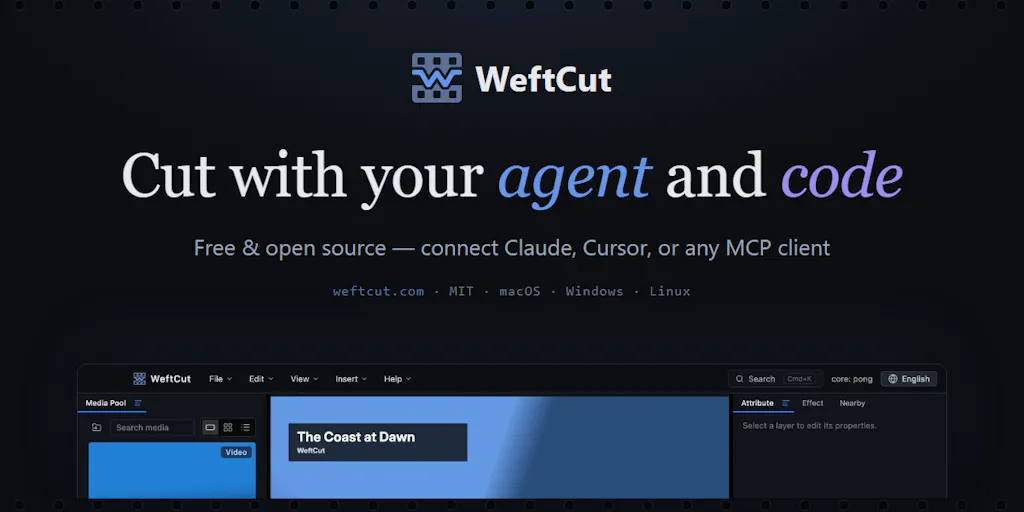
The maker, who goes by UncleChair, describes the origin plainly: he wanted “an editor my AI agent could actually drive, with a timeline I could keep watching and refining by hand.” That sentence is the whole product thesis. WeftCut is a free, open-source, cross-platform video editor — builds for Windows, macOS, and Linux — that connects to any MCP-compatible agent. The agent can trim clips, add captions, and animate elements inside the same project you’re looking at. Changes appear live, and there’s an activity log plus checkpoints you can restore if the agent goes off the rails.
The feature the maker is most excited about is called Motifs: animations written in HTML, CSS, and JavaScript that become editable layers on your timeline. So an agent can generate an overlay for your footage, and you can then adjust the exposed controls by hand in the editor. That’s a meaningfully different model from “AI generates a video file and you take it or leave it.” The output is a project, not a render.
If you’re a social media operator, translate that into your actual week. You shoot a 12-minute interview. You need a 60-second Reel with burned-in captions, a 45-second TikTok with a different hook, a LinkedIn native upload with a slower open, and a YouTube Short that reuses the best 30 seconds. Today that’s four manual passes through an editor, or a subscription to Opus Clip or Descript that gives you auto-clips you then re-edit anyway. WeftCut’s pitch is that your agent does the first 80% — cutting, captioning, overlaying — and you do the last 20% on a timeline, with the ability to undo the agent’s decisions at any checkpoint.
Why this matters more for short-form than for long-form
Long-form YouTube editors have a stable workflow and a high tolerance for manual labor, because a single video justifies hours of work. Short-form creators don’t have that luxury. When you’re shipping three to five pieces a day across TikTok, Instagram Reels, and YouTube Shorts, the marginal cost of each edit is what kills you. If an agent can handle the mechanical layer — silence removal, caption sync, safe-zone placement, overlay animation — and leave you the creative layer, that’s not a 10% speedup, it’s a different job. That’s why I’d bet short-form operators get more out of this category than traditional NLE users do.
How it differs from the AI editing tools you’re already paying for
The obvious comparison set is crowded, and the maker is refreshingly honest about it. When a commenter named Justin Rockmore asked how WeftCut differs from ChatCut, UncleChair replied: “Honestly, there’s a lot of feature overlap with ChatCut.” He then named three design priorities rather than claiming exclusive features — code as video, supervising the agent, and a lightweight interface. That kind of answer is rare on Product Hunt and it’s a trust signal.
Let me map the competitive landscape as I see it, because the distinctions matter for whether you should even bother testing this.
Chat-based editors like ChatCut and the various “chat with your footage” tools put a conversational layer on top of an editor. They’re good at “cut this to 30 seconds and add captions.” They’re weak at giving you a real timeline to refine in afterward, and the AI’s output tends to be a black box.
Auto-clip tools like Opus Clip and Vizard are optimized for one job: take a long video, spit out short vertical clips with captions and a virality score. Great for podcast repurposing, less useful when you want to build something rather than extract something.
Traditional NLEs — Premiere Pro, DaVinci Resolve, Final Cut Pro — are where the professional work happens, and Adobe has been bolting AI features onto Premiere for two years. But none of them are designed around an external agent driving the timeline via a protocol like MCP.
CapCut is the actual incumbent for most social creators, and it’s the one I’d watch most closely. It’s free, it’s fast, its templates are the de facto visual language of TikTok, and it now has AI features baked in. WeftCut is not competing with CapCut on templates or on mobile. It’s competing on a different axis entirely: programmability.
The “code as video” idea, and why it’s the interesting part
Motifs — animations written in HTML, CSS, and JavaScript that become editable timeline layers — is the most genuinely novel thing in this launch. Here’s why it matters operationally.
Right now, if you want a custom animated overlay for your video, you have three bad options. You can build it in After Effects (steep learning curve, slow iteration). You can use a template from Canva or CapCut (everyone else’s video looks the same). Or you can ask an AI video tool to generate it (you get a rendered clip you can’t tweak). Motifs propose a fourth: your agent writes code that produces an animated layer, the layer lives on your timeline as an editable object, and the parameters the developer exposed are yours to adjust with sliders and inputs.
The maker demonstrated this with a music video workflow: ask the agent to learn a library called JIZURA, have it build a component (a Motif), transcribe the song, and use the text to drive the animation. He’s upfront that it’s “not that amazing like opus 5.5 using threejs” — again, refreshingly modest — but argues that “most of the time making a video with editable element is more valuable, we always want to change some details if agent have some misunderstanding.”
I think he’s right about that, and I think the reason is worth spelling out. The failure mode of generative video isn’t that the output is bad. It’s that the output is almost right and you have no way to fix the one thing that’s wrong. If a caption is two frames out of sync, or an overlay sits under the platform’s UI chrome, or the brand color is off by a shade, you need to fix that thing, not regenerate the whole clip. Editable layers solve the almost-right problem. That’s the actual value proposition here, and it’s more defensible than any “10x your output” claim.
What creators and social teams can steal from this launch
Even if you never install WeftCut, there are operational lessons in how this tool is positioned that apply to anyone running social accounts.
Treat your agent as a junior editor, not an oracle
The workflow WeftCut is designed around — agent proposes, human reviews, checkpoints restore — is the correct mental model for AI in any content pipeline right now. When I’ve tested agent-driven tools for scheduling and repurposing, the ones that work are the ones that show their work. An activity log and restore points aren’t nice-to-haves; they’re the difference between “I can delegate this” and “I have to redo this.” If you’re evaluating any AI tool for your stack this quarter — a captioning tool, a repurposing tool, a scheduling tool — ask one question first: when the AI gets it wrong, how many clicks does it take to fix? If the answer is “start over,” the tool isn’t ready for daily production.
Separate the mechanical layer from the creative layer
The most useful reframe in this launch is that editing has two layers. The mechanical layer is trims, caption sync, aspect ratios, safe zones, silence removal — all deterministic, all automatable, all boring. The creative layer is hook selection, pacing, tone, which 30 seconds matter — all judgment, all human, all the reason anyone watches. Most AI editing tools try to do both and end up mediocre at both. The winning configuration, I suspect, is to let the agent own the mechanical layer completely and to keep the creative layer firmly in human hands, with a fast feedback loop between them. That’s what a timeline plus checkpoints actually enables.
Build for the protocol, not the product
The fact that WeftCut connects via MCP rather than shipping its own proprietary agent is a strategic bet worth noting. Model Context Protocol is becoming the lingua franca for connecting AI agents to tools, and any creator-facing software that adopts it early gets to ride whatever agent the user already prefers — Claude, ChatGPT, Cursor, or something that doesn’t exist yet. If you’re building or buying creator tools in 2025, protocol compatibility is a durability signal. Proprietary agent lock-in is a liability.
Where I think WeftCut falls short, and who shouldn’t bother
Here’s the balanced part, and it’s substantial.
It won’t replace your setup today. The maker says this directly. When André J asked about screen recording — a core need for anyone making app demos or tutorials — UncleChair replied that screen recording is “planned” but “isn’t built in yet, so it wouldn’t replace your whole setup today.” If your workflow depends on recording and editing in one place, WeftCut isn’t there.
It’s in active development, and that’s a real risk. The launch copy says so explicitly. Open-source, early-stage tools have a habit of stalling when the maintainer’s attention moves on. Free is great until you’ve built a pipeline around it and it stops getting updates. I’d want to see commit cadence and issue response times before I moved any production work onto it.
It requires an agent you already have. WeftCut doesn’t ship its own AI. You need an MCP-compatible agent connected and configured. If you’re not already running one — and most social media managers aren’t — the setup cost is real, and the payoff is unclear until you’ve invested the time.
No mobile, no templates, no trend library. CapCut wins on TikTok because it has the templates, the sounds, and the mobile-first flow that match how short-form actually gets made. WeftCut has none of that. It’s a desktop editor for people who want programmability, and that’s a much smaller audience.
Pricing and platform support beyond the OS builds are not disclosed. No user counts, no roadmap dates, no funding. That’s fine for an open-source project, but it means you’re evaluating on the maker’s responsiveness and the code itself, not on a company’s track record.
Who this is NOT for
If you make one video a week and you’re happy in CapCut, skip this. If you’re a solo creator who doesn’t run an AI agent and doesn’t want to, skip this. If you need mobile editing, skip this. If you need templates that match current TikTok aesthetics, skip this. WeftCut is for a specific operator: someone technical enough to run an MCP agent, frustrated by the edit-assembly bottleneck, and willing to trade polish and templates for programmability and control.
What I’d watch, and test next
Three things, in order of how soon I’d act on them.
This week: if you already run an MCP-compatible agent, download WeftCut and run one real project through it — not a test clip, an actual piece of content you need to ship. Watch specifically for two things: how well the agent’s trims hold up when you review them on the timeline, and whether the checkpoint/restore flow actually saves you time versus just re-cutting. If the agent’s first pass is 70% right and fixing it takes less time than cutting from scratch, that’s a win. If it’s 50% right and you’re fighting it, it isn’t.
This month: watch the screen recording feature. The maker has confirmed it’s planned, and the comment thread makes clear it’s the single most requested missing piece. If recording lands and integrates cleanly with the timeline, WeftCut becomes a plausible one-tool workflow for tutorial and demo content — which is a much bigger market than “people who want to program their overlays.”
This quarter: watch whether other editors adopt MCP. If Premiere, Resolve, or CapCut add agent-driving via MCP, WeftCut’s differentiation narrows fast. If they don’t, and the protocol keeps spreading, WeftCut has a real head start on a workflow that’s about to become standard. My take: the incumbents will move slowly because agent-driving threatens their UI-centric business model. That gives tools like this a window — but windows close.
The bigger question the launch raises isn’t about WeftCut at all. It’s whether the next generation of social video gets made by humans operating editors or by humans supervising agents operating editors. The tools that win will be the ones that make supervision feel like control rather than babysitting. WeftCut’s timeline-plus-checkpoints model is a credible first answer. Whether it’s the right one, we’ll know when the screen recording ships and the commit history either keeps up or doesn’t.