Every social media operator I know is chasing the same two numbers: watch time and shareability. Flat images can still stop a thumb, but the ceiling keeps lowering as platforms push video and interactive formats. That’s why Ctruh Studio — the AI-powered no-code 3D platform from Ctruh — matters beyond its launch category. It attacks the most expensive bottleneck in interactive commerce: getting a realistic 3D model and a working experience published without hiring a developer. The catch? I’ve watched enough no-code 3D tools promise the world and ship a demo that only runs on a Wi-Fi-connected MacBook. So let’s look at what this actually does, who should use it, and where the math breaks.
What Ctruh Is Actually Trying to Solve
The launch note from Sharun Kanan, Director of GTM at Ctruh, frames the pain in one line: “online shopping is still stuck in 2D.” He wrote it on behalf of founder and CEO Vinay. The claim is easy to verify if you’ve ever run an ecommerce content calendar. Every DTC brand I’ve worked with has a returns problem that traces back to a photo that flatters, a buyer who guesses, and a package that comes back. The old fix — a 3D configurator, AR try-on, an interactive storefront — required what the note calls “hiring developers, stitching five vendors together, and waiting weeks.” I’ve seen brand teams try to assemble that pipeline from a Sketchfab model, a Shopify embed, and a web developer who hates WebGL. Most abandon the project after the first invoice.
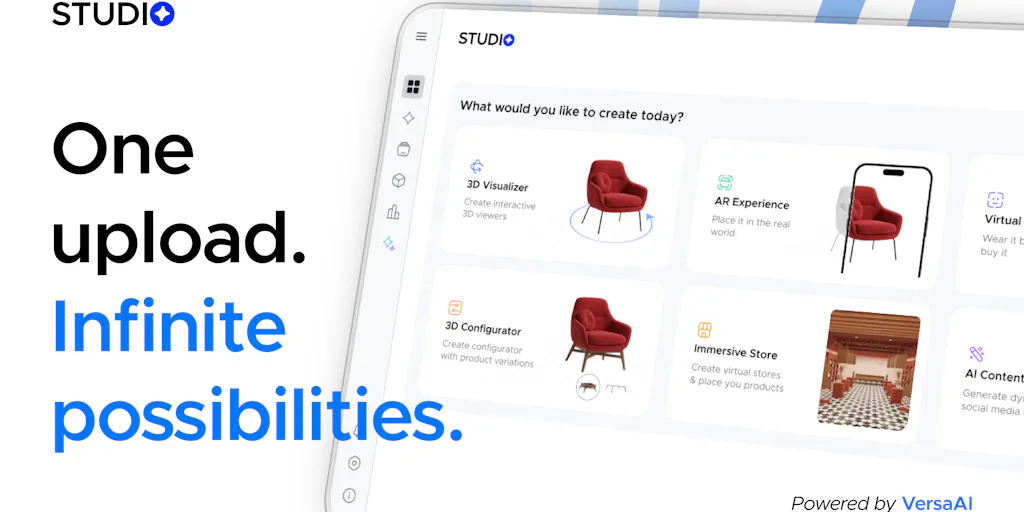
Ctruh Studio is an attempt to collapse that stack into one browser-native tool: no code, no plugins, no downloads. The feature list is broad: VersaAI turns text or an image into a production-ready 3D model in minutes, according to the team; visualizers let shoppers rotate and inspect; virtual try-on and AR place products in a room or on a body; configurators switch colors and materials; virtual storefronts assemble it all into an environment. Everything publishes through a single link. For a social operator, that single link is the part to care about. It turns a 3D experience into the same object you already put in your bio, your ad landing page, or a QR code on a poster. No app, no headset, no install.
For a creator, this also shifts the production workflow. Normally, an interactive 3D campaign means briefing a 3D artist, waiting on revisions, then asking a developer to embed a viewer. With this, the assets and the experience live in the same system. That doesn’t mean you can skip art direction — someone still needs to decide which materials, angles, and configurations matter — but it compresses the part that burns budgets: the integration. In my experience, the integration is where interactive projects die, not the modeling.
How It Compares to the Incumbents (and Where It Earns Its Place)
Two incumbents come to mind immediately: Spline and Sketchfab. Spline is the closest no-code 3D design tool for the web; it makes gorgeous interactive scenes, but it’s aimed at designers, not merchants. Sketchfab is a reliable 3D content host, but it’s mostly distribution — you still need a model and a configurator. If you want full control, you end up in custom WebGL territory, which is not a tool decision but a headcount decision.
The makers are explicitly positioning against that fragmentation. Their “why Ctruh over the tools that already exist” section lists three differentiators: genuinely all-in-one (one asset library, one CMS, not five glued-together vendors), browser-native engine (instant load, nothing to download, works on any device), and AI-native rather than AI-added. The team’s launch comments also mention 3.6 years of engine work and the “wait, this is running in my browser?” moment. That moment is real — browser-based WebGL has gotten shockingly good. But “instant load” is doing a lot of work, and I’ll get to that in a minute.
Another comparison worth making is with Shopify’s own AR support. Shopify lets merchants attach 3D models to product pages if they already have a GLB file, but it doesn’t generate the model or build a configurator. Ctruh is claiming the whole chain: generate, edit, assemble, publish. That’s a materially different promise. The risk is that the chain is only as strong as its weakest link — and for 3D, the weakest link is usually the final rendered polygon count on a mid-range phone.
My take: all-in-one is both the strength and the risk. For a solo creator or a small brand, it removes the three biggest fears — asset creation, asset hosting, and WebGL performance. For a team with an existing asset pipeline, it’s a lock-in decision. You’re betting that Ctruh’s CMS and engine keep up with your SKU count and custom logic. The source doesn’t say whether you can export your generated models to another engine. Not disclosed. If you can’t, the “no code” promise can become a cage. I’d want an export path before I built a business around it.
What Creators and Social Media Teams Can Borrow From Ctruh
Even if you never run a 3D storefront, the format is a content engine. When I plan a month of content for a DTC brand, I look for one interactive centerpiece. A 3D configurator can produce a screen-recorded reveal for TikTok and Instagram Reels, a color-swap tutorial, a 3D-render carousel, and a link-in-bio experience that keeps people on your page longer. The dwell time is the point. Platform algorithms reward watch time, shares, and repeat visits. A person playing with a configurator does all three.
The single-link distribution fits the creator economy’s link-in-bio culture. You can put the experience behind a simple bio link, use it in a sponsored post, or make it the destination of a QR code inside a parcel. The source says “all from a single link” — that’s the line that should get a social media manager’s attention.
Then repurpose harder. You don’t need a full storefront; you need one product model and a 30-second vertical recording of someone rotating, zooming, and changing a material. The repurposing loop looks like this: record a screen capture of a configurator interaction in the browser, overlay a voiceover explaining the material choices, then cut that into three vertical videos — a teaser, a tutorial, and a “before and after” comparison. Post the teaser to TikTok, put the full experience link in your Instagram bio, and track how many people tap through. This is not hypothetical; it’s the same loop I use with any interactive format, whether it’s a quiz, a poll, or a 3D configurator. The tool doesn’t need to be viral; it needs to give you a reason to make the video.
Why TikTok creators should care more than LinkedIn ones
TikTok’s recommendation engine is built around watch time and specific comments. A 3D configurator is inherently comment-bait: “where can I try this?” “how is this real?” It also creates a reason to share — showing someone a product they can configure is more interesting than showing them a static photo. LinkedIn, by contrast, rewards practical business context. A mechanical keyboard configurator might interest a LinkedIn audience, but it won’t get the same playful sharing. If you sell physical products with a visual variable — color, material, shape — this is a TikTok and Instagram play, not a LinkedIn newsletter.
Where the Math Breaks (and Who Should Skip This)
Let me be the person who reads the comments, because the good ones are more honest than the marketing copy. Asad’s comment on the launch page makes a point that should be pinned to every 3D product page: “The spec I’d put on the page is mesh weight, not render quality. A configurator that takes 8 seconds on mobile 4G converts worse than the flat photo it replaced.” That is exactly right. I’ve killed 3D projects for clients because the WebGL bundle was too heavy and the demo stuttered on a mid-range Android.
The maker’s response is telling: “Render quality is table stakes now; delivered mesh weight after optimization is the number.” They also say the pipeline auto-optimizes what VersaAI generates — decimation, texture compression, LODs — before anything reaches a device. But Asad followed up with a sharper observation: the maker told him the pipeline already optimizes, and told another commenter that device-appropriate streaming isn’t in the public build yet. Both can be true — pre-optimized assets and adaptive streaming are different features — but a brand evaluating today cannot tell which one applies to the thing they’re testing. I’d want that answer in writing before I built a campaign around this.
Second, the operational gaps. The source lists “Free Options” and offers free launch credits, but full pricing is not disclosed. Analytics are not discussed, either. For a social operator, that’s a problem. I need to know how many people opened the experience, how long they stayed, and whether that correlates with a purchase. If Ctruh doesn’t expose those events, you’ll be doing blind tests with UTM tags and hoping your ecommerce backend tells the story. I’d also ask about a public API, webhooks, or ad-pixel support — none of that is mentioned in the source. Not disclosed. For a serious DTC operator, the difference between a data island and a conversion tool can be the whole budget.
Third, who it’s not for. If you sell services, build a newsletter, or create content about ideas rather than physical products, Ctruh is likely overkill. A configurator won’t make a course more enrollable. You’re better off spending the same hours on a simple motion graphic or a standard video edit. This is a tool for physical-product brands, DTC merchants, and creators who make commerce their content. For a solo coach or B2B consultant, the ROI math doesn’t work unless you make content about 3D tools themselves.
The material editor is the sleeper feature
One comment from Puja, who runs a ceramics shop, stood out. She said she adjusts roughness and reflectivity directly in the platform, and the results got close enough to real photos that customers stopped asking for extra images. That is the exact problem most 3D product content fails at. AI-generated 3D models often look like plastic. A material editor that handles glaze texture is what turns a demo into something a buyer trusts. For creators, this matters because realistic materials make screen recordings credible. A fake-looking 3D product on TikTok gets called out in the comments; a ceramic pot that looks real gets “where can I buy this?”
What I’d Watch / Test Next
Here’s what I’d do this week if I ran commerce or content for a physical-product brand. First, pick one SKU — not your whole catalog. Use the free launch credits to generate a 3D model with VersaAI, publish it as a single link, and put that link in your Instagram bio. Then make a vertical screen recording of someone rotating and configuring the product, cut it on your phone, and post it to TikTok and Instagram Reels. Measure saves and direct messages more than likes; a save tells the algorithm someone wants to come back.
Second, ask Ctruh’s team for two numbers before you sign anything: the delivered mesh weight for that SKU after optimization, and whether the public build streams adaptive detail per device. If they can’t or won’t answer, build a test with a hard load-time target on a 4G phone. Third, watch for integrations with Shopify or an analytics/event export. If those appear, this moves from promising prototype to real infrastructure. If they don’t, it stays a nice demo. Either way, the format is worth studying — because the next time a client asks, “can we make our product interactive?”, this is the tool I’ll benchmark against.