It’s easy to talk about content strategy as if the hardest part is the algorithm. But the kind of content that actually moves engagement is built on an unglamorous supply chain: raw recordings, screen captures, exports, thumbnails, ad cuts, archive versions, and the cache files that editing software leaves behind. Most creators and social media operators don’t have a storage problem; they have an inventory problem. We treat our hard drives like a busy dropbox, and we keep producing faster than we can organize. That’s why a tool like DuckDisk caught my eye. It’s a macOS disk cleaner, which sounds deeply unsexy. But its approach — a dense, sortable table instead of a pretty visual map — is a useful lesson in how we manage the assets behind our content calendars. If you publish across platforms, your ability to find, reuse, and retire files is directly tied to your ability to publish consistently. Let me explain.
The real problem: your content library is eating your workday
As a creator, you are not in the business of posting; you are in the business of producing variations of the same idea for five different platforms. TikTok gets a vertical cut, Instagram Reels gets a slightly different caption, YouTube gets a long-form version, LinkedIn gets a teaser, X gets a clipped highlight, and Pinterest gets a static pin. Each of those deliverables has a distinct file, and each edit pass creates duplicate exports. When I was preparing a client campaign recently, I had mastered an interview in 4K, generated several aspect ratios, and then made tiny caption changes that multiplied the exports. My desktop became a landfill. The problem was not that I don’t know how to organize; it’s that the tools I was using hid the information I needed.
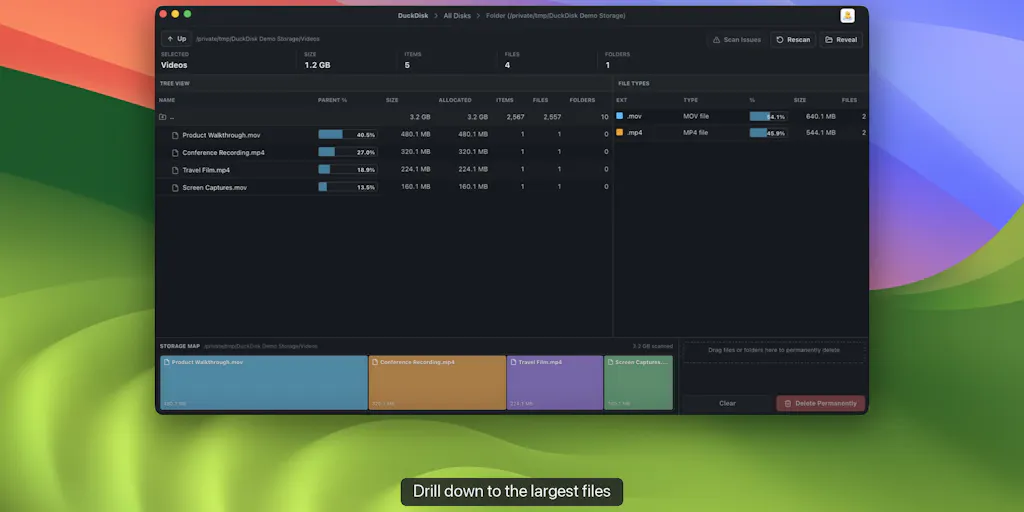
The typical disk-cleaning tool shows you a beautiful daisy map or a colorful box. You stare at the visualization, you feel productive, and then you still don’t know the answer to the only questions that matter: Which folder actually owns this space? How much of that space is allocated versus just reported? How many files are in there? What file types dominate? That’s exactly the gap DuckDisk is aiming at. The maker, puppypi, describes it as a “table-first, WizTree-style approach” that keeps directory size, allocated space, percentage of parent, file/folder counts, and file-type totals visible as you drill down. I need to pause on that, because “allocated space” is the column that most consumer tools skip — and it’s the column that stops you from deleting the wrong thing.
The allocated-versus-size distinction matters more than most people think. On modern APFS volumes, logical file size and allocated blocks often diverge. Sparse files have holes; cloned files share physical blocks; apps that pre-allocate space can reserve more than they write. If you sort by logical size, you’ll chase ghosts. DuckDisk’s column makes the difference visible. It’s the kind of information that makes a cleanup tool trustworthy, because it lets you ask “what is this really costing me?” before you delete.
Why TikTok creators should care more than LinkedIn ones
Let’s be honest: a LinkedIn text post or a static image campaign doesn’t generate much storage pressure. A few files, a couple of exports, and you’re done. But short-form video creators live in a different world. We shoot vertically and horizontally, we collect hours of B-roll, we create version after version in CapCut or Premiere Pro, and then we render multiple delivery files because TikTok and Instagram have different compression, audio, and text-safe requirements. Platform algorithms reward consistency, which means you can’t stop producing. Every week of production adds another stack of source files, project caches, proxies, and render leftovers. A tool that can’t see the reality of cloud storage or allocated file blocks isn’t a disk utility — it’s a distraction. That’s why DuckDisk’s focus on columns and counts, not just pretty pictures, feels relevant to creators specifically: it treats your storage as an operational database, not an art project.
What DuckDisk actually does differently
The incumbents in this space are map-makers. DaisyDisk gives you a shimmering sunburst that looks great on a monitor but doesn’t answer “how many files are in this folder?” GrandPerspective turns your drive into a pixelated mosaic that’s fun to stare at and hard to act on. OmniDiskSweeper gives you a simple list, which is closer, but it doesn’t combine allocated space with cloud sources. CleanMyMac X packages cleanup as a friendly one-click but tends to hide the underlying data. On Windows, WizTree became the utility of choice because it reads the NTFS Master File Table directly and shows a sortable table — fast and factual. DuckDisk is explicitly borrowing that energy for macOS, and that’s the right lineage.
The second differentiator is cloud metadata scanning. DuckDisk can scan OneDrive and Google Drive without downloading the files inside; the maker says cloud scans are metadata-only, so DuckDisk doesn’t download file contents. If you’ve ever managed a Google Drive folder that is also synced to your desktop, you know how dangerous a full download can be. A metadata-only scan is like using a scheduler that pings the platform API for post performance instead of exporting every post manually. It respects bandwidth, and it respects your time.
There are also performance details that matter in real workflows: rows are virtualized, results are cached, and cloud sources can refresh incrementally. That’s an answer to the paralysis that comes when a directory has hundreds of thousands of files — and, in the cloud case, an answer to API rate limits. A cleanup tool that rescans from scratch every time is a cleanup tool you’ll stop using. The incremental refresh is the feature nobody puts on the landing page, but it’s the one that keeps a utility from becoming another chore.
Cleanup logic is also worth noting. The maker says cleanup is staged for review, cloud deletions go to Trash, and permanent local/SSH deletion needs explicit confirmation. In my experience, staged deletion is the difference between a cleanup tool and a trust tool. Too many apps present “clean” as a one-click action and then ask you to confirm with a red button. DuckDisk is conservative in the right way: it makes you look before you commit, and it puts cloud files in a recoverable state rather than burning them instantly.
Where the math breaks
Now the caveats. Allocated space is a technical detail that requires explanation. If you don’t know what sparse files or APFS clones are, the column can be noise. DuckDisk is not a Siri-like assistant that says “you should delete this render cache.” It gives you a better inventory, but you still have to make the call. In the Product Hunt comments, a user asked whether DuckDisk can flag the usual developer offenders like Xcode DerivedData or node_modules; the maker replied that it’s currently size-driven and will consider cache-flagging later. My take: if you’re looking for an automated “clean my Mac” experience, this is not it yet.
There’s also a split in the product’s build story. The Mac App Store build supports local disks, OneDrive, and SSH; the notarized direct build adds Google Drive and uses your system SSH configuration. That’s a transparency win for sandbox constraints, but it’s confusing for users. Which build do I install? If I rely on Google Drive, the answer is “the direct one,” but direct downloads require more trust than the App Store’s review process. This is a sign of honest engineering rather than malice, but it still creates friction, and for non-technical creators it might feel like a decision you didn’t sign up for.
DuckDisk is also not a digital asset manager. It can show you that a 3GB file called “interview-final-final.mov” exists, but it can’t tell you whether that file was superseded by “interview-final-v2.mov.” The metadata-only cloud scan means you can’t preview content inside the scan, so if your file names are garbage, the tool can’t rescue you. You still need a naming convention. The tool is a flashlight, not a librarian.
What creators and social media teams can borrow from DuckDisk
Even if you never use DuckDisk, its design contains three lessons for content operations.
First, tables beat maps when you need to act. A visual editorial calendar is nice, but the dense table of post statuses, assets, deadlines, and owners is what keeps a multi-platform pipeline moving. Stop trying to make everything a beautiful kanban. Use a database. When I run social accounts, I want to see campaigns as rows: platform, asset status, publishing date, UTM parameters, and the person responsible. That’s the same shift DuckDisk makes — from “here’s a pretty picture of your disk” to “here are the fields you need to make a decision.”
Second, metadata-only is a productivity principle. Don’t download everything to decide if it’s useful. In social media scheduling, don’t pull every comment into a spreadsheet; query the API for engagement metadata. In content repurposing, work from transcripts and titles before you open the video. It saves bandwidth, attention, and API rate limit headroom. DuckDisk’s choice to scan cloud storage metadata-first is a good reminder that the best way to deal with information overload is to stop downloading the entire internet out of FOMO.
Third, stage your deletions. Before you archive a client’s account or clean an old campaign, move assets to an archive folder or cloud Trash. Let them sit for a month. A staged deletion workflow is better than any AI cleanup that guesses what you might need later. The few times I’ve deleted a “useless” export only to need it for a retrospective post, I wished the tool had made it harder to act fast. DuckDisk’s go-to-Trash default for cloud files is the kind of friction that saves your career.
The 80⁄20 of storage for a creator
Most storage chaos is not raw footage; it’s redundant exports. Every time you render a new version for a platform-specific caption or a corrected audio mix, you leave behind a large file. Before you know it, you have three versions of the same video, each around the same size, because you weren’t sure which one you sent to the client. A table-first inventory forces you to confront that. Use the file-type totals in DuckDisk to see whether video files are dominating; if they are, the solution isn’t a bigger drive, it’s a stricter export discipline: one master file, plus one deliverable per aspect ratio. Everything else goes to an archive or Trash. I’d bet a large share of the storage pressure on a creator’s laptop comes from versions that were obsolete before the upload finished. That’s a guess from years of watching creators hoard files, not from data in the launch materials — but I’ve lived it.
Where my judgment says DuckDisk falls short
DuckDisk is not for everyone. It’s a Mac-only utility, so Windows teams should stick with WizTree. It’s not an automated cleaner; it doesn’t know that a file is an old render cache versus a master edit, because the maker has said it’s size-driven. If you want to click one button and see your disk freed, CleanMyMac X is still the easier — if less transparent — path. My take: DuckDisk is for people who want to understand their data before deleting it.
There’s also the open-source license question. DuckDisk is free and open source under AGPL. For an indie founder, that’s a plus; for someone working inside a company with a strict open-source policy, AGPL can trigger legal review. That’s not a judgment on the software, just a practical operational reality. And the launch materials don’t disclose user counts or revenue numbers, so there’s no evidence of “proven at scale” yet. That doesn’t make it a bad tool; it makes it an early tool. For a one-person creative studio, early is fine. For a large agency that depends on a third-party utility to keep editing workstations clean, the risk model is different.
I also worry that the term “WizTree-style” sets an expectation of raw NTFS-level speed. WizTree on Windows is fast because it reads the Master File Table directly. DuckDisk is a macOS app, and macOS doesn’t give you that same filesystem backdoor, especially inside the App Store sandbox. So I’d expect DuckDisk to be fast and efficient, but not necessarily WizTree-fast on huge volumes. The maker doesn’t claim impossible numbers, and the source material doesn’t include benchmarks, so this is my reasonable hesitation, not a fact. If you have a 4TB drive full of video, test it on a smaller folder first.
Who this product is NOT for
DuckDisk is not for you if you want a tool that guesses what to delete. It’s not for you if you store everything in the cloud and expect the tool to download and preview video files. It’s not for you if you work on Windows or Linux as your primary editing machine. And it’s not for you if you’d rather pay for a support team than navigate open-source documentation. But if you’re a creator who treats your laptop like a production console — and you want one honest, column-driven view of what’s actually taking up space before you buy another external drive — DuckDisk is worth a scan.
What I’d watch / test next
This week, if you have a Mac, download DuckDisk from its Product Hunt page and run a local scan before you schedule another post. Sort by allocated space, not file size. Look for render caches and old exports. You don’t have to delete anything; just build the habit of seeing your storage as data.
If you use cloud storage, connect a cloud account and run a metadata-only scan. Ask yourself: did the incremental refresh survive a second run without hitting API limits? That’s the test that separates a real tool from a toy. Then apply the same table-first logic to your content pipeline: create a sheet with columns for asset, status, platform, deadline, and owner. Use it for your next campaign. Finally, watch the Product Hunt page for cache-flagging. If the maker ships that feature, I’d test it on an editing project and see whether it catches the files that actually matter. Until then, DuckDisk is a transparent, no-drama utility — and sometimes that’s exactly the upgrade your workflow needs.