The Desk Is a Content Studio Too: Why the Creator Economy’s Next Bottleneck Is Ergonomic
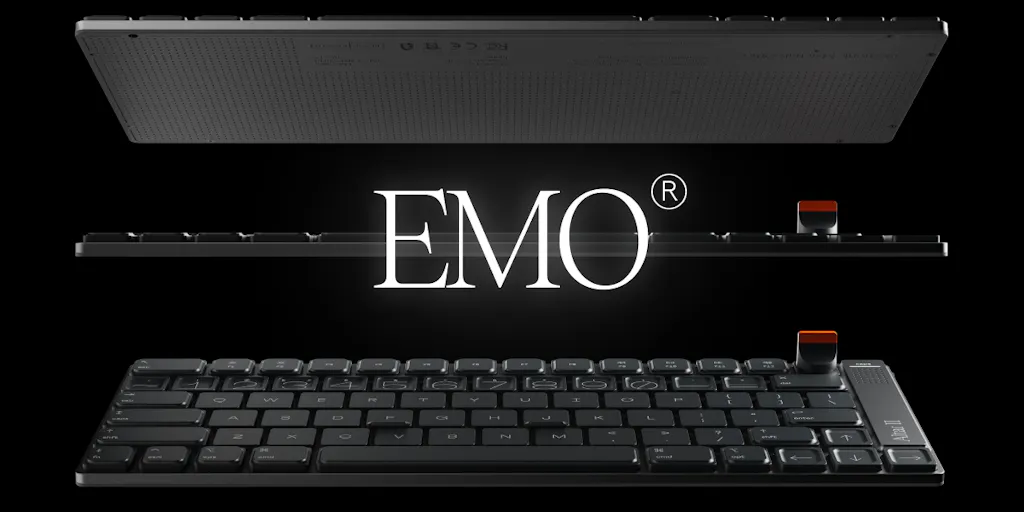
Every social media operator I know has the same silent struggle: we spend 10, 12, 14 hours a day hunched over a keyboard, yet we treat that keyboard like an afterthought. We’ll agonize over a 0.3% engagement rate shift, A/B test thumbnail colors, and debate the merits of a new scheduling tool — but we’re typing all of that on a crusty membrane keyboard that came free with an iMac from 2017. That’s backwards. The tools we use to create content are content infrastructure. When I saw Altar II launch on Product Hunt, I didn’t see a gadget; I saw a commentary on how the creator economy’s most expensive input is still human hands. The pitch is deceptively simple: a 4.75mm-thick mechanical keyboard that wants to replace your Magic Keyboard. But underneath that aluminum slab is a story about tradeoffs, about designing for the reality of long-form work, and about how the best tools disappear into the work — or don’t. For anyone whose livelihood depends on producing daily content, the choice of input device isn’t peripheral. It’s the difference between a day of clean output and a day of carpal tunnel flare-ups and mis-typed captions.
The Real Problem: Your Setup Is Sabotaging Your Output
Let me paint a picture that might feel uncomfortably familiar. You’re a content manager juggling three client accounts. You’ve got a content calendar in Notion, a draft queue in Google Docs, and you’re about to schedule 30 posts across five platforms using a tool like Buffer or Hootsuite. You’ve got a 2 PM deadline for a LinkedIn thought-leadership piece and a 5 PM cut for a TikTok script. Your wrist is already aching from the morning’s email triage. Now, ask yourself: how much of your creative energy is being drained by the physical act of typing? For most of us, the answer is “more than I’d like to admit.” We’ve optimized everything upstream — the AI content tools that draft our first passes, the Canva templates that speed up our visuals, the Metricool dashboards that track our analytics — but the final mile, the actual keystrokes, remains an unoptimized bottleneck. The Altar II maker, Andrew Emerson, frames it as “the keyboard I wish Apple made,” and that’s a compelling hook. But for a creator, the more relevant framing is: it’s the keyboard that acknowledges you’re going to be typing for six hours straight, and it’s trying to make that less punishing. The 1.8mm of travel, the tactile bump, the heavier weighting — these aren’t just specs; they’re an argument that feedback matters. When you’re grinding through a month of content in a single afternoon, you need to feel the actuation point. You need to know, without looking, that your keystroke registered. That’s not luxury; that’s efficiency.
How It Differs From the Incumbents: A Study in Tradeoffs
The keyboard market is weirdly crowded for something that seems so solved. You’ve got the ergonomic split boards from Kinesis that look like science experiments, the mechanical workhorses from Keychron that have become the default for remote workers, and then the Apple ecosystem’s default: the Magic Keyboard. Each of these represents a different set of compromises. The Magic Keyboard is thin and portable but famously shallow — it’s a chiclet-style keyboard with minimal travel that can feel like typing on a tabletop. Mechanical boards offer the tactile feedback and satisfying thock that typists crave, but they’re usually thick, heavy bricks that sit on your desk like a monument to your hobby. The Altar II is trying to split the difference: the profile of a Magic Keyboard (4.75mm is almost impossibly thin for a mechanical board) with the feel of a proper switch. The maker claims it has 1.8mm of travel versus a MacBook’s roughly 1.2mm, which doesn’t sound like much, but in practice, that extra 0.6mm is the difference between “mushy” and “snappy.” My take: this is a smart positioning. It’s not trying to convert the die-hard mechanical keyboard enthusiasts who want lubed switches and custom keycaps — those folks are already served by the likes of Drop or NovelKeys. Instead, it’s targeting the massive middle: the Mac users who find the Magic Keyboard lifeless but don’t want to deal with the bulk of a traditional mechanical board. That’s a huge addressable market of creators and knowledge workers.
Why TikTok Creators Should Care More Than LinkedIn Ones
Here’s a subtle point that most keyboard reviews miss: your platform of choice dictates your physical workflow. A LinkedIn ghostwriter or a long-form newsletter author is doing marathon typing sessions — 2,000 words a pop, multiple times a day. For them, the ergonomics and feel of the keyboard are paramount; a bad board directly translates to fatigue and reduced output. But a TikTok or Instagram Reels creator? Their primary input is video and audio, not text. They’re editing in CapCut or Adobe Premiere, and their typing is mostly relegated to captions, hashtags, and comments. The keyboard is still important, but it’s a secondary tool. For that cohort, the Altar II’s aesthetic — the single-piece CNC-machined aluminum chassis, the red backlight, the detachable dial — might actually matter more than the switch travel. It’s a desk prop that shows up in the background of your videos. It signals “serious creator” without saying a word. The Instagram account for Electronic Materials Office leans into that vibe hard — it’s not just product shots; it’s an aesthetic. So while the typing feel is the headline, the visual identity is a silent killer feature for video-first creators.
What Creators Can Borrow From This Playbook
Beyond the hardware, there’s a lesson here for anyone building a personal brand or a content operation. The launch strategy for this product is a masterclass in niche targeting and community building. They didn’t try to sell a keyboard to everyone; they sold a specific vision to Mac-obsessed creators and designers. They’re leveraging Product Hunt as a launch pad, which is still a viable channel for indie hardware, and they’re being transparent about the engineering journey — the custom USB-C housing, the cramped PCB, the two-year development timeline. For creators, this is a reminder that your “behind the scenes” content is often more compelling than the final product. The story of why something was made, and the struggle to make it, is inherently engaging. I’ve seen this work across the creator economy: the YouTubers who document their studio build-outs, the indie hackers who share their revenue numbers, the writers who post their drafting process. The Altar II team is doing exactly that in their Product Hunt comments — responding to questions about firmware versus app-based customization, sharing typing test recordings on their website, and acknowledging feedback from their previous product, Altar I. That’s not just customer service; it’s content. It’s building trust through transparency. And it’s a tactic that works whether you’re selling a $249 keyboard or building a personal brand on X.
Where the Math Breaks: The Limitations You Need to Know
It’s time for a dose of reality. The Altar II is a beautiful object, but it’s not for everyone, and the launch page itself contains a cautionary tale. Look at the review for the original Altar I from a user named Jacob Waites. He loved the design but hated the function: a hair-trigger Bluetooth pairing button that caused accidental pairing mode six times on day one, a flat 0-degree typing angle that left his hands sore, and deep-inset keys that led to mis-typed nearby keys. The maker claims they’ve addressed this in Altar II — the dial is now detachable, and the pairing button placement has been revised — but this is a classic hardware lesson: the first version is often a beta test. My take: don’t be an early adopter unless you’re prepared for friction. The $249 early-bird price (against a $349 retail) is tempting, but it’s a reservation, not a purchase. The Kickstarter launches on 10 November 2026, which is a long way out. If you’re a creator who needs a reliable tool today, you’re better off waiting for the reviews to roll in from people who aren’t the maker. Also, note the limitations: it’s a Mac-first device with a native macOS companion app. If you’re a Windows-based creator, this keyboard is not for you. And if you’re someone who types with a heavy hand, the 1.8mm travel might feel too shallow — it’s closer to a MacBook keyboard than a traditional mechanical board. The maker explicitly says so, comparing it to a MacBook with more travel and a snappier feel. So, manage your expectations: this is not a thocky, deep-travel keyboard. It’s a precise, low-profile instrument.
The Verdict: A Tool for the Aesthetic- and Output-Driven Creator
So, who should actually care about this? In my assessment, the Altar II is for two distinct personas. First, the long-form writer or editor who spends their entire day in a text editor and wants a typing experience that’s more engaging than a Magic Keyboard but less bulky than a traditional mechanical board. For them, the tactile bump and the snappy feel could genuinely reduce fatigue and improve accuracy. The second persona is the video-first creator who cares about their desk aesthetic and wants a piece of hardware that looks as good on camera as it feels to use. The aluminum chassis and the red backlight are going to look fantastic in a B-roll shot. But if you’re a casual user, or someone who’s perfectly happy with your current setup, this is an easy pass. There’s no compelling reason to spend $249 on a keyboard unless the one you have is actively causing you pain or holding back your output. The reservation model is smart — it locks in the price and builds a pre-launch community — but it’s not a commitment. You’re paying $1 to hold your place in line, and you can walk away when the Kickstarter goes live.
What I’d Watch / Test Next
This week, if you’re intrigued by the premise of a low-profile mechanical keyboard, here’s what I’d do before you even think about the Altar II. First, go to their website and listen to the typing test. Sound is a huge part of the typing experience, and you need to know if the acoustics match your preference. If you like the sound of it, I’d then go to a local electronics store and try out a low-profile mechanical board from a brand like Keychron or Logitech — the MX Mechanical Mini is a good baseline. This will give you a reference point for what 1.8mm of travel actually feels like. Then, and this is the operator’s move, audit your own setup. Are you using a keyboard that’s causing you wrist pain? Are you sacrificing typing speed because you’re constantly looking down to check your key presses? If so, that’s a problem worth solving, and the Altar II is one possible solution. But don’t get caught up in the hype. The creator economy is full of shiny objects; your job is to find tools that make the work easier, not more complicated. The Altar II has the potential to be that tool, but only time — and the reviews after the November 2026 launch — will tell. In the meantime, the most actionable takeaway is this: pay attention to your physical infrastructure. Your desk, your chair, your keyboard, your monitor — these are the platforms on which your content is built. Optimize them, and you optimize your output.