The signature block is a landing page nobody optimizes — and that’s a bigger creator-economy problem than it sounds
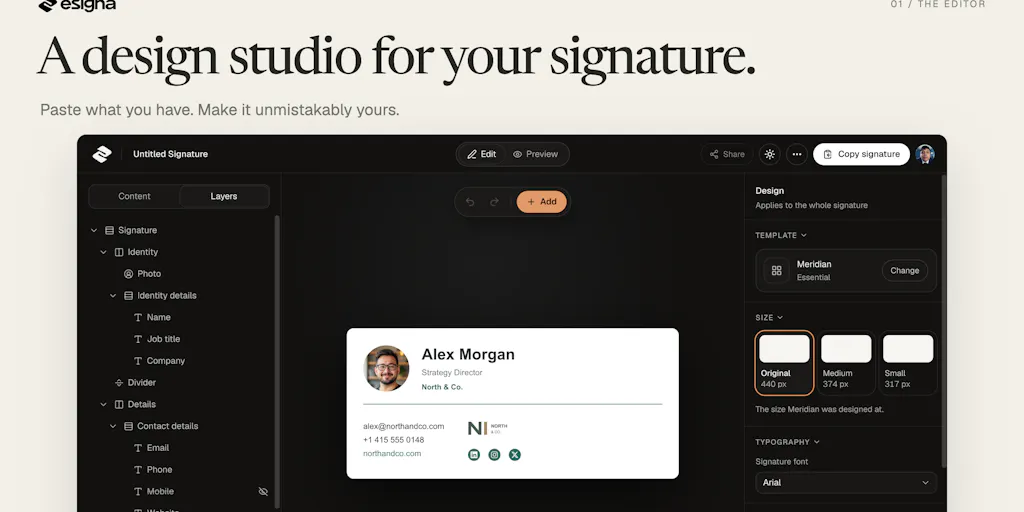
Every social media operator I know spends hours A/B testing a link-in-bio page, then pastes a three-line plain-text signature into every outbound email they send. That asymmetry has always bugged me. Your email signature is the one piece of branding that travels with you into a prospect’s inbox, a podcast guest’s reply thread, a brand deal negotiation, a newsletter swap — and most creators treat it like a legal disclaimer. So when a tool shows up promising a canvas instead of a form, I pay attention. esigna, launched by Luis Rodriguez, is exactly that bet: design your signature like a small webpage, not a fill-in-the-blanks wizard. Here’s why that framing matters beyond email, and where I think the pitch still has gaps.
What problem esigna actually solves (and what it doesn’t)
The maker’s own framing is the clearest tell: “Most signature tools hand you a form to fill in. I wanted a canvas.” That’s a design philosophy difference, not a feature difference, and it changes who the tool is for. If you’ve ever used a legacy signature generator — the kind bundled into HubSpot or Mailchimp campaign footers, or the free tools that spit out a fixed table layout — you know the drill. You pick a template, you type your name, you accept whatever spacing the template decided for you, and you move on. The output is functional and forgettable.
esigna’s pitch is that you can edit text directly on the canvas, move and resize blocks, adjust type and spacing, add a booking button or a banner, and even change a template’s underlying structure. The paste-to-populate flow is the smartest onboarding decision in the whole launch: copy a signature from an email you’ve already sent, paste it in, and the tool parses your name, title, numbers, and links into the right fields, then redraws all 26 templates with your details. You can flip through designs without retyping. That’s a genuinely good UX instinct — it meets creators where their existing signature already lives, rather than asking them to re-enter data they’ve typed a hundred times.
Why this matters more to a solo creator than to an enterprise
Enterprise signature management is a solved, boring, IT-department problem. Tools like Exclaimer and WiseStamp exist to enforce brand consistency across hundreds of employees, and they charge accordingly. What’s underserved is the middle: the indie founder, the freelance social media manager, the creator who sends 40 outbound emails a week and wants their signature to look like they hired a designer. That’s the gap esigna is aiming at, and I think it’s a real one. A recruiter, a sales lead, or a freelancer pitching brand deals all have the same problem — their signature is the first impression inside a channel where they can’t control the layout — and none of them want to learn HTML to fix it.
How it stacks up against the incumbents you’d actually compare it to
Let me be specific about the comparison set, because “signature tool” is a mushy category.
- WiseStamp is the closest direct competitor. It’s mature, has a browser extension, integrates with Gmail and Outlook natively, and has a free tier. Its editor is more form-driven than canvas-driven.
- Exclaimer is the enterprise play — centralized signature management, Microsoft 365 and Google Workspace admin controls. Overkill for a solo operator.
- HubSpot and Mailchimp bundle signature blocks into their broader email tooling, but you’re paying for the whole suite to get a signature.
- DIY in Canva is what a lot of creators actually do — design a signature as an image, paste it into Gmail, and discover that image-only signatures are exactly what spam filters dislike.
That last point is where esigna’s positioning gets interesting. The maker explicitly addresses the spam-filter fear in the comments: “An HTML signature on its own won’t get you flagged, since almost every email is HTML already. What filters dislike is image-only signatures, tracking pixels and sketchy links, and esigna does none of those.” That’s a technically accurate answer, and it’s the right answer to give. Most creators I know default to image signatures precisely because they’re scared of HTML, and that fear is backwards — it’s the image-only approach that’s riskier.
Where the math breaks
Here’s my take, and I want to flag it clearly as opinion: the pricing is unusual in a way that could either be a strength or a red flag depending on how the product evolves. The maker states that “every template and export is free, and you can design and copy without an account. A free account saves 2 signatures and includes 6 pastes. If you need more, it’s $19 once for 25 signatures and unlimited pastes. No subscription.”
A one-time $19 with no subscription is refreshing in a category where everything is SaaS-priced. But it also raises a sustainability question I’d want answered before I built a workflow around it. If the product never charges again, what funds the ongoing maintenance of email-client compatibility? Gmail, Outlook, and Apple Mail change their rendering engines regularly, and a signature that looks perfect today can break silently in six months. The maker acknowledges this directly — “Those previews are close, not exact, because every inbox has its quirks” — which is honest, but it also means the tool’s core value depends on continuous upkeep that a one-time payment doesn’t obviously fund. I’d bet on a future subscription tier or a hosted-sync product, but that’s speculation, not something the launch states.
What creators and social media teams can borrow from esigna’s approach
Even if you never use the tool, there are three operational lessons in this launch that apply directly to how you run social.
1. Paste-to-populate is the onboarding pattern social tools should steal
The single best idea here is letting users paste existing content and having the tool parse it into structured fields. Think about how much friction that removes. When I onboarded a client onto a scheduling stack last quarter, I spent the first two hours re-entering their bio, links, and brand colors into Buffer, then again into Later, then again into Metricool. Every one of those tools asked me to type data that already existed somewhere. The paste-to-populate pattern — parse what the user already has, then let them refine — is a much better default. If you’re evaluating scheduling or analytics tools this year, ask the vendor whether their onboarding supports importing existing content rather than re-keying it. That question alone will separate the modern tools from the legacy ones.
2. Cross-client previews are a content QA habit, not just a signature feature
esigna shows previews in light mode, dark mode, mobile, and Outlook before you copy. That’s table stakes for email, but it’s a habit most social teams still don’t apply consistently to their own content. How many of you preview a Reel in dark mode on an OLED phone before publishing? How many check how a carousel’s first frame reads at thumbnail size in the feed? The CapCut and Canva workflows make it easy to design in one context and ship blind into another. Borrowing esigna’s “check it in four contexts before you export” discipline would catch a lot of embarrassing mistakes — especially the dark-mode text contrast issue that plagues so many branded graphics.
Why TikTok creators should care more than LinkedIn ones
This is counterintuitive, so let me explain. LinkedIn is where you’d assume a polished signature matters most, because it’s the professional network. But LinkedIn creators rarely send cold outbound email at scale — their distribution happens in-feed, and their “signature” is their headline and featured section. TikTok creators, by contrast, are constantly negotiating: brand deals, UGC contracts, affiliate partnerships, podcast bookings. That negotiation happens over email, often cold, often with a media kit attached. A signature that includes a booking button, a clean link to your media kit, and a banner for your current campaign is doing real commercial work in that inbox. The same logic applies to newsletter operators running beehiiv or Substack sponsorship outreach. If your revenue depends on outbound email, your signature is a conversion surface, not decoration.
3. The “no account required” default is a trust signal worth copying
esigna lets you design and copy without an account, and only gates the paste feature and multi-signature saving behind a free account. That’s a smart funnel — you experience the core value before you’re asked to commit. Compare that to the average SaaS trial that demands an email before you see anything. For creators building their own funnels — lead magnets, free tools, waitlists — the lesson is to let people experience the thing before you ask for their data. The conversion you lose to friction is usually larger than the email addresses you gain by gating early.
Where I think esigna falls short — and who it’s not for
I want to be balanced here, because the launch has genuine open questions.
The template count is stated but not the quality distribution. The maker says all 26 templates redraw with your details. What’s not disclosed is how many of those are genuinely distinct versus variations on a theme. In my experience with template-based design tools, the effective choice set is usually a third of the advertised number.
The preview accuracy caveat is honest but load-bearing. “Close, not exact” is the right thing to say, but for a tool whose entire value proposition is visual fidelity, the gap between preview and reality is the whole product. If a signature looks great in the editor and breaks in Outlook, the user blames the tool, not the inbox. The maker’s suggestion to “skip the photo and logo” for maximum safety is good advice but also quietly admits the fanciest designs carry the most rendering risk.
Not disclosed: user counts, whether the tool supports team/multi-user management, whether there’s an API, whether signatures sync across devices, and how updates to templates propagate to already-exported signatures. If you’re a social media agency managing signatures for ten clients, those gaps matter.
Who it’s not for: enterprise IT teams that need centralized enforcement across hundreds of mailboxes — that’s Exclaimer’s territory. Teams that need signatures dynamically pulled from a CRM — not what this does. And anyone who wants a signature they never have to think about again — because the one-time-payment model means you should assume you’ll re-export periodically as email clients evolve.
What I’d watch / test next
If you’re a creator or social operator reading this, here’s my concrete recommendation for this week. First, go run the paste-to-populate flow yourself — it takes five minutes and it’s free without an account. Copy a signature from a recent sent email, paste it in, and see whether the parser actually captures your links and title correctly. That single test tells you whether the tool’s core promise holds. Second, before you commit to any signature design, preview it in dark mode and on mobile, and if you use an image or logo, send yourself a test email to a Gmail and an Outlook address to confirm it renders. Third, and this is the part most people skip: treat your signature as a tracked conversion surface. If you’re running outbound for brand deals or clients, put a UTM-tagged link in your signature and actually measure clicks — you’ll likely be surprised how much traffic a well-designed signature drives.
The bigger takeaway isn’t about esigna specifically. It’s that the unglamorous surfaces — signatures, link-in-bios, DM auto-replies, email footers — are where a lot of creator revenue quietly converts, and almost nobody optimizes them. A canvas-based signature editor is a small product, but it’s pointing at a real gap. I’d watch whether the maker adds team features and a sync layer, because that’s the difference between a one-time design tool and infrastructure creators actually build on.