The Real Problem Isn’t Your Content Calendar — It’s That You Can’t See What Your Tools Are Doing
Every social media operator I know has hit the same wall. You hand a task to an AI tool — a content repurposing pipeline, an auto-scheduler, a comment responder — and you walk away. Twenty minutes later you come back to find it’s published seventeen variations of the same hook across five platforms, changed your UTM parameters, and somehow deleted the alt text from every image in your last campaign. The chat log tells you what the tool said it did. It doesn’t tell you that one of those changes broke the link tracking on your entire LinkedIn funnel, or that the one post nobody checked is the one your biggest client just screenshotted.
That’s the gap Flare is aiming at, and it’s why I’m paying attention even though it’s technically a developer tool. Because the underlying problem — losing track of what your autonomous agents are actually changing — is about to become your problem, not just a software engineer’s.
When I saw Flare on Product Hunt, the maker’s framing hit me immediately. He built it because he kept losing track of what his agents were doing. You hand Claude Code or Codex a task, come back later, and there are thirty changed files and a chat transcript. The transcript tells you what the agent said. It doesn’t tell you that one of those files is imported by nine others, or that the one change nothing tests is the one holding the app together. Swap “files” for “scheduled posts” and “imports” for “cross-posting dependencies,” and that’s the exact anxiety I have every time I let an automation touch my publishing stack.
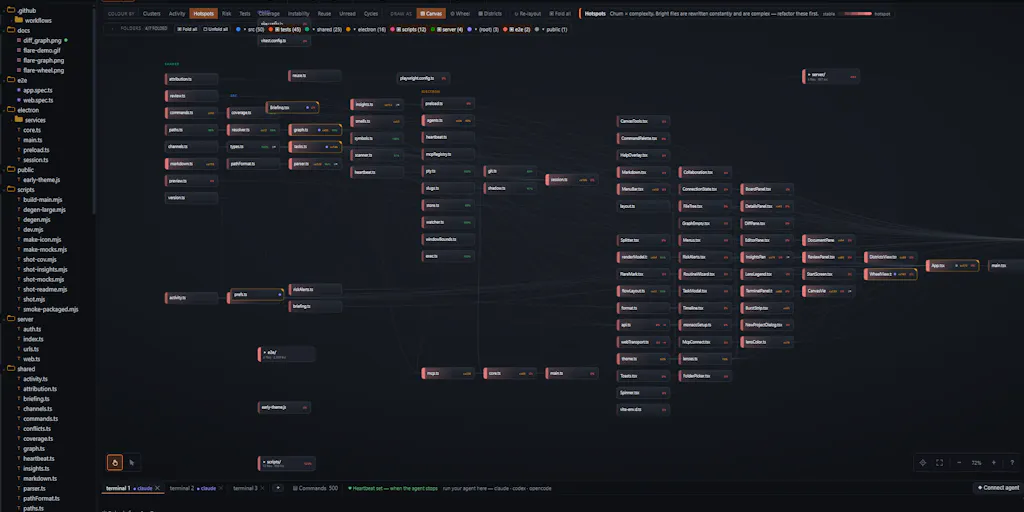
So Flare reads the repo instead of the conversation. Files become nodes, imports become edges, and the map updates as the agent writes. Every change is attributed, so when two agents cross over the same file you see it as a crossing on the map, not as a merge conflict tomorrow. For a creator running a multi-platform operation, that’s the difference between catching a problem while it’s a graph visualization and catching it after your engagement rate tanks.
What Flare Actually Solves — And Why It Matters Beyond Code
Let me be clear about what this product is. Flare is a local-first tool that visualizes your codebase as a graph while AI agents work on it. It’s MIT licensed, runs entirely on your machine, and has no account, no telemetry, no cloud. The maker’s key decisions are worth unpacking because they map directly onto what social media operators should be demanding from their own tooling.
The Terminal Is a Real Terminal
The first thing that stood out to me is that Flare doesn’t wrap, proxy, or touch your API keys. It’s a real terminal that brings your own agent. This is a trust architecture decision, and it’s the right one. Every time a social media SaaS tries to lock me into their proprietary automation layer, I get nervous. I’ve got tools I trust — Buffer for scheduling, Metricool for analytics — and I don’t want a new tool deciding it knows better than the ones I’ve already got configured. The “bring your own agent” model means Flare isn’t trying to replace your workflow; it’s trying to give you visibility into it.
For social media operators, this is the difference between a tool that integrates with your existing stack and a tool that demands you rebuild your stack around it. When I look at the creator economy tooling landscape, the tools that win long-term are the ones that respect what you’ve already built. Flare’s approach here is the right instinct.
Every Change Burst Is Snapshotted Locally
The second thing that caught my attention is the local snapshotting. Every change burst is snapshotted locally, so you can diff and revert one file or the whole tree without involving git. You also get notified by every risky change and have access to a “diff sub-graph” showing what changed in the last session.
This is where I start to see direct parallels to social media operations. When I’m running a content calendar across Instagram, TikTok, YouTube, and LinkedIn, I need version control on my content. Not just “here’s the final post” but “here’s what changed between draft three and the version that went live.” The ability to revert one change or the whole tree without involving git is huge. It’s like being able to unpublish a post and restore the previous version without having to dig through your archive.
The notification on every risky change is also a feature I want in every social media tool I use. When a scheduling tool suddenly decides to change the time zone on all my posts, or a repurposing tool decides to swap out my hashtag strategy, I want to know immediately — not when I check my analytics three days later and wonder why my reach dropped.
The Task Board Is Exposed Over MCP
The third piece is the task board exposed over MCP, so the agent picks up work and asks its questions there. You’re both looking at the project rather than at each other’s messages. This is a collaboration model, not just a monitoring tool. The agent isn’t working in a black box and reporting back; it’s working in a shared space where you can see what it’s doing in real time.
For social media teams, this is the difference between an automation tool that runs in the background and one that’s actually part of the team. When I’m working with a content repurposing pipeline, I want to see what it’s doing while it’s doing it — not get a summary at the end. The MCP exposure means Flare isn’t just showing you a log; it’s giving you a live view of the agent’s work in progress.
How This Differs From What’s Already Out There
Let me put Flare in context against the tools social media operators actually use. The obvious comparison is to the scheduling and analytics platforms that have been the backbone of creator workflows for years.
The Scheduling Giants
Hootsuite and Buffer have been around forever, and they solve a real problem: getting content out across platforms without logging into each one individually. But they’re fundamentally publishing tools, not visibility tools. They tell you what you planned to publish, and they tell you how it performed after the fact. They don’t tell you what’s happening in the moment when an automation goes off the rails.
Later is similar — it’s great for visual planning and Instagram-first scheduling, but it’s not designed to give you granular visibility into what’s changing in your content stack. The analytics are retrospective, not real-time.
Flare’s graph-based approach is different. It’s not asking “what did you publish and how did it do?” It’s asking “what is your agent changing right now and is that change safe?” That’s a fundamentally different question, and it’s one that becomes more important as AI tools get more autonomous.
The AI Content Tools
The newer wave of AI content tools — things like Canva with its AI design features, CapCut for video editing, and the various AI copywriting tools — are great at generating content. But they’re black boxes. You input a prompt, you get output, and you have no idea what happened in between. If the output is wrong, you can’t trace back to figure out where it went off track.
Flare’s model of reading the repo instead of the conversation is a direct challenge to that black-box approach. It’s saying: “I don’t care what the agent said it was doing. I care what it actually changed.” That’s the right instinct for anyone who’s ever been burned by an AI tool that confidently produced garbage.
The Monitoring Tools
There are monitoring tools out there — things like Datadog for infrastructure and various APM tools — but they’re designed for engineers monitoring production systems, not for creators monitoring content pipelines. They’re overkill for a solo creator or a small social media team, and they don’t understand the content domain.
Flare sits in a sweet spot between developer tools and content operations. It’s technical enough to be useful for the engineering side, but the underlying concept — seeing what your autonomous agents are changing — applies directly to content workflows.
Why TikTok Creators Should Care More Than LinkedIn Ones
Here’s where I’m going to get specific about which creators should pay attention to this concept, because it’s not uniform across platforms.
TikTok is the most algorithmically volatile platform right now. The TikTok algorithm rewards consistency and punishes inconsistency brutally. If an automation tool changes your posting schedule, your content mix, or your engagement patterns, the algorithm notices immediately. Your views can tank overnight, and it takes weeks to recover.
LinkedIn, by contrast, is more forgiving. The LinkedIn algorithm is less reactive to short-term changes, and the audience is more tolerant of inconsistency. If a tool makes a mistake on LinkedIn, you have time to catch it and fix it before it does lasting damage.
So TikTok creators should care more about the visibility that Flare’s model provides. When you’re operating on a platform where a single bad change can cost you thousands of views, you need to know what your tools are doing in real time. The graph-based approach — seeing every change attributed and every crossing between agents — is exactly the kind of early warning system that TikTok creators need.
LinkedIn operators, on the other hand, can afford to be more relaxed. The stakes are lower, the algorithm is more forgiving, and the audience is more patient. That doesn’t mean they shouldn’t use tools like this — it means they have more margin for error.
Where the Math Breaks
Let me be honest about where this model gets complicated. The graph visualization works beautifully for code because code has clear, defined relationships. Files import other files. Functions call other functions. The edges are explicit.
Content doesn’t work that way. A YouTube video doesn’t “import” a TikTok post the way a JavaScript file imports a module. The relationships are looser, more contextual. A repurposed post might share a hook with a video, or reference a stat from a blog post, but those connections aren’t machine-readable the way code imports are.
So when I imagine applying Flare’s model to content operations, I have to squint. The graph would be messier, the edges fuzzier. It would require either manual tagging of relationships (which adds overhead) or some kind of semantic analysis (which is less reliable than the syntactic analysis that works for code).
This is a real limitation. Flare is built for code, and the graph model that makes it powerful for code doesn’t translate perfectly to content. That doesn’t mean the concept is useless for creators — it means the implementation would need to be different.
What Creators Can Borrow From Flare’s Approach
Even if you never touch Flare itself, there are three principles from this product that every social media operator should steal.
1. Read the Artifact, Not the Conversation
The core insight of Flare is that you should judge agents by what they produce, not what they say. When I’m evaluating a content tool, I should look at the actual posts, the actual scheduled times, the actual analytics — not the dashboard’s claim about what it did.
This sounds obvious, but it’s not how most creators operate. We trust the tool’s interface. We see “Published successfully” and move on. Flare’s model says: don’t trust the message, check the artifact. That’s a discipline worth adopting.
2. Version Everything
Flare’s local snapshotting means every change is reversible. For content operations, this translates to: keep backups of everything, and make sure you can revert any change without losing the rest of your work.
I’ve been burned by this before. I’ve had a tool update my entire content library and then discover I can’t revert just the one bad change without losing all the good ones. Flare’s model of per-file and whole-tree revert is exactly what I want from my content tools.
3. Make the Work Visible
The MCP-exposed task board is a collaboration model that content teams should adopt. Instead of tools working in the background and reporting back, tools should work in a shared space where the team can see what’s happening.
This is a cultural shift as much as a technical one. It means treating your automation tools as team members, not as black boxes. It means demanding visibility into the decision-making process, not just the output.
Where My Judgment Says Flare Falls Short
I’ve been pretty positive so far, so let me balance that with some honest criticism.
It’s Not Built for Non-Developers
Flare is a developer tool. It requires comfort with terminals, git, and the concept of code graphs. Most social media managers and content creators are not going to be comfortable with that. The maker’s target audience is clearly developers who use Claude Code or Codex, not social media operators.
That’s fine — not every tool has to be for everyone. But it means the practical application for creators is limited. You’d need a developer on your team to set it up and interpret the graphs. For a solo creator or a small team without technical resources, this is a non-starter.
The Content Analogy Breaks Down
As I discussed above, the graph model that works for code doesn’t translate cleanly to content. The relationships between pieces of content are semantic, not syntactic. You can’t automatically detect that a tweet references a blog post the way you can detect that a file imports another.
This means the core value proposition — automatic relationship mapping — doesn’t apply to content. You’d have to define the relationships manually, which defeats the purpose.
It’s Early Stage
The Product Hunt launch is from a single maker, and the product is clearly early. It’s MIT licensed, which is great for transparency, but it also means there’s no commercial support, no roadmap guarantees, and no promise of ongoing development. For a tool that’s supposed to give you confidence in your autonomous agents, the lack of commercial backing is a concern.
No Analytics Integration
This is a personal gripe, but the tool doesn’t connect to analytics platforms. For social media operators, the whole point of visibility is to improve performance. Flare tells you what changed, but it doesn’t tell you how those changes affected your metrics. You’d have to cross-reference Flare’s graphs with your analytics dashboards manually.
What I’d Watch / Test Next
If you’re a creator or social media operator who’s intrigued by this concept, here’s what I’d actually do this week.
First, evaluate your current automation stack. Go through every tool that touches your content pipeline — schedulers, repurposers, auto-responders, analytics. Ask yourself: can I see what this tool is changing in real time? If the answer is no, that’s a risk.
Second, check out Flare on Product Hunt for yourself. Even if you don’t use it, the product philosophy is worth studying. The maker’s approach to local-first, no-telemetry, bring-your-own-agent is the direction I’d bet the creator economy tooling is heading.
Third, adopt the “read the artifact” discipline. For the next week, don’t trust what your tools say they did. Check the actual output. Look at your published posts, your scheduled times, your UTM parameters. Verify that what the tool claims matches what actually happened.
Fourth, talk to your developer colleagues. If you work with engineers, ask them what they think of Flare. The graph-based approach to agent visibility is going to become standard in software development, and the principles will eventually trickle down to content tooling. Understanding it now puts you ahead of the curve.
Finally, demand better visibility from your content tools. When you’re evaluating a new scheduling platform or analytics tool, ask about real-time visibility. Ask about change attribution. Ask about revert capabilities. The tools that can’t answer those questions are going to become liabilities as AI automation becomes more common.
Flare is a developer tool, but it’s pointing at a problem that’s about to hit every social media operator: we’re handing more and more of our work to autonomous agents, and we have no idea what they’re actually doing. The answer isn’t to stop using automation — it’s to demand visibility. Flare’s model of reading the artifact instead of the conversation is the right starting point, even if the implementation is still code-specific.
The question isn’t whether you’ll need this kind of visibility. It’s whether your tools will give it to you before you get burned.