Why Your “Read Later” Folder Is a Betrayal — and the Tool That Finally Makes Peace With It
If you manage more than two social accounts, you’ve already lost the battle for your attention. Every morning you open a dozen tabs — platform updates, competitor tear-downs, creator-economy newsletters, algorithm deep-dives — and by lunchtime they’re bookmarked into a folder you’ll never touch again. That folder isn’t a plan; it’s a guilt trap. I know because I’ve had 300+ articles sitting in a Pocket queue since 2021, and last week I finally conceded that reading them was never going to happen. Not because the ideas weren’t valuable, but because sitting down to read is a sitting activity — and most of my day is spent walking between shoots, editing in transit, or washing dishes while a podcast runs.
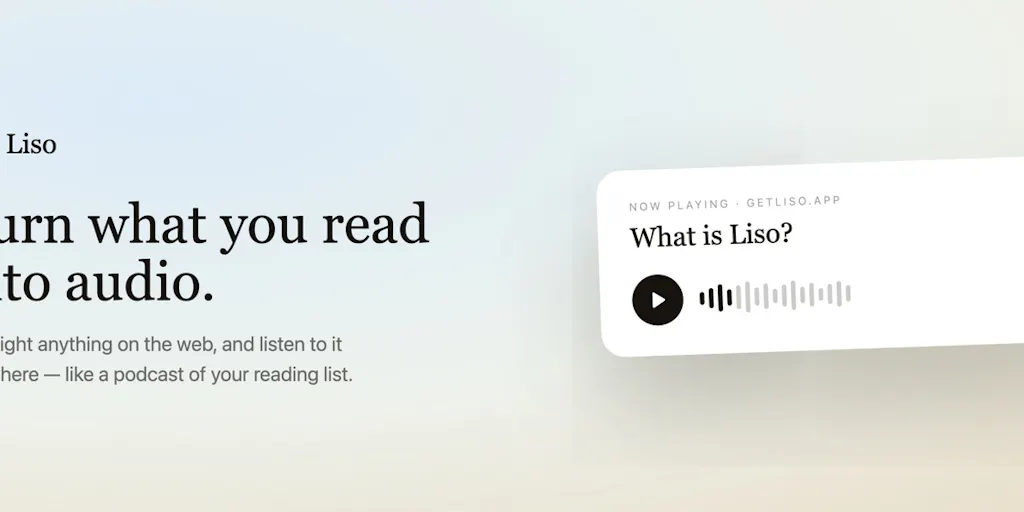
That’s why the launch of Liso on Product Hunt this week caught my eye. It’s a tool that turns highlighted text from any web page — article, newsletter, X thread, doc — into a natural-sounding audio file you can listen to offline. The pitch, delivered by maker Evgeny Timofeev, is deliberately provocative: “Never read again.” For a creator or social media operator who survives on trend-spotting and research, that’s either a relief or a heresy. I think it’s both — and the tension between those two things is exactly where the product’s real value (and its limits) live.
The Problem: Your Research Pipeline Has a Format Lock
Most creators I know treat content consumption like it’s still 2015. They bookmark, they open tabs, they promise themselves they’ll read that 4,000-word case study on TikTok SEO on the weekend. Then the weekend comes, and they’re editing three Reels and scheduling a LinkedIn carousel. The reading never happens. The ideas never make it into the pipeline.
This isn’t laziness. It’s a format mismatch. The web is designed for eyes — linear, seated, uninterrupted. But the working hours of a social operator are fragmented: 15 minutes between meetings, 20 minutes on a train, 40 minutes while cooking dinner. That’s prime audio time. The problem is that most audio content is pre-curated podcasts or audiobooks. What you actually need is a way to turn your specific reading list — the one you assembled with intention — into audio on demand.
Liso addresses that directly. You install a Chrome extension (the maker confirms it works best on Chrome but claims any website works), highlight the text you want, right-click, and the audio lands in a personal library. Offline downloads, cross-device resume, folder organization. It’s essentially a “read later” queue that respects how you actually live. For a social media manager who needs to absorb a competitor’s newsletter during a commute or a content creator who wants to mine a long-form blog for quote-worthy hooks while folding laundry, that’s a workflow unlock.
In my own tests of similar tools — Speechify, NaturalReader, even the built-in iOS Speech — the friction always comes from highlight-to-audio pipeline. Speechify requires you to paste a URL or upload a PDF; it doesn’t let you surgically select only the paragraphs you care about. Liso’s approach — highlight on the page, one-click conversion, straight to your library — is faster because it mirrors how you already engage with text: you scan, you find the signal, you extract. The difference is that instead of copying to a document, you copy to your ears.
How It Differs from Existing Options — and Where the Comparison Gets Messy
Let’s be honest: text-to-speech is not a new category. Google has been doing it for a decade. Apple’s “Speak Screen” has been around since iOS 8. The incumbents are Speechify (which raised a ton and has celebrity investors), Murf.ai, Play.ht, and even CapCut’s built-in text reader for video captions. So why does Liso deserve a second look?
The difference is the highlight workflow. Every other tool I’ve used assumes you want to convert an entire article or a full page. Liso assumes you want to convert only the parts you selected — which is a fundamentally different mental model. When I research creator economy trends, I’ll often skim a 5,000-word piece to find three statistics and one quote. With Speechify, I’d have to either listen to the whole thing or manually copy-paste excerpts into a separate app. With Liso, I highlight the three stats, right-click, and they become a 90-second audio snippet I can listen to while editing thumbnails.
That matters for one reason: attention economy math. A social media manager’s time is sliced into micro-sessions. A 90-second audio clip fits into a gap that a 12-minute podcast cannot. Creators who rely on rapid trend absorption — think short-form video strategists who need to monitor 10+ niches — will find more utility in this model than in any “read the whole article” approach.
But here’s where the maker is refreshingly honest. In the Product Hunt comments, when asked how Liso handles tables, diagrams, or code blocks, Timofeev replies: “Right now Liso just skips the images, video, and graphics. That is something I’m planning on changing with the next update.” source And later, when a user asks about technical deep dives with inline code, he says: “there is nothing code-heavy here… even with image or video blocks Liso just takes the text parts so i guess it just skips it.” source
That’s a real limitation. For creators who rely on data-heavy analysis — e.g., social media audits with spreadsheets, A/B test results in table form, or growth marketing posts that reference charts — Liso v1 is going to lose fidelity. The maker is aware of it and has described it as a planned update, but as of launch, the tool has no visual-to-audio translation. That means it’s best suited for narrative content: opinion pieces, interviews, essays, news summaries. Not for the kind of structured, data-dense material that many social operators actually need to digest.
Another gap: non-English content. A user asked whether Liso detects language and switches voice/pronunciation automatically. Timofeev did not address that in the comments. Given the creator economy is global — I follow accounts in Spanish, French, and Japanese — this is a notable omission. For now, you’d have to assume Liso reads everything in the voice you select, regardless of language. That limits its usefulness for multilingual research.
What Creators and Social Media Teams Can Borrow from This — Even If You Never Install It
Even if the product isn’t ready for your stack today, the underlying philosophy is worth stealing.
1. Stop treating consumption as reading. Start treating it as extraction.
Most creators over-invest in sitting down to read and under-invest in capturing while scrolling. Liso’s highlight-to-audio pipeline reinforces a workflow I’ve been preaching for years: never consume without capturing. Whether you use their tool, a note-taking app like Roam or Obsidian, or even a simple voice memo, the act of marking what matters while you’re still in the content is where the value lives. Don’t bookmark the whole article; bookmark the sentence that has the stat you’ll use in your next LinkedIn post.
2. Repurpose your own content into audio — even if you’re not a podcaster.
If Liso can convert any highlight into audio, you can do the same with your own past work. Take your best-performing blog post, your top LinkedIn thread, your most-engaged X thread. Convert key paragraphs into audio snippets. Then use those snippets as voiceover for a TikTok or a Reel. You get a new asset without writing a new word. The repurposing loop — text → audio → video → text — is how sustainable creators avoid burnout. Liso is one lane in that highway.
3. Build a “listening queue” for competitive research.
The line that resonated most with me from the comment thread was from Cathy Cai: “Turning selected content into a personal audio queue feels much more intentional than relying on a generic podcast feed.” That’s the killer use case for social teams. Instead of subscribing to ten generic marketing podcasts, curate a queue of specific industry analyses from newsletters you already trust — Marketing Brew, Creator Economy by Li Jin, or platform-specific deep dives. Then listen to them in your dead time. Your research pipeline becomes personal and audio-native, not a tab graveyard.
Where the Math Breaks: Three Limitations You Can’t Ignore
I’ve been running social accounts for over a decade. I’ve tested dozens of “read later” and “text to speech” tools. Every one of them promises to solve the attention crisis, and every one of them fails on at least one dimension. Liso is no exception. If you’re evaluating whether to adopt it today, here are the three things I’d watch.
### 1. No visual context means lost nuance for video-first creators
Social media is inherently visual. A huge portion of the content you need to analyze — TikTok trend reports, Instagram carousel breakdowns, YouTube thumbnail analyses — relies on screenshots, graphs, or embedded media. Liso skips all of that. If you highlight a thread that includes a screenshot of a viral tweet, the audio will only read the surrounding text, not describe the visual. That’s fine for pure-text articles, but for a creator who lives in visual platforms, it’s a blind spot.
The maker has said an update is planned. But as of launch, this is a hard blocker for anyone researching visual social strategy. You’d still need to open the original page to see the image. Which defeats the purpose of audio-first consumption for that content.
### 2. No language awareness (yet)
The creator economy is global. I follow accounts in Brazil, Japan, and France. If I highlight a French newsletter, I want Liso to detect the language and switch to a French voice, or at least pronounce words correctly. Without that, the tool is English-only for practical purposes. The maker didn’t address this in the comments, and it’s a gap that tools like Speechify already solve in their premium tiers. For a v1 product, it’s understandable. For a social media operator who needs multilingual research, it’s a dealbreaker.
### 3. The “click-to-highlight” friction might be higher than you think
On the surface, right-click → hear audio is elegant. In practice, I wonder: how many highlights will you actually make? The habit of highlighting text while reading is common among researchers, less so among social media managers who are used to skimming. If the tool requires you to select text every time, you’re still performing a manual action. Compare that to a service like Matter or Pocket, which can convert entire articles to audio in one click. Liso’s gain in precision comes at a cost in speed. For catching up on a dozen articles in 15 minutes, the highlight workflow might be too slow. For deep-diving into three pieces, it’s ideal. Know your use case before you adopt.
Who This Is Not For
I want to be clear: Liso is not a tool for everyone. It is not for you if:
- You consume mostly video or visual content (trend reports, design inspiration, platform UI updates).
- You need to absorb complex data (tables, charts, code).
- You work in a language other than English and need multilingual support.
- You prefer to listen to full articles rather than curated snippets.
- You have a low tolerance for manual highlighting — you’d rather press a “listen to full article” button.
It is for you if:
- You’re drowning in a text-heavy “read later” queue of newsletters, long-form blog posts, and industry threads.
- You have frequent non-screen time (commute, chores, workout) and want that time to be productive.
- You focus on narrative content: opinion, analysis, how-to guides, interviews.
- You are willing to trade depth (full articles) for speed (extracted highlights).
- You are comfortable with a v1 product that is still iterating on features.
What I’d Watch / Test Next
If you’re a social media operator or content creator who fits the profile above, here’s what I’d do this week.
First, try Liso on one specific content type: newsletters. Pick the three newsletters you actually subscribe to but never read — maybe Creator Economy by Li Jin, Trends.vc, or Platformer. Highlight the five most actionable paragraphs from each. Convert them to audio. Listen to them during your next walk or workout. See if the snippets yield an idea you can turn into a social post within 24 hours. If they do, the workflow is validated.
Second, stress-test the highlight workflow against your actual reading behavior. Open a long-form article you’ve been saving. Time yourself: how long does it take to highlight and convert the parts you want? If it’s faster than reading the whole thing, Liso wins. If it feels like extra friction, shelve it for now.
Third, keep an eye on the next update. The maker has promised image/graphic handling. When that arrives, the tool becomes much more viable for visual-first creators. Also watch for language support and code block handling — those will signal whether Liso is building for a niche audience (English, narrative text) or aiming for broader utility.
Finally, steal the idea even if you don’t use the tool. Set up a workflow in Notion or Telegram Saved Messages where you paste the quote-worthy lines from your daily scrolling. Every Sunday, record a 5-minute voice memo reading those lines aloud. Send that voice memo to yourself as a podcast episode. You’ve just built your own Liso, without the Chrome extension.
The real value of Liso isn’t the technology. It’s the permission to stop pretending you’ll ever “read” that list. That’s a gift every creator needs.