The Creator Economy Has a Sitting Problem, and No Break App Ever Fixed It Until Now
Every social media manager I know has the same secret shame: we preach “consistency” to our audiences while our own bodies fall apart from the very work that consistency demands. I’ve scheduled 30 posts across five platforms in a single afternoon, and by hour four my lower back is screaming, my hips have locked up, and I’m reaching for another coffee instead of standing up. The irony is brutal. We build content calendars designed to keep audiences engaged, yet we treat our own physical engagement with the work as an afterthought. The creator economy runs on hours of sitting — editing in CapCut, scheduling in Buffer, monitoring analytics in Metricool — and we’ve collectively decided that “just take a break” is advice for other people. Then we wonder why burnout hits harder than any algorithm update.
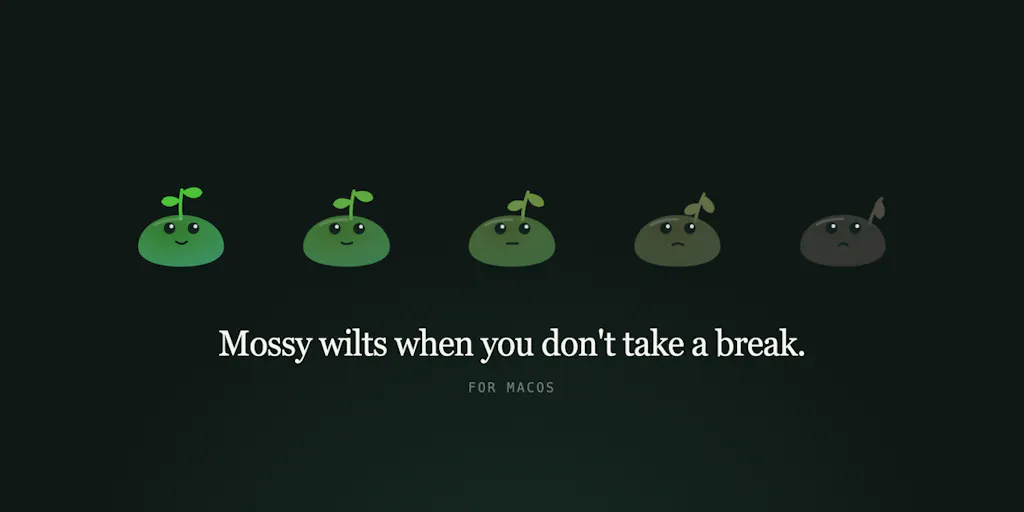
Enter Mossy, a macOS app that launched on Product Hunt this week, and it’s the first break tool I’ve seen that actually understands the psychology of how creators work. Not because it’s aggressive or gamified or punitive, but because it does the opposite: it wilts quietly in the corner of your screen, never blocks anything, and treats your refusal to take a break as normal behavior rather than a failure to correct. For a demographic that lives and dies by engagement metrics, this is a radical reframe. We’re not bad at self-care because we lack discipline; we’re bad at it because every tool we’ve tried has been designed to shame us into compliance. Mossy’s approach — a plant that visibly suffers when you ignore it — is the kind of gentle, persistent nudge that might actually survive contact with a 12-hour editing session.
What Problem This Actually Solves (and Why It’s Not Just Another Timer)
Let me be clear about what Mossy is not: it’s not a Pomodoro timer, not a screen-time blocker, not a wellness guilt-trip machine. The maker — a developer who says he sits ten hours a day, has dealt with chronic lower back issues, and tore his ACL last October — built this for himself and his architect wife, who also sits ten hours daily with a one-year-old at home. The origin story matters because it explains the design philosophy. They deleted every break app they tried because “the full screen break lands mid-sentence, you skip it, and a week later it’s gone.” Sound familiar? Every creator I know has downloaded Forest or similar focus apps, felt the dopamine hit of planting a virtual tree, and then abandoned it by day three when the guilt of skipping a session became louder than the app’s nagging.
Mossy inverts that dynamic. The plant sits in the corner of your screen and wilts while you sit. It doesn’t block your work, doesn’t demand attention, doesn’t interrupt your flow. Refusing a break is treated as a normal way to use the app, not a failure to correct. That single design decision is worth more than any feature list because it addresses the root reason why break apps fail: they’re built on a model of external enforcement, but creators are internally motivated people who resent being told what to do. When I’m in the middle of a video edit and a full-screen overlay pops up demanding I stretch, my first instinct isn’t gratitude — it’s irritation, followed by dismissal, followed by uninstall. Mossy’s wilting plant works because it doesn’t demand anything. It just exists, slowly deteriorating, and that visual cue is somehow more powerful than any alarm.
The second thing the maker got right is customization. My body needs hip and psoas work; the maker’s wife’s doesn’t. No fixed stretch list could cover both, so Mossy lets you write one sentence and an AI generates each break from it. Write “20 push-ups” or “teach me a Spanish word” and that’s what you get. For a creator, this is the killer feature. I don’t need generic “shoulder rolls” prompts — I need something that fits my actual workflow and physical state. Some days I need a movement break; other days I need a mental reset that has nothing to do with my body. The AI-generated breaks are private, too: the key lives on a small relay, never in the app, and the only things that leave your Mac are that one call and an anonymous daily ping you can switch off. No account, no tracking. In an era where every SaaS wants your email, your credit card, and your behavioral data, a free, native, 1.4 MB Swift app with no account requirement feels almost subversive.
Why TikTok Creators Should Care More Than LinkedIn Ones
Here’s where the platform divide gets interesting. If you’re a TikTok creator, your entire workflow is built around short-form video — which means you’re not just sitting; you’re hunched over a phone or laptop for hours, often in awkward positions, filming yourself doing the same 15-second dance or talking head segment repeatedly. The physical toll is different from a LinkedIn content strategist who writes long-form posts in a text editor. TikTok creators need breaks that reset their bodies because their content requires physical performance. A wilting plant that suggests “do 20 push-ups” isn’t just a wellness nudge — it’s a content performance enhancer. If you’re about to film a high-energy video, a quick movement break can actually improve your on-camera energy. LinkedIn creators, by contrast, need breaks that reset their minds — something like “teach me a Spanish word” or a quick cognitive reset. Mossy handles both because you write your own prompt. The AI isn’t prescribing; it’s reflecting your own words back at you.
How It Differs From the Incumbents (and What You Can Steal)
Let’s talk about the existing landscape. Hootsuite and Buffer own the scheduling side of social media management, but they don’t touch your physical state. Later and Canva handle visual content but ignore your body entirely. The wellness-adjacent tools — Calm, Headspace — are meditation apps, not work-integrated break systems. And the break apps that do exist are either too aggressive (full-screen interruptions) or too passive (a tray icon you ignore). Mossy sits in a unique middle ground: it’s visible enough to create a persistent reminder but passive enough to never feel like an interruption. The wilting plant is a brilliant visual metaphor because it leverages our innate empathy for living things. We’ll ignore a timer, but a plant that visibly suffers triggers something deeper. The Product Hunt commenter who said “The flower starts wilting, and suddenly you feel guilty” nailed it — guilt is a more effective motivator than alarm fatigue.
What creators and social media teams should steal from Mossy isn’t the app itself (though you should download it if you’re on macOS 12+). It’s the design philosophy: gentle persistence over aggressive enforcement. When I’m building content calendars for clients, I apply this same principle to posting schedules. Instead of demanding daily posting (which leads to burnout and abandonment), I recommend consistency windows — 3-4 times per week on LinkedIn, daily on TikTok, but with permission to skip without shame. The platforms reward consistency, but they also reward quality, and a burned-out creator produces neither. Mossy’s approach to breaks mirrors what I tell clients about content: it’s better to show up imperfectly and consistently than to blast perfect content and disappear.
The AI-generated break feature is also worth examining as a content repurposing strategy. The maker says you write one sentence and the AI writes each break from it — your words decide what you do, and nothing in the app inspects what you asked for. For creators, this is a model of personalized automation that could apply to content generation. Instead of generic templates, what if your content tools learned your voice and generated variations of your own prompts? That’s essentially what Jasper and Copy.ai promise, but Mossy’s approach is more intimate — it’s not generating content for an audience; it’s generating instructions for your own body. The privacy angle is notable too: the key lives on a small relay, never in the app, and the only things that leave your Mac are that one call and an anonymous daily ping you can switch off. In a world where Notion and Slack are data vacuums, a tool that explicitly minimizes data collection is a trust signal.
Where the Math Breaks
Here’s my honest assessment of Mossy’s limitations. The app is macOS-only, which immediately excludes a huge chunk of creators who work on Windows or Chromebooks. The maker says it’s free, native Swift, 1.4 MB, and requires macOS 12+, but there’s no mobile version — and one Product Hunt commenter suggested adapting it for phones with graduating tones to warn drowsy drivers. That’s a great idea, but it’s not in the current product. The AI-generated breaks are only as good as your prompt, and while the privacy design is commendable, it also means the AI has no context about your physical state — it can’t adapt if you’re already in pain or exhausted. The maker is clear that “it isn’t medical advice, and the app says so itself,” which is responsible but also limits its utility for people with chronic conditions.
The pricing is “free,” which is great, but it raises questions about sustainability. Is this a passion project, or is there a business model? The source doesn’t disclose revenue plans, and the maker’s framing suggests this was built for personal use first. That’s fine — some of the best tools are — but it means you shouldn’t expect rapid feature development or customer support. If you’re a creator who relies on tools for your livelihood, you might want to wait and see how the project evolves before making it a core part of your workflow.
What Creators and Social Media Teams Can Borrow From It
The most valuable thing Mossy offers isn’t the app — it’s a framework for thinking about breaks as a content strategy rather than a wellness afterthought. Here’s what I mean: every creator knows that burnout kills consistency, but we rarely design our content calendars with built-in recovery periods. Mossy’s wilting plant is a visual reminder that ignoring your body has consequences, and that’s a metaphor for content strategy too. If you’re posting daily without rest, your content quality will wilt just like that plant. The solution isn’t to post less — it’s to build in deliberate, guilt-free rest periods.
For social media teams, the AI-generated break feature suggests a workflow innovation: instead of generic wellness breaks, what if each team member wrote their own break prompts based on their specific needs? A video editor might need “look at something 20 feet away for 30 seconds” to rest their eyes. A community manager might need “stand up and do 10 deep breaths” to reset after a stressful moderation session. Mossy’s approach personalizes the break experience, which is exactly what we should be doing with our content strategies. Stop using generic templates; write your own prompts based on your audience, your platform, and your unique voice.
The privacy angle is also worth borrowing. Mossy’s “no account, no tracking” stance is a differentiator in a market where every tool wants your data. For creators, this is a trust signal you can extend to your audience: if you’re collecting email addresses or tracking user behavior, be transparent about it. The maker’s decision to keep the AI key on a small relay rather than in the app is a technical choice that signals respect for user privacy — and it’s the kind of decision that builds long-term trust, which is more valuable than short-term engagement metrics.
Where My Judgment Says It Falls Short
I’ve been testing break apps for years, and Mossy is genuinely refreshing — but it’s not a complete solution. Here’s where I’d push back. First, the wilting plant visual, while effective, is also easy to ignore. I’ve spent hours in Premiere Pro with a dozen windows open, and a small plant in the corner of my second monitor is not going to break my focus. The maker’s own comments suggest they’ve thought about this — the app “never blocks anything” — but that’s both a feature and a limitation. If you’re the kind of person who can ignore a wilting plant, Mossy won’t help you.
Second, the AI breaks are only as good as your prompt, and there’s a risk of prompt fatigue. I’ve used ChatGPT enough to know that generating good instructions requires effort. If I have to write a new sentence every time my needs change, I’m less likely to use the feature. The maker says you write one sentence and the AI writes each break from it — but what happens when that sentence becomes stale? The app doesn’t seem to offer prompt evolution or adaptation based on your behavior. That’s a missed opportunity.
Third, the lack of mobile support is a significant gap for creators who work on the go. A Product Hunt commenter suggested adapting it for mobile phones with graduating tones to warn drowsy drivers — that’s a genuinely useful idea, but it’s not in the current product. If you’re a creator who edits on your phone or manages social media from your phone, Mossy won’t help you. The maker says it’s macOS 12+, which is a reasonable constraint for a native Swift app, but it limits the potential audience.
Finally, there’s the sustainability question. The app is free, which is great for users, but it raises questions about long-term viability. Is this a passion project, or is there a business model? The source doesn’t disclose revenue plans, and the maker’s framing suggests this was built for personal use first. That’s fine — some of the best tools are — but it means you shouldn’t expect rapid feature development or customer support. If you’re a creator who relies on tools for your livelihood, you might want to wait and see how the project evolves before making it a core part of your workflow.
What I’d Watch / Test Next
Here’s what I’m doing this week, and what I’d suggest you try too. First, download Mossy if you’re on macOS 12+ — it’s free, it’s tiny, and it’s worth testing even if you’re skeptical. Write a prompt that actually fits your body and workflow, not a generic “stretch” prompt. I’m going to write “stand up and walk around the room for 2 minutes” because that’s what I actually need during long editing sessions. Second, pay attention to how you feel when the plant wilts. The maker’s insight — that “refusing a break is a normal way to use it, not a failure to correct” — is a testable hypothesis. Does a gentle visual cue change your behavior more than an aggressive timer? My bet is yes, but I want to see it in practice.
Third, apply Mossy’s design philosophy to your content strategy. Instead of demanding daily posting from yourself or your team, build in deliberate rest periods. The platforms will survive if you post 4 times instead of 7. What won’t survive is a creator who burns out and disappears for three months. Fourth, watch how Mossy evolves. The maker is clearly responsive to feedback — they’re already answering comments on Product Hunt and suggesting specific stretches like the cobra position. If they add mobile support or prompt evolution, this could become a genuinely essential tool for creators. For now, it’s a promising experiment with a smart design philosophy — and in a market full of aggressive, guilt-tripping productivity tools, that’s worth paying attention to.