The Privacy Wars Are Over, and the Creators Lost. Here’s What Actually Comes Next.
If you’ve managed social accounts for more than a year, you’ve felt the ground shift beneath your feet. The analytics that used to tell you exactly which Instagram Story drove a sale now give you a shrug and a “data unavailable.” The Facebook pixel that once tracked a user from impression to purchase now trips every consent banner in Europe. And TikTok’s native dashboard will happily tell you how many people watched, but it won’t tell you which of those viewers actually bought your course. We’ve been living in a fractured attribution world, and most of us have quietly accepted it—building content calendars on vibes and praying that the algorithm rewards us.
But there’s a deeper problem than missing data. The tools we’ve relied on for years—Google Analytics chief among them—were built for a web that no longer exists. They assume persistent cookies, cross-site tracking, and a user who stays logged into the same browser for weeks. That user is a ghost now. Apple killed the cookie, GDPR killed the consent-less tracker, and every major platform has followed suit. The result is that we’re flying blind, and the tools that promise clarity are either too complex for a solo creator or too shallow to tell us anything useful.
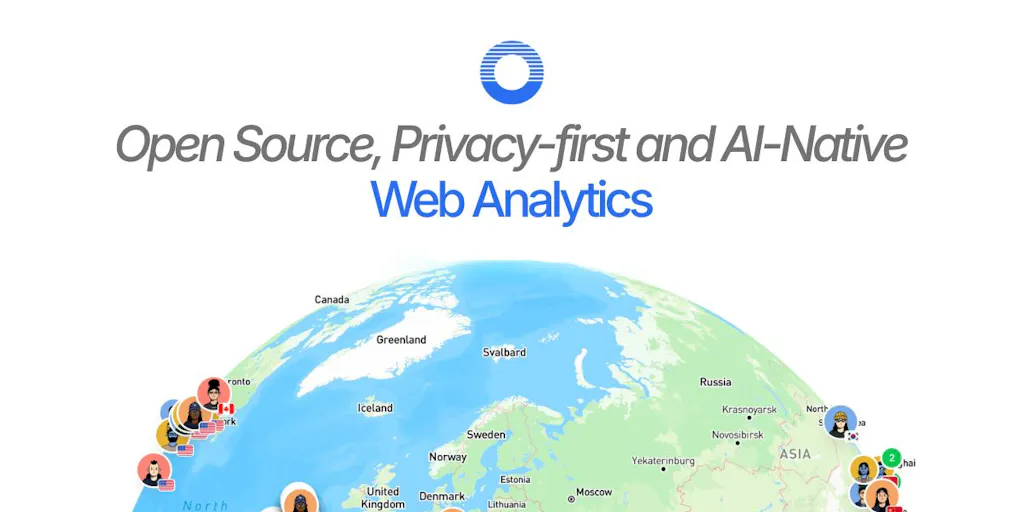
That’s why I’ve been watching the open-source analytics space with more interest than I’ve had in any new SaaS in months. When I saw Open Analytics launch on Product Hunt, I didn’t expect much—another privacy-first dashboard, another cookie-less counter, another “we respect your users” manifesto. But the more I dug into the thread, the more I realized this team is solving a problem that’s been nagging at me for years: how do you get real attribution without becoming the thing you hate?
The short answer is that you can’t have perfect cross-device tracking and perfect privacy. But you can get close—if you’re willing to make trade-offs and, crucially, if you’re willing to be honest about what your data can and cannot tell you. That honesty is the rarest thing in analytics right now.
What Open Analytics Actually Solves (and Why It Matters for Your Content Funnel)
Let me paint a scenario that every creator will recognize. You run a newsletter, a YouTube channel, and a TikTok account. You’ve got a link-in-bio that routes to your landing page. Last month, you published a video that got 50k views, and your email list grew by 200 people. But when you open your analytics dashboard, you can’t tell which platform drove those signups. Google Analytics will show you sessions and pageviews, but it won’t connect the dot between that TikTok view and that email subscription—not without a complex funnel setup that requires more JavaScript than you’re willing to paste into your site.
The team behind Open Analytics—the same folks who built Sleek Analytics—says they built this tool because they kept hitting a wall: every analytics solution forced them to choose between knowing their numbers and respecting their users. Their launch post lays it out plainly: Google Analytics gave them numbers but came with complexity and consent banners; privacy-first tools removed the banners but stopped at pageview counts. They wanted both.
Here’s what they built instead. The system is cookieless by design—visitor identity is represented by a salted hash that rotates at midnight, raw IP addresses are never stored, and no cross-site profile is created. That’s a meaningful technical choice, not just a marketing bullet. It means that when I look at my dashboard, I’m seeing anonymous, single-day sessions. I can’t track a user across a week-long consideration cycle unless they explicitly identify themselves.
But here’s where it gets interesting for creators. They’ve built revenue attribution directly into the product. Connect Stripe, and each payment appears alongside the visit that generated it, showing which pages, channels, and referrers drive actual revenue. For a creator selling a course or a digital product, that’s the difference between guessing which platform works and knowing. When I scheduled my own launch last quarter, I had to manually cross-reference Stripe transactions against my referral sources in a spreadsheet. It took hours and still produced murky results. This is the feature that would have saved me a weekend.
There’s also an AI chat interface and an MCP server that lets you query your data in plain English. I’ll be honest—I’m skeptical of AI analytics features because most of them are just a thin wrapper around a SQL query generator. But the team made a specific architectural choice that I respect: the model never writes queries. Instead, each MCP tool is a fixed, named read (site_overview, revenue_summary, etc.) whose SQL is constant on their side. The model only picks the tool and fills in parameters like date ranges. That’s a subtle but crucial distinction—it means the AI can’t quietly redefine what “a person” means or invent a metric that doesn’t exist.
Why TikTok Creators Should Care More Than LinkedIn Ones
If you’re a LinkedIn thought-leader posting text posts and measuring engagement in comments, you probably don’t need this tool. Your funnel is simple: post, get impressions, get connections, maybe get a consulting client. The analytics that LinkedIn provides natively is probably enough.
But if you’re on TikTok or Instagram Reels, your problem is different. You’re producing video content that lives on a platform that doesn’t share detailed referral data with external tools. You’re driving traffic to a link-in-bio or a YouTube channel, and you need to know which video actually converted. The platform’s native analytics will tell you views and watch time, but it won’t tell you which viewer clicked through and bought your product. Open Analytics, with its Stripe integration and channel attribution, is the missing piece. It connects the dots that the platforms refuse to connect for you.
The trade-off is that you need to get people off-platform to your own site. If you’re one of those creators who posts natively and never leaves the app, this tool won’t help you. But if you’ve built an email list or a course landing page, this is the bridge you’ve been missing.
How This Differs from the Incumbent Stack
Let me be specific about what I’m comparing this to, because the analytics landscape is crowded and most of it is mediocre.
Google Analytics 4 is the elephant in the room. It’s free, it’s powerful, and it’s a nightmare to configure. The learning curve is brutal, the interface is confusing, and the privacy implications are real—you’re giving Google a treasure trove of behavioral data that it uses to build ad profiles. For a solo creator, GA4 is overkill. For a small team, it’s a full-time job just to maintain.
Plausible Analytics and Fathom Analytics are the privacy-first alternatives that most indie hackers recommend. They’re simple, they’re cookieless, and they give you basic pageview and referral data. But they stop there. No revenue attribution, no custom events without JavaScript, no AI querying. They’re excellent tools if you just want to know how many people visited your site. They’re insufficient if you want to know which of those visits turned into dollars.
Mixpanel and Amplitude are product analytics tools that are way too heavy for most creators. They’re built for SaaS companies with complex funnels and retention cohorts. If you’re a solo creator selling a $49 course, you don’t need cohort analysis. You need to know which TikTok video drove sales.
Open Analytics sits in a sweet spot that I haven’t seen occupied before. It’s cookieless like Plausible, but it has revenue attribution like a proper marketing analytics tool. It’s open source under AGPL and fully self-hostable, which means you own your data—a huge deal for creators who are tired of platform lock-in. And the hosted version starts at $9/month, with every feature included in every plan. You pay for volume, not for access. That’s a pricing model that respects the fact that most creators aren’t running enterprise-scale operations.
The custom events feature is another differentiator. You can add data-oa-event="signup" to a button and track it without writing custom JavaScript. For non-technical creators, that’s a game-changer. I’ve spent hours debugging custom event tracking in GA4, and the idea of just adding an attribute to a button is genuinely refreshing.
What Creators and Social Media Teams Can Borrow from This (Even If You Never Use the Tool)
Here’s where I want to step back from the product itself and talk about the operational lessons. Even if Open Analytics isn’t right for your stack, there are three things this launch teaches us about how to run social media operations in 2025.
Lesson one: Honest data beats comprehensive data. The most striking moment in the Product Hunt thread is when a commenter named Lisa asks a sharp question: if identity hashes rotate at midnight, how do you handle funnels that take a few days—like an ad click on Monday and a purchase on Thursday? The maker’s answer is refreshingly honest: that’s the trade, and it’s deliberate. Anonymous IDs rotate, so you can’t track a cookieless visitor across days. But if a user logs in, you can call identify(external_id) from the tracker, and that hash is stable, allowing a 30-day attribution window.
What I love about this answer is that it doesn’t pretend the problem doesn’t exist. Most analytics tools would just show you a funnel and let you assume it’s accurate. This team explicitly labels which identity scope a report was computed under, so it never claims a journey the data can’t support. For social media operators, that’s a lesson worth internalizing: your metrics should come with caveats. When I’m reporting to a client or my own team, I should be clear about what I can and cannot attribute. That builds trust, even if it makes the numbers look less impressive.
Lesson two: The AI layer should be constrained, not creative. The MCP server and AI chat are impressive on the surface, but the real intelligence is in the constraint. The model doesn’t write SQL; it picks from a fixed set of tools. This is the opposite of what most AI analytics products do. They give the model free rein to generate queries, which sounds powerful but actually creates a nightmare for trust—you never know if the AI is answering your question correctly or hallucinating a metric.
In my own testing of similar tools, I’ve seen AI generate queries that silently excluded certain segments or used different date ranges than I specified. The result was always a number that looked right but wasn’t. By pinning the SQL to constants and only letting the model fill in parameters, Open Analytics avoids that entire class of errors. For anyone building content workflows with AI, this is a model worth copying: use AI for the interface, not for the logic.
Lesson three: Privacy is a feature, not a limitation. The team’s decision to honor Global Privacy Control server-side is worth highlighting. Even if you configure the snippet to ignore it, those requests are dropped before they’re counted. That’s a level of commitment to privacy that goes beyond what most tools offer. For creators who are building audiences in Europe or working with brands that care about compliance, this is a selling point that matters.
Where the Math Breaks
I need to be honest about the limitations, because this isn’t a perfect tool. The midnight hash rotation means that anonymous users who return across days look like new visitors. If your content has a long consideration cycle and you’re not capturing email signups or logins, your attribution will be incomplete. The maker’s answer is to use identify() for logged-in users, but that requires you to have a login system—which many creators don’t.
The Stripe integration is powerful, but it only works for Stripe payments. If you’re selling through Gumroad, Lemon Squeezy, or PayPal, you’re out of luck. The revenue attribution is also tied to individual visits, which means it works best for products with a short consideration cycle. If someone clicks your link, doesn’t buy, and comes back a week later through a different channel, the attribution will be split or lost.
And there’s the self-hosting question. The AGPL license is a strong commitment to open source, but it also means that if you self-host, you’re responsible for maintaining the infrastructure. For a solo creator without DevOps experience, that’s a significant hurdle. The hosted version at $9/month solves this, but you’re still trusting a small team to keep your data secure and available.
Who This Is NOT For
Let me be direct: if you’re a creator who posts natively on social platforms and never drives traffic to your own site, this tool is irrelevant. If you’re a brand that needs enterprise-level reporting with custom funnels and cohort analysis, this is too lightweight. If you’re selling physical products through Shopify, the Stripe integration won’t cover your full funnel.
But if you’re a digital creator selling courses, memberships, or digital products through Stripe, and you’re tired of guessing which platform drives your sales, this is worth a serious look. The Product Hunt thread has a comment from a user named Andrew who shares a cautionary tale: his dashboard told him a subscriber had churned, but it turned out to be his own test account that he’d refunded. The counting was correct; the mistake was one layer up, in what he’d told the tool counted as a person. The maker’s response is instructive: the model never writes queries, so you audit which read it chose, not hand-written SQL that could quietly redefine what a person is. The system keeps gross, refunds, disputes, and fees as separate parts, so a refund you issued to yourself shows up as exactly that—a refund.
That level of transparency is rare, and it’s the reason I’d recommend this tool to creators who value understanding their data over having impressive-looking dashboards.
What I’d Watch / Test Next
If you’re intrigued, here’s what I’d do this week, not next month.
First, spin up the hosted version. At $9/month, it’s cheaper than a single coffee-shop work session. Install the snippet on your landing page and connect your Stripe account. Don’t bother with the AI features yet—just get the basics running and see if the referral data matches what you expect.
Second, run a controlled experiment. Pick one platform—say, TikTok—and drive traffic to a specific landing page with a data-oa-event on the signup button. Post for a week, then compare the Open Analytics data against TikTok’s native analytics. If the numbers roughly align, you’ve found a reliable source of truth.
Third, test the AI chat. Ask it a question you already know the answer to, like “Which page got the most visits last week?” Then ask a question you don’t know the answer to, like “Which channel drove the most revenue in the last 30 days?” See if the answers make sense. That’s the real test—not whether the AI is impressive, but whether it’s trustworthy.
Fourth, read the source code. If you’re technical, or if you have a developer on your team, look at how the identity hashing works and how the Stripe integration is implemented. The AGPL license means you can audit everything. That’s a level of transparency that GA4 will never offer you.
The creator economy has a trust problem. We’re asked to build audiences on platforms that own our relationships, and we’re given analytics that obscure more than they reveal. Tools like Open Analytics are a small rebellion against that opacity. They won’t solve everything, but they’re a step toward a future where creators actually know their numbers—and can defend them. That’s a future worth testing.