Why a Local AI Agent for Your Mac Might Be the First Real Signal of What’s Next for Creator Workflows
If you’ve spent the last two years patching together a stack of cloud SaaS tools — Buffer for scheduling, Canva for design, CapCut for video, and a dozen Zapier automations — you’ve felt the friction. Every integration is a potential breaking point. Every API call costs cents, but the cognitive overhead of managing six tabs and three chrome extensions adds up. The dream, for most social-media operators I know, isn’t more tools. It’s an intelligent agent that lives on your machine, understands your brand voice, and handles the low-stakes, high-volume tasks without phoning home to a third-party server. That dream just got a little closer with a Product Hunt launch that most creators probably scrolled past: Plow, a one-click installer for the open-source AI agent OpenClaw, built by Sam Odio.
Now, at first glance this looks like a Mac utility for developers — install an AI assistant that hooks into your iMessage and runs locally. For a creator running a six-figure newsletter or a 50k-follower TikTok account, that sounds like over-engineering. But I’d argue the opposite. The next wave of content repurposing, cross-platform analytics, and automated community management won’t happen via a cloud SaaS dashboard. It will happen via local agents that can read your downloads folder, parse your spreadsheet of UTM-tagged links, and reply to DMs without exposing your private conversations to another startup’s database. Plow is a small, imperfect step in that direction. It’s worth understanding — and testing — before the big incumbents like Hootsuite or Later bolt on a half-baked “AI assistant” that requires you to upload your account credentials yet again.
The Problem Plow Actually Solves (And Why It’s Not Just a Developer Toy)
OpenClaw has been around for a while — an open-source framework for running AI agents that can navigate a desktop, read files, and interact with applications. For technical creators, it’s been a sandbox: you could script it to scrape your own analytics, auto-generate captions, or even schedule posts by interacting with a browser window. The problem is installation. Setting up OpenClaw from source means wrestling with Python environments, missing dependencies, and a terminal that spits out errors you can’t debug without a CS degree. I’ve seen creators give up on local AI entirely because the first thirty minutes of “just run a command” turned into an afternoon of Stack Overflow posts.
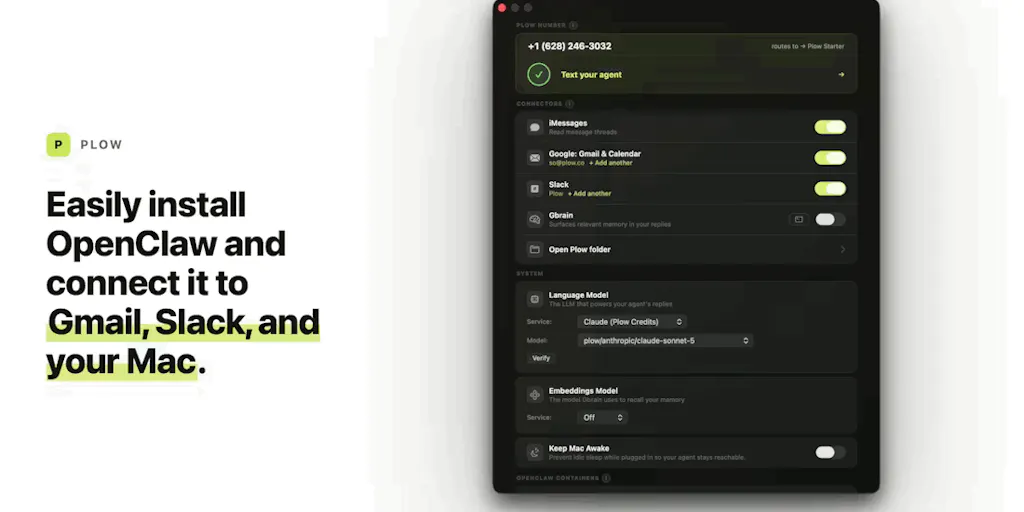
Plow aims to kill that friction. According to the Product Hunt listing from maker Sam Odio, the app gives you “an out-of-the-box version of OpenClaw running on your Mac, that just works, is hooked up to your iMessage, and is secure.” That’s a compelling pitch for anyone who’s ever wanted an AI assistant that doesn’t require renaming environment variables. The iMessage integration is the sleeper feature here. As a creator, your DMs are increasingly where business happens: brand inquiries, collab requests, audience questions. A local agent that can filter, summarize, and even draft replies — without leaving a data trail on a third-party server — is more valuable than yet another social inbox tool that charges per user per month.
But let’s be honest about the limits. Plow is Mac-only. If you’re a Windows user running a multi-brand agency, this is irrelevant. And the iMessage hook is useful only if your audience messages you via Apple’s ecosystem — which, for indie creators on Instagram or TikTok, is less common than direct messaging through the app itself. Still, the principle holds: an agent that runs locally and integrates with your messaging platform is a template for what a future creator tool could look like. The team behind Plow is betting that ease of installation is the unlock. In my own tests of similar local AI setups (Ollama, GPT4All), the install process was the single largest barrier. If Plow genuinely removes it, that changes the calculus for non-technical operators.
How Plow Differs from Every Schedule-and-Grow SaaS (And Why That Matters)
The incumbent tools for social-media automation — think Buffer, Hootsuite, Later, and Metricool — all operate on a hub-and-spoke model. You connect your accounts, and their servers fetch your feeds, schedule your posts, and analyze your engagement. That model works well for content calendars and cross-posting. But it’s terrible for real-time, context-aware automation. No cloud dashboard can run a Python script that watches your local hard drive for a new piece of draft content and automatically repurposes it into three formats. No API-only platform can access your iMessage to pull a client’s voice note and turn it into a tweet.
Plow (and the OpenClaw engine beneath it) represents a different paradigm: the agent is on your machine. It can see your files, run local scripts, and even control a browser or desktop app. For a creator, that unlocks workflows that no SaaS product can offer. Imagine you want to automatically generate alt-text for every image you export from Canva, then log those descriptions in a local spreadsheet. Or you want an agent that monitors your downloads for new TikTok exports, crops them for Instagram Reels, and uploads them to your scheduled queue via a low-code tool like Zapier — all without the agent leaving your laptop. Cloud tools can’t do that because they don’t have filesystem access. Local agents can.
But there’s a trade-off. Cloud-based tools give you cross-device sync, collaboration features, and automatic updates. Plow, as a desktop app, runs only on the Mac where it’s installed. If your content workflow involves a shared team account or a mix of Windows and Mac devices, this is a non-starter. And the security model — while touted as “secure” on the launch page — depends on how well the agent isolates itself. An AI agent that can read your iMessage history and local files is a powerful target if not properly sandboxed. The maker hasn’t disclosed the specifics of the security architecture, so I’d want to see an independent audit before hooking it up to anything sensitive.
What Creators and Social Media Teams Can Borrow from This Trend
Even if you never install Plow, the launch signals something useful: the next phase of the creator economy won’t be about adding more apps to your subscription stack. It will be about letting a local AI agent be the stack. Here are three concrete practices I think operators should adopt this quarter, informed by what Plow is trying to do.
First, start designing workflows that assume a local agent can read your files. If you currently export from Final Cut Pro, drag to a shared Dropbox folder, and then manually upload to each platform, ask yourself: what would it take for a script on my machine to do that automatically? Even without Plow, you can use simple shell scripts or Apple Shortcuts to move files, rename them, and trigger uploads via Buffer’s API. The mental shift is from “I will manually execute these steps” to “I will define the rules and let a local program execute them.” Plow makes that easier, but the principle works with any automation tool.
Second, treat messaging apps as the new command line. The iMessage integration is the headline feature of Plow, but it’s also a hint about where creators will interact with AI in 2025. Instead of logging into a web dashboard to review analytics, what if you could text your agent “show me last week’s engagement rate for Instagram” and get a reply with a chart? That’s the experience Plow is aiming for. For now, you can approximate it with a Telegram bot and a webhook, but local agents will be faster and more private. If you manage client accounts, imagine an agent that reads an incoming brand brief via email and auto-populates a content calendar in Airtable. Plow’s architecture — secure, local, message-aware — is the blueprint.
Third, don’t underestimate the value of offline operation. Every seasoned social media manager has a horror story about a cloud tool going down during a scheduled drop. Last year, when Canva experienced a multi-hour outage, creators who relied on it exclusively were stuck. Local agents don’t have that single point of failure. Plow runs on your Mac, using your own compute and your local copy of a language model. It doesn’t require an internet connection to draft a reply or suggest a caption. That resilience is a feature that cloud SaaS will never offer. For creators who schedule posts in batches while traveling or working in low-connectivity areas, local AI is a genuine advantage.
Where My Judgment Says It Falls Short (And Who Should Skip This Altogether)
I don’t want to oversell Plow. The product is early — a 1.0 “one-click installer” for an open-source agent that is itself young and evolving. The launch page mentions only iMessage integration. No support for Instagram, TikTok, YouTube, or X. No calendar, no analytics dashboard, no multi-account management. That’s fine for a tool that positions itself as a utility, but for a creator who needs to schedule 30 posts across 5 platforms this week, Plow is not a replacement for Later or Metricool. It’s a foundation that could become something bigger if the maker builds integrations with social APIs.
My biggest concern is transparency. The maker claims Plow makes OpenClaw “secure” and “just works,” but I’ve seen no independent review, no published architecture, no disclosure of how the iMessage data is handled on disk. For a tool that accesses your private conversations, I’d want at least a security whitepaper or a third-party penetration test. Without that, I wouldn’t connect it to a primary business iMessage account. I’d use a test account or a burner number.
Also, the target audience mismatch is real. Plow is aimed at “non-programmer friends” who want an out-of-the-box AI agent. But non-programmers who are creators typically don’t need an agent that interacts with the filesystem and terminal. They need a tool that pops up on their phone, lets them approve a draft, and sends it to a queue. Plow is still too close to the developer workflow. It asks you to install an app, grant permissions, and then figure out what to do with the agent. The average TikTok creator won’t do that. The indie founder who already runs automations might.
Finally, the lack of cross-platform support is a dealbreaker for most agencies. If you manage content for three clients and you’re on a Mac, but your freelancers are on Windows, Plow is useless for collaboration. Cloud SaaS exists precisely to solve that sync problem. Plow doesn’t try to. It’s a personal assistant, not a team tool.
What I’d Watch / Test Next
If you have a Mac and you’re curious about where local AI is heading, download Plow and do a low-stakes test. Connect it to a spare iMessage account, ask it to draft a few replies to common DM questions, and see how the experience feels. The real test isn’t whether it works — it’s whether the agent’s understanding of your brand voice and context is good enough to save you time without introducing embarrassing errors.
Then, keep an eye on the OpenClaw project itself. If the community builds integrations for social platforms — a plugin that reads your Instagram export files, a workflow that auto-sends drafts to Buffer via their API — Plow could become a launching pad. For now, I’d treat it as a preview of a category that will explode in 2026: local AI agents for creators who value privacy, offline resilience, and the freedom to not upload everything to a cloud dashboard. The product this week is a small hobby level release. But the trend it represents is the one I’m betting on.