The creator stack is drowning in dashboards — and the anti-SaaS backlash is coming for your planning tools too
Every social media operator I know runs the same quiet math in their head: how many subscriptions can I justify before the stack costs more than it returns? Buffer or Hootsuite for scheduling, Later for visual planning, Metricool or Sprout for analytics, Canva for assets, CapCut for edits, a link-in-bio tool, a UTM builder, and somewhere in the corner a spreadsheet holding the actual editorial calendar together. The Product Hunt launch of shadow-planner — a local-first desktop planning app from maker Martin Midori — is worth your attention not because it’s a social media tool, but because it’s a clean signal of where creator tooling is heading: local data, one-time pricing, and AI that runs on your own machine. If you run content operations for a brand or a solo channel, that shift matters more than any single feature.
What shadow-planner actually is (and what it isn’t)
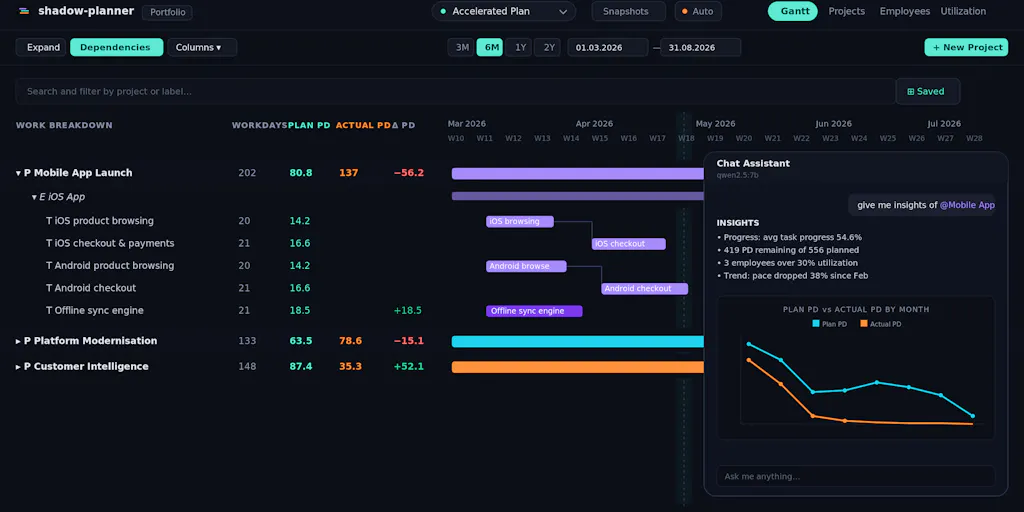
Let me be precise, because the framing here matters. shadow-planner is a desktop project and resource planning app. It is not a social media scheduler, an analytics dashboard, or a content calendar. According to the maker’s launch post, it bundles three things that usually live in separate tools: a Gantt chart with finish-to-start dependencies and drag-to-preview downstream shifts, resource utilisation tracking with weekly capacity versus allocation per person and over-capacity highlighting, and scenario planning that lets you copy a baseline, test a re-org or a slipped deadline, compare outcomes, and discard the experiment. There are snapshots for record-keeping and an AI assistant that queries your actual plan — “who’s over capacity next month?”, “push the beta a week and show me what moves” — with destructive changes gated behind your approval. There’s also a planning agent that takes a Markdown brief and returns epics, tasks, dates, and assignments as a reviewable draft.
The privacy and pricing posture is the headline for me. The data lives in a local SQLite file. No account, no sync, no telemetry. The AI defaults to a local Ollama model, with Claude, OpenAI, or OpenRouter available as opt-in alternatives using your own API key, called directly from your machine. The free tier includes every feature, capped at one scenario, three projects, and three people. Unlimited access is €4.99 once — the maker notes he originally launched with a monthly plan, got pushback, and switched, with existing subscribers grandfathered into lifetime access for free.
That last detail is the most interesting sentence in the entire launch post. A maker launched subscription-first, got told off by his own early users, and reversed course. That’s not a marketing anecdote — it’s a data point about what the market will tolerate right now.
Why creators and social teams should care about a project planner
Here’s my take, and I’ll flag it clearly as opinion: the most under-discussed problem in creator operations is not content ideation or even distribution. It’s capacity. Every solo creator and small social team I’ve worked with can generate ideas faster than they can produce, edit, schedule, and report on them. The bottleneck is almost never creativity. It’s the collision between “we want to post five times a week across four platforms” and “there are two of us and one of us is also doing community management.”
The Gantt chart is secretly a content calendar
When I scheduled thirty posts across five platforms last month, the failure mode wasn’t the scheduler — Buffer and Later both did their jobs fine. The failure was upstream: a video edit slipped by two days, which pushed the caption review, which pushed the CapCut export, which meant a Reel went out with a thumbnail I wasn’t happy with. That’s a dependency chain. That’s exactly what a finish-to-start Gantt is built to model, and it’s exactly what a standard social media calendar does not model. Most content calendars show you when something publishes. They don’t show you what has to happen first and what breaks downstream when one link slips.
The drag-to-preview mechanic the maker describes — where moving a task previews every downstream shift before you save — is the feature I’d actually use. In my experience, the reason content teams abandon Gantt tools is that updating them feels like data entry, not planning. If the preview makes the cascade visible before commit, that’s a meaningful friction reduction.
Scenario planning is the killer feature for agency and brand teams
If you run social for a brand, you’ve had this conversation: “What happens to our Q3 content plan if we lose the video editor in July?” or “If the product launch slips three weeks, which posts move and which get cut?” Most teams answer that question in a panic, in a spreadsheet, the week it happens. The scenario feature here — copy baseline, test the change, compare, discard — is the right primitive. It’s the same logic Metricool users apply when they A/B test posting times, just applied to headcount and timelines instead of captions.
For agencies specifically, this is closer to a margin-protection tool than a planning tool. Over-servicing is the silent killer of small agencies, and over-servicing usually happens because nobody modelled capacity before saying yes to a scope increase. A weekly capacity-versus-allocation view with over-capacity highlighting is unglamorous and probably the highest-ROI screen in the app.
Why TikTok-first creators should care more than LinkedIn-first ones
This is a sidebar worth pulling out. If your primary platform is TikTok or YouTube Shorts, your production pipeline is heavier and more sequential than a text-first creator’s. Script, shoot, edit, caption, thumbnail, schedule — each step depends on the last, and each step has a person attached. A text-first LinkedIn or X creator can compress the whole pipeline into a single sitting. So dependency modelling and capacity tracking pay off disproportionately for video-heavy operations. If you’re posting three TikToks a week solo, a Gantt tool is probably overkill. If you’re coordinating a shooter, an editor, and a community manager across two brands, it isn’t.
How it stacks up against the incumbents you’re already paying for
The honest comparison set isn’t Asana, Monday.com, or ClickUp in the abstract — it’s those tools plus your social-specific stack, because most creator teams end up running both. The project management tool holds the campaign plan; the social tool holds the calendar and the analytics. That’s two subscriptions, two sources of truth, and a permanent sync problem.
shadow-planner’s pitch is consolidation on the project-management side, with a deliberate refusal to compete on the social side. It doesn’t schedule posts. It doesn’t pull platform analytics. It doesn’t do UTM tracking or engagement rate reporting. What it does is own the plan and the capacity model, locally, for a one-time fee.
Against Notion — which is where a lot of creator teams actually run their content calendars — the tradeoff is structure versus flexibility. Notion can be anything, which means it’s usually a mess by month three. A dedicated Gantt with real dependency logic is more rigid and more correct.
Against Asana and Monday, the tradeoff is collaboration versus ownership. Those tools are built for teams that need shared cloud state, comments, notifications, and integrations. shadow-planner’s local-first, no-account model is a feature for a solo operator and a hard blocker for a distributed team. I’d bet the maker knows this and is targeting the solo consultant or the two-person studio, not the ten-person agency.
Where the AI assistant fits — and where I’m skeptical
The AI angle here is more interesting than most, for one reason: it’s grounded in your actual plan. “Who’s over capacity next month?” is a query against structured local data, not a chatbot hallucinating from a PDF. That’s the right architecture, and the local-Ollama default is the right privacy posture for anyone handling client names or unreleased campaign details.
But I’m skeptical of the value ceiling. In my experience testing AI planning assistants, the query-and-answer loop is genuinely useful for the first two weeks and then becomes a novelty, because the people who need the answer already know it from looking at the board. The higher-value AI feature is probably the Markdown-brief-to-draft-plan agent, because that’s the part of planning nobody wants to do. Paste a campaign brief, get a structured draft with dates and owners, then edit. That’s a real time save. The conversational query layer is nice-to-have.
The pricing experiment is the real story
A €4.99 one-time price for unlimited projects, scenarios, and people, with a free tier that includes every feature, is aggressive. The maker’s own account — that he launched monthly, got pushback, and converted existing subscribers to lifetime for free — tells you the market’s mood. Creators and small operators are subscription-fatigued. The average creator stack already runs into the hundreds of dollars a month once you stack scheduling, analytics, design, editing, hosting, and email. A one-time €4.99 is less than a single month of most of those tools.
My take: this pricing is a customer-acquisition strategy, not a business model, and that’s fine — but it raises a question the launch post doesn’t answer. How does the product sustain development? Not disclosed. If you’re building a workflow around it, that’s a real consideration.
What creators and social teams can borrow from this launch
Even if you never install shadow-planner, there are three operational lessons here that apply directly to social media work.
First, model dependencies, not just dates. Your content calendar should show what has to happen before each post goes live, and who owns it. If a video edit slipping by a day doesn’t visibly cascade through your plan, you don’t have a plan — you have a wish list with timestamps.
Second, separate baseline from scenario. The most common content operations failure is treating the plan as sacred. It isn’t. The plan is one hypothesis. Keep a baseline, test changes against it, and be willing to throw the experiment away. This is the same discipline good media buyers apply to ad spend, and it’s almost entirely absent from organic content planning.
Third, watch the local-first, one-time-pricing wave. shadow-planner is one of a growing set of tools betting that a meaningful slice of creators and small operators will trade cloud sync and collaboration for data ownership and no recurring fee. Whether that bet pays off depends on how many of you actually work solo enough to not need shared state. My read: more than the SaaS incumbents assume, and fewer than the anti-subscription crowd hopes.
Where my judgment says it falls short
I want to be balanced here, because the launch post is well-written and the maker is clearly thoughtful, but there are real gaps.
The biggest is collaboration. No account, no sync, no telemetry means no shared workspace. If two people need to see the same plan, you’re passing a SQLite file around. For a solo creator, fine. For even a three-person social team, that’s a dealbreaker, and it’s the exact reason teams default to Google Sheets or Notion despite their flaws.
The second is integration. There’s no mention of connecting to your scheduling tool, your analytics, or your asset storage. So the plan lives in one place and the execution lives in another, which is the original problem shadow-planner claims to solve — just relocated. Not disclosed whether integrations are on the roadmap.
The third is mobile. It’s a desktop app. Social media operators work from phones constantly. A capacity model you can only check at your desk is a capacity model you’ll check too late.
And the fourth is the AI cost model. Local Ollama is free but requires local compute and some technical comfort. Opt-in Claude or OpenAI means you’re paying per token with your own key, which reintroduces the variable cost the one-time price was supposed to eliminate. That’s a legitimate tradeoff, but it’s worth naming.
Who is this not for? Distributed teams, anyone who needs mobile-first planning, anyone who wants their plan and their scheduler in one tool, and anyone who doesn’t want to think about model hosting. That’s a lot of people.
What I’d watch / test next
If you’re a solo creator or a two-person studio and the capacity problem resonates, here’s what I’d actually do this week. First, before installing anything, write down your last four weeks of content work as a dependency chain — what had to happen before each post published, and who did it. You’ll learn more about your real bottleneck from that exercise than from any tool demo. Second, if the chain is long and sequential, grab the free tier of shadow-planner and model one upcoming campaign in it, then deliberately slip one task and watch what cascades. That’s the fastest way to know if dependency modelling fits how you work. Third, if you’re on a team, don’t bother yet — the collaboration gap will kill it for you, and you’re better off fixing your Notion or Asana setup first.
For the maker, the things I’d want answered before recommending this to anyone running a real operation: Is there a sync or shared-workspace path? Are scheduling-tool integrations planned? What’s the sustainability plan behind a €4.99 lifetime price? And how does the AI assistant handle a plan with fifty-plus tasks before it starts giving shallow answers? Those aren’t gotchas — they’re the questions any operator should ask before moving their planning off a tool they already pay for. The local-first, one-time-pricing instinct is right. The execution gaps are the part I’d watch.