The Notch Is the New Dashboard: Why a MacBook Menu Bar App for AI Agents Is Actually a Lesson for Every Social Media Operator
Let me start with a confession that might get me kicked out of the creator economy club: I spend more time watching my publishing tools than I do watching my content. Last month, I scheduled thirty posts across five platforms—Instagram, TikTok, LinkedIn, X, and YouTube—and the actual act of creating that content took maybe six hours. The other fourteen hours? That was me refreshing dashboards, checking whether the scheduler actually fired, wondering if the API rate limit was going to eat my queue, and trying to figure out why one platform’s analytics said 2,000 views while another said 400. The content was done. The coordination was the job.
That’s why I found myself nodding at a tiny Product Hunt launch for a tool called Treebar, a MacBook menu bar app that shows you where OpenAI’s Codex agent is working. It’s not a social media tool. It’s not a content calendar. It’s not even close to our world. But it solves the exact problem that’s quietly eating every serious creator’s day: the cost of switching context to check on your autonomous workers.
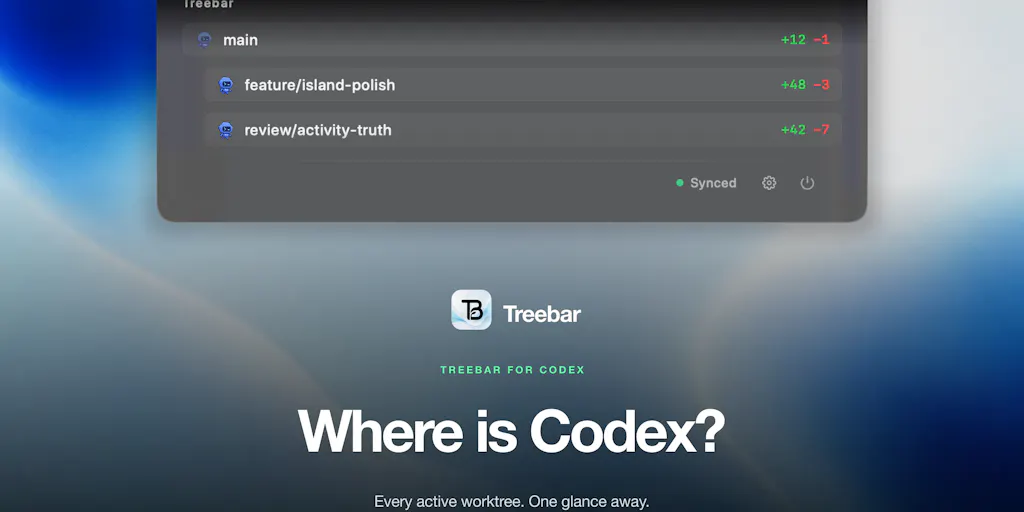
The maker, Cory Parry, built it because he kept losing track of where Codex was actually working across multiple worktrees. He put it in the MacBook notch—a tiny, always-visible strip that shows active worktrees, live diffs, whether the agent is exploring or writing, and how many subagents are running. No window jumping. No context switching. Just a glance.
Now, I’m not going to pretend I’m running Codex agents across worktrees. I’m a social media operator, not a software engineer. But when I saw this thing, I immediately understood why it matters to us. Because we’re running our own agents now—schedulers, auto-posters, AI content repurposers, analytics crawlers—and we’re all flying blind. The difference between a tool that works and a tool that feels like it’s working is visibility. And Treebar, despite being built for a completely different audience, is a masterclass in what visibility actually means.
The Real Problem: Your Tools Are Black Boxes and You’re Paying for It
Here’s what nobody tells you when you start scaling your social media operation: the moment you move from “I post manually” to “I use a scheduler and an AI repurposer,” you lose sight of what’s actually happening. I use a mix of tools—Buffer for scheduling, Canva for design, CapCut for video editing—and every single one of them is a black box when it comes to execution. I set up a queue of twenty posts on Sunday night. By Tuesday, I’m checking to see if they actually went live. Did the API rate limit throttle the posting? Did the platform change its authentication requirements overnight? Did my AI-generated caption get flagged by the platform’s spam filter? I can’t tell without opening the app, digging through logs, and cross-referencing timestamps.
This is not a niche problem. Every social media manager I know has a version of this story: you spend hours building a content calendar, you schedule everything, and then you discover that one platform silently failed to post three days ago. Your engagement rate tanks because you missed the window. Your client is angry. Your algorithm distribution is shot because you’re posting at the wrong time. And the tool that was supposed to save you time just cost you two hours of investigation.
Treebar solves this for software development by making the agent’s state *ambient*—you don’t have to go looking for information, it’s just there in your peripheral vision. The notch shows you, at a glance, whether Codex is exploring or writing, which worktree is active, and how many subagents are working. You don’t need to open a terminal. You don’t need to switch windows. You just look up.
That’s the exact model social media tools need. We don’t need more dashboards. We need ambient awareness of our publishing pipeline. I’d bet that the next wave of social media management tools will borrow this exact pattern: a persistent, always-visible indicator of whether your scheduled posts are firing, whether your API connections are healthy, and whether any platform has quietly changed its rules overnight. The notch isn’t just a gimmick—it’s a design philosophy.
When I look at the comment section on the launch page, I see people asking for exactly the features that would translate to our world. Asad M. says the thing he’d want out of the notch isn’t where each agent is, but which one is stuck. “An agent that’s been thinking for twenty minutes and one that’s been thinking for twenty seconds look identical in every tool I’ve used, and the stuck one is the only one I actually need to touch.” That’s the same problem I have with my schedulers—a post that’s stuck in a retry loop looks identical to a post that’s about to go live. I don’t need to know that everything is running. I need to know what’s not running.
Why TikTok Creators Should Care More Than LinkedIn Ones
Let me get specific about where this visibility problem hurts most. If you’re a LinkedIn writer, your publishing cadence is forgiving. You post once a day, maybe twice. If a post fails, you notice within an hour because your engagement is low and you’re actively watching. But if you’re a TikTok creator, you’re posting multiple times a day, often using automated tools to push content across platforms. A failed post doesn’t just mean a missed slot—it means your algorithm distribution for that day is broken. TikTok’s recommendation engine rewards consistency and watch time. One missed post in a high-frequency schedule can cascade into lower distribution for the next three posts.
The same logic applies to YouTube, where the algorithm’s freshness signals matter. And if you’re using an AI repurposing tool to turn long-form YouTube videos into short-form clips for Instagram Reels and TikTok, you’re depending on a chain of automated steps. If that chain breaks at step two—say, the AI transcription fails or the video export gets stuck—you don’t find out until you check the analytics and see that your Reels didn’t get posted. By then, the damage is done.
This is why I think Treebar’s “stuck agent” insight is the most valuable thing in that comment section. We need tools that tell us what’s not working, not tools that celebrate what is. The default state of most social media dashboards is “everything is fine unless you dig deep enough to find the problem.” That’s backwards. The default state should be “here’s what’s broken, fix it first.”
What Treebar Actually Does Differently (and What It Doesn’t)
Let me give credit where it’s due. Treebar is solving a real problem that existing tools have ignored. The maker’s story is simple: he kept losing track of where Codex was working, so he built a tool to show him. That’s the best kind of product development—scratching your own itch with a focused, opinionated solution. It’s not trying to be everything to everyone. It’s a tiny, specific tool that does one thing well.
The key differentiator is the placement. By putting the status in the MacBook notch, Treebar makes the information unavoidable without making it intrusive. You don’t have to open a dashboard. You don’t have to check a log. The information is just there, in your peripheral vision, updating in real time. This is a fundamentally different interaction model from the incumbent tools in the developer space, which are mostly terminal-based or dashboard-based. GitHub shows you diffs and pull requests, but you have to go to the website. VS Code has a source control panel, but you have to open the sidebar. Treebar puts it in the one place you’re always looking at.
Now, the honest critique: Treebar is not a comprehensive solution. It’s a menu bar app that shows you where things are happening, not why they’re happening. It can tell you that Codex is exploring a worktree, but it can’t tell you whether that exploration is productive or whether it’s stuck in a loop. Asad M. makes this exact point—the tool can’t distinguish between an agent that’s been thinking for twenty minutes and one that’s been thinking for twenty seconds. That’s a real limitation, and it’s worth acknowledging.
It also doesn’t solve the coordination problem. If two worktrees are editing the same file, Treebar will show you that both worktrees are active, but it won’t warn you about the merge conflict until it happens. Asad M. says it best: “if two worktrees are editing the same file I’d much rather hear it from the menu bar than at merge.” That’s a feature that would require a much deeper integration with the codebase—not just a status display but an actual conflict detection system. Treebar isn’t there yet.
And let’s be clear about the audience. This is a developer tool. If you don’t use Codex, if you don’t use worktrees, if you’re not running multiple agents in parallel, Treebar has zero value for you. The maker is planning to open source the core, which is a smart move—it signals that he understands the tool is a foundation, not a finished product. But as it stands, it’s a niche solution for a specific workflow.
Where the Math Breaks
Let me do the arithmetic on why this matters for social media operations, even though the tool itself isn’t for us. The average social media manager I know juggles at least three platforms, each with its own posting requirements, analytics dashboard, and algorithm quirks. Add in a scheduling tool and an AI repurposer, and you’re managing five separate systems. Every time you switch between them to check status, you lose about 23 minutes of focus—that’s the well-documented cost of context switching.
Now multiply that by the number of times you check status per day. If you’re checking each platform three times a day, that’s fifteen checks, which is roughly 345 minutes of lost focus—almost six hours. That’s not an exaggeration; that’s the math of attention fragmentation. Treebar’s model—put the status in an always-visible location—eliminates the context switch entirely. You don’t check the status; the status comes to you.
The social media tool that figures out how to do this for publishing pipelines will be the next big thing. Imagine a menu bar app that shows you, at a glance, whether your Instagram Reels went live, whether your TikTok scheduler is healthy, whether your YouTube uploads are processing, and whether any platform has flagged your content. No dashboards. No log digging. Just a tiny, always-visible strip that tells you what’s working and what’s not.
That’s the opportunity. And it’s why I’m watching this space closely.
What Creators and Social Media Teams Can Borrow Right Now
You don’t need to use Treebar to learn from it. The design philosophy—ambient awareness over dashboard checking—is transferable to any social media operation. Here’s what I’m actually doing with this insight this week.
First, I’m auditing my own context-switching patterns. I’m tracking how many times per day I open my scheduling tool just to check whether posts went live. The answer, embarrassingly, is about eight times. That’s eight context switches that could be eliminated if I had a better status indicator. I’m setting up a simple rule: I check the scheduler twice a day—once in the morning, once in the evening—and I trust the platform’s notification system for failures. It’s not perfect, but it’s better than the constant refreshing.
Second, I’m building my own version of a “stuck agent” alert. Asad M.’s comment about wanting to know which agent is stuck is directly applicable to my publishing pipeline. I’m setting up alerts for the specific failure modes I’ve encountered: posts that don’t fire, videos that fail to process, API connections that drop. Instead of waiting for the analytics to show a problem, I’m getting proactive notifications. This is basic operational hygiene, but most social media tools don’t do it well.
Third, I’m rethinking my tool selection criteria. When I evaluate a new social media management tool, I’m now asking a different question. Instead of “does it have all the features I need?” I’m asking “does it make the status of my publishing pipeline visible without requiring me to dig for it?” That’s a higher bar, and it eliminates most of the tools on the market.
The tools that get this right are the ones that treat status as a first-class citizen. Metricool has decent analytics, but it still requires you to open the dashboard. Later has a clean interface, but the status of your scheduled posts isn’t ambient. Even Hootsuite—the granddaddy of social media management—requires active checking. Nobody has cracked the ambient awareness model yet. That’s an opportunity.
Where My Judgment Says Treebar Falls Short (and Where the Category Is Headed)
Let me be direct: Treebar is a good tool, but it’s not a complete one. The maker’s decision to open source the core is smart, but it also signals that the tool is a foundation, not a finished product. The limitations are real: it can’t distinguish between a productive agent and a stuck one, it can’t warn you about merge conflicts before they happen, and it’s tied to a specific workflow (Codex + worktrees) that most people don’t use.
But here’s the thing: the category is what matters, not the specific tool. Treebar is an early entry into what I’d call “agent observability”—tools that give you visibility into what your autonomous workers are doing. This category is going to explode, not just for developers but for anyone running automated workflows. Social media managers are running agents too, whether they call them that or not. Our schedulers are agents. Our AI repurposers are agents. Our analytics crawlers are agents. And we have zero visibility into what they’re doing.
The tools that win this category will be the ones that make status ambient without being annoying. The notch is a clever placement, but it’s not the only option. A menu bar icon, a widget, a subtle notification—the key is that the information is always there, updating in real time, without requiring action. That’s the bar.
I’d also bet that the next iteration of these tools will move beyond status into prediction. Instead of telling you that an agent is stuck, they’ll tell you that an agent is likely to get stuck based on patterns. Instead of telling you that a post failed, they’ll tell you that a post is likely to fail based on platform changes. That’s the real value—not just seeing the present state, but anticipating the future state.
What I’d Watch / Test Next
If you’re a social media operator and you want to act on this insight this week, here’s what I’d do.
Watch the open source release. The maker says he’s planning to open source the core. When that happens, watch what the community builds. The forks and extensions will tell you more about the category than the original tool ever could. If someone builds a “social media agent observability” fork, that’s your signal to pay attention.
Test the “stuck agent” concept in your own workflow. Pick one platform and one failure mode. For me, it’s Instagram Reels failing to post via my scheduler. Set up a notification that tells you when that specific failure happens, and measure how much time it saves you. I’d bet it saves you at least an hour a week, just from not having to check.
Audit your tool stack for black boxes. Make a list of every tool you use to publish, schedule, and analyze your content. For each one, ask: “Can I see the status of my content without opening the dashboard?” If the answer is no, that’s a gap. Either find a tool that closes it or build a workaround—even a simple spreadsheet that tracks expected vs. actual posting times is better than nothing.
Pay attention to the agent observability category. This isn’t just a developer trend. As AI tools become more integrated into social media workflows, the need for visibility into what those tools are doing will become critical. The tools that solve this problem will be the ones that win the next wave of creator economy software. I’d bet on it.
Treebar is a tiny tool for a specific audience, but it’s pointing at something big. The notch is the new dashboard. The question is who’s going to build the social media version of it. I’m watching.