The AI literacy gap is now a content operations problem, not a curiosity gap
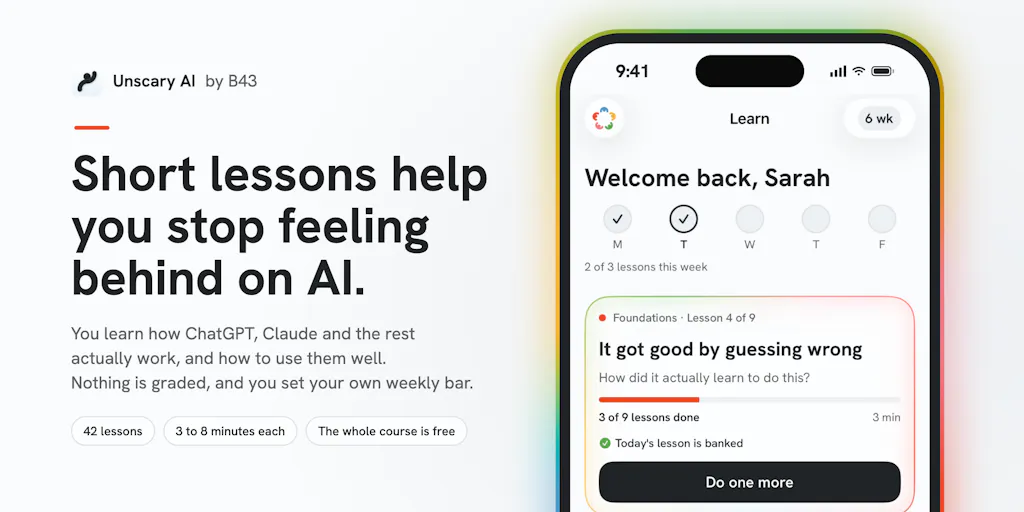
Every social media operator I know is quietly running the same experiment right now: how much of the content pipeline can AI actually carry before the output starts sounding like everyone else’s? The answer depends far less on which model you subscribe to than on whether you actually understand what these tools are doing under the hood. That’s why Unscary AI, a free iPhone course from Bryce Murray and his team at B43 in Columbia, Missouri, caught my attention — not because it’s another AI tool, but because it’s an attempt to fix the literacy layer that most creators skip on the way to prompt libraries and automation stacks.
If you manage accounts across Instagram, TikTok, YouTube, LinkedIn, and Threads, you’ve probably felt the squeeze: clients and founders now expect you to “use AI” for captions, repurposing, thumbnails, and analytics summaries, but almost nobody has been taught the fundamentals of how these systems actually generate, hallucinate, or fail. Unscary AI is a 42-lesson, 3-to-8-minute-per-lesson course built for people who feel behind. Murray says it’s the same curriculum his team refined with hundreds of in-person workshop attendees, and it’s free. That combination — short, mobile-first, no paywall — is what makes it worth a look from a social-media operations angle.
What problem does this actually solve for creators?
The creator economy has spent the last two years sprinting toward AI-assisted production without building the on-ramp. Tools like Buffer, Hootsuite, Later, and Metricool have all bolted AI caption writers, hashtag suggesters, and repurposing assistants onto their dashboards. Canva and CapCut have embedded generation directly into the editing surface. The assumption baked into all of this is that the operator already knows what a good prompt looks like, what the model can and can’t do, and where the output will need human correction.
In my experience, that assumption is wrong for a huge chunk of the market. I’ve watched talented social managers — people who can read a TikTok retention graph in their sleep — freeze up when asked to write a system prompt, because nobody ever explained the difference between a model that predicts the next token and a search engine that retrieves facts. That gap is exactly what Unscary AI targets. The lessons cover how ChatGPT, Claude, Gemini, Copilot “and the rest” actually work, with one concept per screen. Murray’s framing is deliberately anti-hype: the first lesson is called “What is AI, really?” and takes three minutes. There’s no “AI” inside the lesson flow itself, just reading, clicking, and understanding — a design choice Murray calls out explicitly in the comments.
Why this matters more for TikTok and YouTube operators than for LinkedIn ones
Here’s my take, and it’s an opinion rather than a sourced fact: the platform where AI literacy pays off fastest is short-form video. TikTok’s distribution is brutal about watch time and completion rate, and the algorithm will happily serve a mediocre hook to a small test audience before deciding whether to expand reach. That means AI is most useful in the ideation and scripting stage — generating 20 hook variations, stress-testing a premise, summarizing comments into content angles — and least useful in the final render, where authenticity signals (real voice, real face, real cadence) still drive retention. YouTube is similar but with a longer feedback loop: thumbnails and titles are where AI-assisted iteration shows up fastest, but the video itself still lives or dies on the first 30 seconds.
LinkedIn is a different beast. The feed rewards text posts and document carousels, and the audience is more forgiving of AI-assisted drafting because the format is inherently text-first. That’s also why LinkedIn is where AI-generated content gets punished hardest when it’s obvious — the platform’s users are professional writers and marketers who can smell a ChatGPT caption from three scrolls away. If you’re running LinkedIn for a B2B client, the value of a course like this isn’t “write better prompts,” it’s “understand where the model will produce generic sludge so you can intervene before it ships.”
How it differs from the AI-course landscape
The obvious comparison set is the firehose of paid AI courses that flooded the market after ChatGPT’s breakout moment — cohort-based programs, Notion-template bundles, “prompt engineering” certifications, and the endless stream of creator-led mini-courses sold through Instagram funnels. Most of those are priced somewhere between $50 and $2,000, and the quality varies wildly. Unscary AI’s positioning is almost the inverse: free, iOS-only, requires iOS 26, and structured as a mobile micro-learning experience rather than a video course or a PDF.
That’s a meaningful differentiator for two reasons. First, the format matches how social media operators actually consume information — in fragments between meetings, on the bus, while waiting for a render to finish. Louis Durance’s comment on the launch page nails it: “I never finish long courses, but I can do this on the bus or while waiting for my tea.” Second, the free price point removes the friction that usually kills course completion. When you’ve paid $500 for something, you feel obligated to finish it; when it’s free, you finish it because it’s actually useful or you don’t finish it at all.
The other comparison worth making is against the built-in education that platforms and tool vendors provide. Meta has its own AI learning resources, Google runs AI Essentials courses, and every major SaaS tool now ships with a “how to use AI in our product” tutorial. Those are useful but inherently biased toward their own ecosystems. Murray’s course, by contrast, is tool-agnostic — it covers ChatGPT, Claude, Gemini, and Copilot side by side, which is closer to how real operators work. Nobody runs a social account on a single model; you use whatever’s fastest for the task at hand.
Where the math breaks
I want to flag a structural limitation here, because it matters for whether this is worth your time. A 3-to-8-minute lesson format is excellent for conceptual foundations and terrible for operational depth. You can teach “what a token is” or “why models hallucinate” in five minutes. You cannot teach “how to build a repurposing workflow that takes one YouTube video and produces 12 platform-native assets with UTM tracking on every link” in the same window. That kind of knowledge requires either longer-form instruction or — more realistically — hands-on practice inside the tools themselves.
So my read is that Unscary AI is a foundation, not a substitute for the operational playbooks you’d build yourself or hire someone to build. If you’re already comfortable with prompt engineering and you’ve been running AI-assisted content workflows for a year, this course will likely feel remedial. If you’re a social manager who’s been nodding along in meetings while quietly Googling “what is a large language model” in another tab, it’s probably the highest-leverage three hours you’ll spend this month.
What social media teams can borrow from this approach
The most transferable insight from Unscary AI isn’t the content itself — it’s the delivery format. Murray and his team built this for in-person workshops first, refined it with hundreds of attendees, and only then ported it to an app. That’s the reverse of how most creator education gets made, where someone records a course, launches it, and iterates based on refund requests. The workshop-first approach means the lessons have been stress-tested against real confusion, real questions, and real drop-off points.
If you run content for a brand or a client, there’s a direct application here: the same micro-lesson structure works for onboarding junior team members, training clients on how to use the dashboards you’ve built them, or creating internal documentation that people will actually read. A 5-minute Loom walking through “how to approve a post in Later” will get watched. A 40-page PDF will not.
The comment-section as product research
One more thing worth stealing: Murray’s launch post asks for exactly one thing — try the first lesson and leave one comment, ideally about where it lost you. That’s a remarkably disciplined ask. Most Product Hunt launches beg for upvotes, shares, and five-star reviews. Asking for the specific point of confusion is a much better signal, and it’s the kind of question social media managers should be asking their own audiences. “Where did this post lose you?” is a far more useful comment prompt than “let me know what you think!” — it gives you actionable data instead of vague sentiment.
I’d bet this is also why the course has been refined effectively. When your feedback loop is “tell me the exact moment you got confused,” you fix the actual problems rather than the perceived ones.
Where my judgment says it falls short
Let me be direct about the limitations, because the launch page doesn’t dwell on them. First, the iOS 26 requirement is a real constraint. If you’re on Android, or on an older iPhone, or you work primarily from a desktop — which is most social media managers during working hours — you can’t access the course at all. That’s a significant accessibility gap for a product whose entire pitch is “reach anyone who feels behind on AI.” Murray doesn’t address whether an Android or web version is planned; that information is not disclosed on the launch page.
Second, the “42 lessons” figure is the only content metric provided. There’s no published syllabus, no breakdown of how many lessons cover which model, and no indication of whether the course covers image generation, video tools, or agentic workflows — all of which are now core to social media production. If your job involves Midjourney, Runway, or ElevenLabs, it’s unclear whether this course touches those at all.
Third, and this is the biggest open question for me: there’s no information about how the course stays current. AI models ship major updates on a near-monthly cadence. A lesson recorded in early 2025 about ChatGPT’s capabilities may be misleading by mid-2025. Murray says the content was “fine-tuned” through workshops, but that describes past refinement, not an ongoing update process. For a course explicitly framed as helping people “navigate the constant change,” the update mechanism is the whole ballgame.
Who this is not for
If you’re a growth marketer already running multi-model workflows, building custom GPTs, or wiring AI into your scheduling stack via API, skip this. You’re past the fundamentals. Similarly, if you work exclusively on Android or desktop, the iOS 26 requirement is a hard blocker until that changes. And if you’re looking for platform-specific AI tactics — “how to use AI to write TikTok hooks that actually retain” — this isn’t that course. It’s the layer underneath.
What I’d watch / test next
Three concrete things I’d do this week if I were evaluating this seriously. First, download it and take the first lesson — “What is AI, really?” — specifically to see whether the teaching style lands for you. Three minutes is a trivial investment, and the answer will tell you whether the remaining 41 lessons are worth your time. Second, if you manage a team, assign it as optional onboarding for anyone who’s been quietly avoiding AI tooling. The free price point and short format remove every excuse. Third, watch for two things over the next quarter: whether an Android or web version ships, and whether the lesson content gets visibly updated as models change. Those two signals will tell you whether this is a durable resource or a well-intentioned one-off.
For the broader creator economy, the interesting question isn’t whether Unscary AI succeeds as a product — it’s whether the “AI literacy as free public infrastructure” model spreads. If it does, the operators who benefit most won’t be the ones with the fanciest tool stacks. They’ll be the ones who finally understand what the tools are actually doing, and can therefore stop using them badly.