The Creator Economy’s Dirty Secret: We’re All Still Screenshotting Our Own Screens
If you’ve spent any serious time running social accounts — not the “post a quote graphic and pray” kind of running, but the operational kind where you’re juggling client approvals, internal previews, and last-minute creative changes — you know the real bottleneck was never content ideation. It’s distribution logistics. It’s the moment you’ve built something genuinely impressive, a local dashboard, a private AI tool, a prototype of an interactive campaign, and you realize the only way to show it to a client or a collaborator is to either deploy it to a public URL (with all the security and permanence that implies) or record a janky screen capture that looks like it was shot through a kaleidoscope.
That’s the gap I’ve been watching fill up with workarounds for years. We’ve got a dozen tools for scheduling a static image to Instagram, but almost nothing elegant for the ephemeral, high-stakes moment of sharing something that isn’t finished yet. So when I saw Localdock pop up on Product Hunt, pitched as a way to share local projects with a persistent link, my first thought wasn’t about tunneling protocols. It was about the last time I had to walk a client through a Figma prototype via a Zoom screen-share because I couldn’t give them a clean, temporary URL to click on their own phone.
This matters to you, the social media operator, more than you might think. Because the line between “content creator” and “software builder” has effectively dissolved. If you’re running a newsletter with a custom-built landing page, a client portal, or a branded micro-site for a campaign, you are a developer now, whether you like it or not. And the ability to share that work-in-progress, securely and temporarily, is a core competency. Localdock, at its heart, is a tool that solves a communication problem, not just a networking one. It’s about reducing the friction between “I built this” and “you can see it.” Let’s dig into what it actually does, who it’s actually for, and where I think the hype needs a reality check.
The Problem: Your Portfolio Is a Graveyard of Dead Links
Let’s start with the operational pain. In my own workflows, I’m constantly spinning up local environments. Maybe it’s a custom analytics dashboard I’ve built in Python to track engagement across platforms that Metricool and Buffer don’t surface in the way I need. Maybe it’s a staging site for a client’s new content hub that’s running on a local server. The problem is always the same: how do I show this to a stakeholder who isn’t technical?
The default answer for years has been to deploy it, even if it’s not ready. You push a half-finished build to a staging server, you set up authentication, you pray that the client doesn’t share the link with the whole company before you’ve fixed the mobile layout. Or, you fall back on the screen recording. I’ve personally sent more Loom videos than I care to count, which are fine for walking through a static flow, but terrible for letting someone actually click around and get a feel for the interaction design.
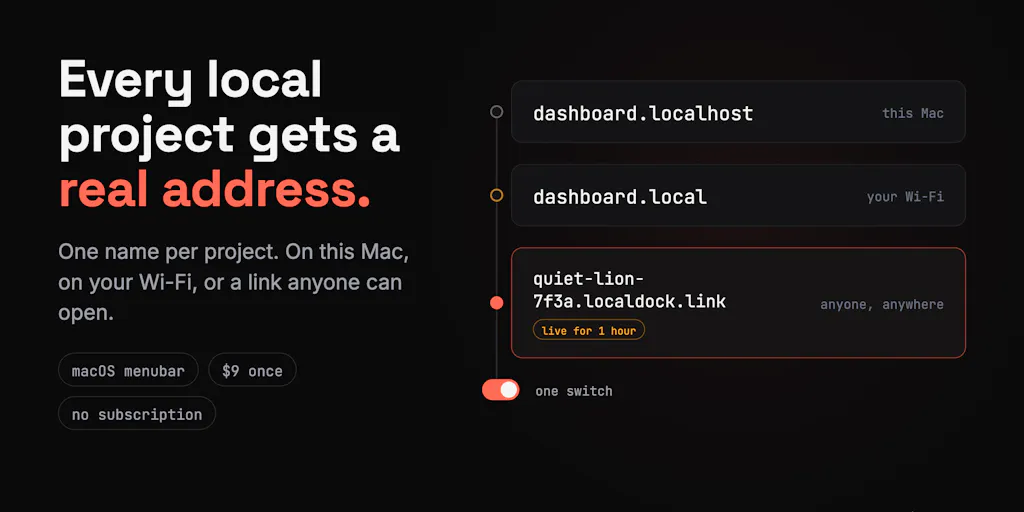
The source for Localdock’s pitch is a bit thin — it’s mostly a Product Hunt comment thread — but the maker, Dmytro V, outlines the core features clearly enough. He frames it around three pillars: a persistent project link instead of localhost plus port, WiFi sharing with that same persistent link, and a tunnel. Now, the “persistent link” part is what catches my eye. Anyone who’s used ngrok knows the drill: you fire it up, you get a random URL, and if you restart the process, that URL dies. It’s a temporary bridge. Localdock is claiming to solve that by giving you a link that stays the same, which is a huge quality-of-life improvement for anyone doing iterative client reviews.
This is where the creator-economy angle gets concrete. Think about the workflow of a modern social media manager who’s also producing short-form video. You might be using CapCut or Canva for editing, but you’re also likely using a tool like Notion to build a content calendar or a client hub. If you’re building a custom automation in Make or Zapier that pulls data from your social accounts, you’ve built a local tool. And when you want to show that automation to a client for approval, you’re stuck. Localdock’s pitch, as I read it, is that it gives you a clean, shareable URL for that local project, so the client sees a polished, branded link instead of http://localhost:3000/dashboard. That’s a small detail, but in the world of client trust, it’s everything.
Why TikTok Creators Should Care More Than LinkedIn Ones
There’s a split in the creator economy that this tool exposes. On one side, you have the “performative” creators — the ones making content for TikTok, Instagram Reels, and YouTube Shorts. Their “product” is the video itself, and the distribution is handled by the platform’s algorithm. They rarely need to share a local project; they need to get a video out the door.
On the other side, you have the “operational” creators — the indie founders, the newsletter writers, the social media consultants who sell strategy and automation. For us, the product is often a system. It’s a custom-built dashboard that shows a client their engagement rate in real-time. It’s a proprietary scoring model for content ideas. It’s a lead-generation tool that scrapes X (formerly Twitter) for relevant conversations. These are all local projects. And for this group, the ability to share a live, interactive version of that system is a massive differentiator. It moves you from “I’ll send you a PDF report” to “here’s your live dashboard, refreshed every hour.” That’s a higher-value conversation.
Localdock, if it delivers on the persistent link promise, is squarely aimed at this operational creator. It’s not about getting more views; it’s about getting more retainers. It’s about closing a deal because you could show a prospect a working prototype of the exact automation they need, without having to spend a day setting up a secure staging environment.
How It Differs: The Fight Against the Incumbents
The comment thread on the Product Hunt page is actually more revealing than the product description itself. A user named Gal Dayan asks the exact right question: “what does the $9 one-time buy you that a free ngrok/Tailscale Funnel tunnel doesn’t?” This is the crux. The tunneling space is crowded. You’ve got ngrok which is the veteran, Tailscale which is beloved by the homelab crowd, and Cloudflare Tunnel which is powerful but complex.
The maker’s response is telling. He doesn’t claim to out-tunnel ngrok. Instead, he pivots to the “persistent project link” and the WiFi sharing feature. That’s the right move. The tunnel is table stakes; the persistence is the differentiator. When I use ngrok for a client demo, I have to be careful about the session timing. If the client clicks the link after the tunnel has expired, they get an error page, and I look unprofessional. The idea of a stable link that I can put in a proposal and have it work a week later is genuinely attractive.
But let’s be clear about the limitations. The maker also states in the thread that “the link is temporary and lives for no more than 1 hour.” Wait, that contradicts the “persistent” framing. If the link dies after an hour, is it persistent? Or is it just a longer-lived ngrok session? This is a crucial ambiguity that the source doesn’t resolve. My take is that “persistent” might mean the URL structure is consistent (i.e., myapp.localdock.io instead of random-string.ngrok.io), but the session still has a time limit. That’s a significant caveat.
Another user, Vladislav Razin, asks about bandwidth and throughput, specifically for a “Netflix server.” The maker’s response is again about the time limit, not about speed. This tells me that Localdock is not designed for high-bandwidth media streaming. It’s for web apps, dashboards, and prototypes. If you’re trying to share a video file, you’re going to hit a wall. For a creator, this means it’s perfect for sharing a Figma prototype or a live analytics view, but useless for sharing a raw 4K video cut. You’d still use Frame.io or a cloud drive for that.
Where the Math Breaks
Let’s talk about the pricing model because it’s a point of friction. The source mentions a “$9 one-time buy” in the comment from Gal Dayan. The maker doesn’t correct this. If that’s accurate, it’s a refreshingly simple model in a world of subscription fatigue. But for a tool like this, the math only works if the maker can sustain the infrastructure costs on a one-time fee. Tunneling servers cost money to run. If they’re not collecting logs (which the maker claims in response to Leroy Price: “Nope, localdock is not collecting any info”), and they’re charging a flat fee, the only way to make that work is to heavily limit usage or to hope that most users are light.
This is where I’d bet the model will evolve. Either the “one-time” price will become a “per-seat” or “per-project” fee, or they’ll introduce a freemium tier with a hard cap on link duration or bandwidth. The current model is great for early adopters, but I’m skeptical it’s sustainable for a growing user base. For the social media operator, this means the tool is a low-risk experiment at $9, but don’t build your entire client review workflow around it until you see a roadmap that includes a pricing tier that aligns with heavy usage.
What Creators and Social Teams Can Borrow
Even if you never buy Localdock, the concept is a masterclass in operational efficiency. Here’s what I’m taking away from the launch, and what you should apply to your own stack:
The “Persistent Link” Mindset: Stop sending screenshots. Start sending links. Whether it’s a Notion page, a Google Data Studio report, or a live prototype, the goal should be to give your client or collaborator a single, stable URL where they can always see the current state of the project. This reduces back-and-forth email chains and creates a single source of truth.
The WiFi Sharing Feature: This is a hidden gem for anyone who does in-person workshops or client meetings. The ability to share a local project link over WiFi, without exposing it to the internet, is brilliant for security and speed. It means you can demo a tool in a coffee shop without worrying about your data being intercepted or your local server being probed by strangers on the same network. I’d love to see this feature expanded, as it’s the most unique part of the offering.
The “No Logs” Trust Signal: In an era of data breaches and surveillance, the maker’s explicit claim that Localdock is “not collecting any info” is a powerful trust signal. For social media managers handling sensitive client data (like access to ad accounts or unreleased campaign assets), this is non-negotiable. It’s a reminder that when you’re choosing tools for your stack, privacy isn’t just a feature; it’s a selling point you can use with your own clients.
Where My Judgment Says It Falls Short
Here’s the honest assessment. Localdock is solving a real problem, but it’s a niche one, and the source material doesn’t give me confidence that it’s ready for prime time.
Who it’s NOT for: - The High-Bandwidth User: If you’re sharing video files, large datasets, or running a media server, look elsewhere. This is for web traffic, not media streaming. - The “Set and Forget” User: The one-hour link limit is a killer. If you need a persistent public URL for a permanent tool, you need to deploy it properly to a cloud host like Vercel or Netlify. Localdock is for sessions, not for hosting. - The Non-Technical User: Despite the maker’s attempts to simplify, the tool still requires you to run a local server and install a client. If you’re a pure content creator who doesn’t touch code, this is still too technical. You’re better off using a tool like Webflow to build a public prototype.
The Big Open Question: The most significant gap in the source is the lack of detail on the actual mechanics. How does the persistent link work with the one-hour expiry? Is it a persistent name that points to a new temporary tunnel each time? Or is it a persistent session that resets? The distinction is critical. If it’s the former, it’s just a nicer-looking ngrok. If it’s the latter, it’s a genuinely new tool. The maker’s comments suggest it’s the former, which is a bit of a letdown.
Furthermore, the response to the bandwidth question was a dodge. Instead of saying “we support X Mbps,” the maker pivoted to the time limit. That’s a red flag. It suggests the infrastructure is not robust enough to handle heavy traffic, which will be a problem if you’re sharing a dashboard with a client who has a slow connection or a large team.
What I’d Watch / Test Next
If you’re an operator who’s intrigued by the pitch, here’s my suggested action plan for the week. Don’t just buy it; test it.
Build a “Client Facing” Demo: Take one of your internal dashboards or a recent client deliverable that exists only on your local machine. Set up Localdock and share the link with a friend or a secondary device. Don’t use your own computer. Test the experience from a fresh browser, on a phone, and on a different WiFi network. This will simulate the client experience and expose any issues with the link’s reliability.
Stress Test the Expiry: Create a link, wait 61 minutes, and then click it. Does it die? Does it redirect? Does it give a friendly error message? The resurrection of a dead link is a critical moment. If it’s a blank “connection refused” page, that’s a fail. If it’s a clean “this link has expired” message, that’s a pass. This is the make-or-break detail.
Compare Side-by-Side with ngrok: This is the essential test. Run a simple local server (like a basic Node.js app) and expose it via both ngrok and Localdock. Note the time it takes to set up, the clarity of the URL, and the stability of the connection over 30 minutes. The $9 price is only worth it if the experience is significantly better than the free tier of ngrok. If it’s just a marginal cosmetic improvement, save your money.
Check the Roadmap: The maker mentioned he has “a lot of plans.” Before you commit, look for a changelog, a Twitter account, or a Discord server. The success of a tool like this depends on the maker’s responsiveness to feedback. If they’re actively engaging with users on Product Hunt, that’s a good sign. If they vanish after launch day, that’s a warning.
In my experience, the best tools in the creator economy are the ones that solve a tiny, painful problem elegantly. Localdock has the right instinct — making local sharing feel less like a hacker ritual and more like a professional handshake. But the execution is still rough around the edges. The “persistent link” promise is muddy, the bandwidth limits are unclear, and the one-hour session cap is a significant constraint. It’s a tool with potential, but it’s not a silver bullet. I’d keep it on the radar, test it against the free incumbents, and only pull the trigger if it genuinely saves you time in your client review workflow. For now, I’m still going to be sending a lot of Loom links, but I’m hopeful that the next iteration of tools like this will finally kill the screen recording as a default communication method for builders.