FlowNib Review: A One‑Stop AI Social Distribution Tool for Cross‑Border Sellers—Is It Worth It?

Switching between five or six social platforms every day, copying and pasting content one by one, adjusting formats, and scheduling time zones—this is the daily routine for many cross‑border sellers. Manual posting not only wastes time but also risks missing exposure due to formatting errors. A new tool called FlowNib claims to “create once, publish automatically across all platforms,” but how does it really perform? This article breaks down its core capabilities from an actual workflow perspective, helping you avoid pitfalls when choosing a solution.
If you run Instagram, TikTok, and LinkedIn simultaneously, you’ve probably experienced this: a caption that fits Instagram exceeds LinkedIn’s character limit; a carefully cropped 1:1 image gets cut in half on Pinterest. These tiny format conflicts require manual adjustments each time, and the time cost is often the most underestimated part.
1. Real Pain Points of Social Distribution for Cross‑Border Sellers
In cross‑border e‑commerce, your customers are scattered across different social platforms. U.S. users tend to browse product images on Instagram and Facebook, European buyers may follow industry news on LinkedIn, and the Southeast Asian market relies heavily on TikTok short‑video recommendations. In theory you should cover all of them, but each platform has its own quirks.
First, time zones. Your shop targets a global audience, but Instagram’s algorithm is sensitive to posting time; Los Angeles’s prime time is midnight in Tokyo. Manual scheduling means setting five or six alarms a day or waking up at night to post. After a week of continuous operation, you’ll be exhausted.
Next, formats. X (formerly Twitter) has a 280‑character limit (even shorter in Chinese), LinkedIn allows long posts but requires proper paragraph spacing, YouTube community posts support link previews, while TikTok video descriptions cannot contain clickable links. Research shows cross‑border sellers spend an average of 2 hours per day on manual publishing—excluding the extra time spent re‑editing due to format errors.
Another often‑overlooked issue is that copy‑pasting often corrupts formatting. Emojis render differently across platforms; plain text looks like a notice on LinkedIn; line breaks may be merged on Facebook. I’ve seen a case where a team pasted an emoji‑dense Instagram caption directly into LinkedIn, resulting in garbled text and a 40 % drop in likes.
Switching platforms manually isn’t just an efficiency problem; it directly affects exposure quality and brand consistency. When you have to abandon a platform, you’re essentially giving up that segment of potential customers.
2. FlowNib’s Core Features Explained: AI Rewriting and One‑Click Distribution
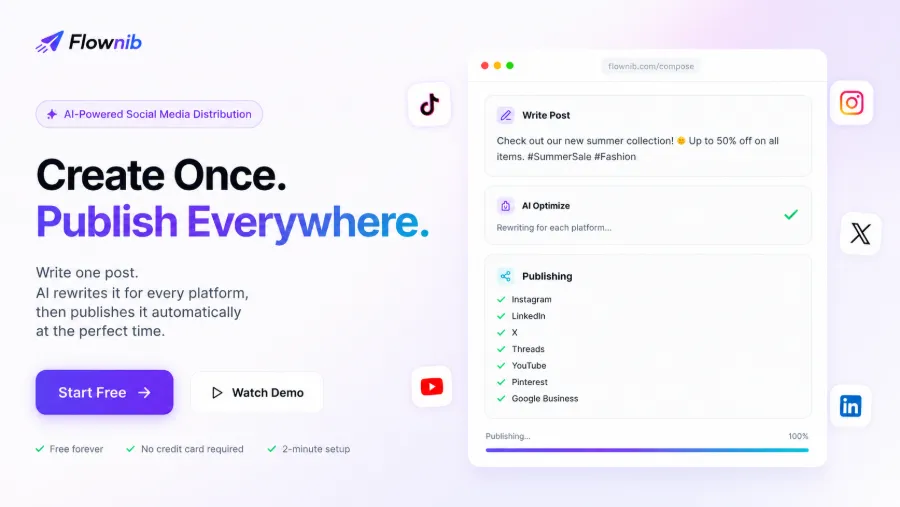
After trying several scheduling tools, I found that the real time‑saver isn’t bulk publishing itself, but the automatic adaptation of content to each platform’s format. When you write a post, FlowNib’s AI automatically rewrites it, adjusting tone, length, and emoji usage per platform—Instagram gets lively short sentences with a bunch of hashtags, while LinkedIn receives a more formal, paragraph‑structured version. The core brand message stays the same; only the expression changes.
One‑click distribution sounds simple, but in practice the stability and response speed of each platform’s API vary widely. FlowNib supports ten major platforms—Instagram, X, LinkedIn, TikTok, Facebook, Threads, Pinterest, YouTube, Bluesky, Google Business—all connected via official APIs. Official APIs reduce the risk of account bans and allow tracking of publishing status. The provider claims a 99.99 % uptime and a 2‑minute setup; my tests confirmed that connecting each account rarely failed.
The smart scheduling feature deserves a separate mention. AI analyzes your historical audience interaction patterns and automatically selects the optimal posting time for each post. However, I observed that for new accounts or during a cold start, historical data is almost nonexistent, so the AI’s “optimal time” is essentially the platform’s average. I ran AI scheduling and manual scheduling side by side for two weeks and found that, for new accounts, manual scheduling performed more consistently because you better understand the real active windows in the target time zone.
The content calendar is very intuitive: all published and scheduled posts are arranged on a timeline, and switching accounts doesn’t lose context. Each platform’s status is separate, and clicking into it shows the actual preview.
3. Hands‑On Experience: Can You Register and Publish in 2 Minutes?
The registration process was simpler than I expected. No credit‑card verification—just an email and password, and you’re in the dashboard within a few steps. Connecting social accounts happens within the same UI, avoiding repeated redirects to each platform’s authorization page, making the experience smooth. If you’re trying this type of tool for the first time, feel free to start for free and see how it feels.
My test workflow: in the editor, I wrote a product launch caption, clicked the “AI Optimize” button, and a few seconds later the preview window displayed rewritten versions for eight platforms. The Instagram version added three hashtags, the X version was compressed to under 200 characters, and the LinkedIn version automatically inserted blank lines for structure. Each version can be manually fine‑tuned if needed.
There are three publishing options: publish immediately, set a manual time, or use smart scheduling. I chose smart scheduling; the system recommended a 10 AM Eastern Time slot based on my account’s interaction history. However, the night before I realized the post targeted the European market, so the time zone was wrong. I switched to a manually set Berlin time of 3 PM.
The free plan includes three social accounts and six posts—enough for individual creators or small independent sites to test compatibility for a while. If the workflow fits, you can upgrade as needed. For slightly larger teams, three accounts aren’t enough—covering Instagram, Facebook, LinkedIn, TikTok, and Pinterest already exceeds the free tier. You can sign up now to see whether the free limits meet your needs.
4. FlowNib’s Role in the Cross‑Border Seller Content Ecosystem—Synergy with SEO and Video Generation
Social distribution is only a part of a cross‑border content strategy. Many sellers focus on posting frequency but overlook a fact: social media traffic is pulse‑like; engagement drops sharply a few hours after posting. Sustainable organic traffic comes from SEO content and video assets.
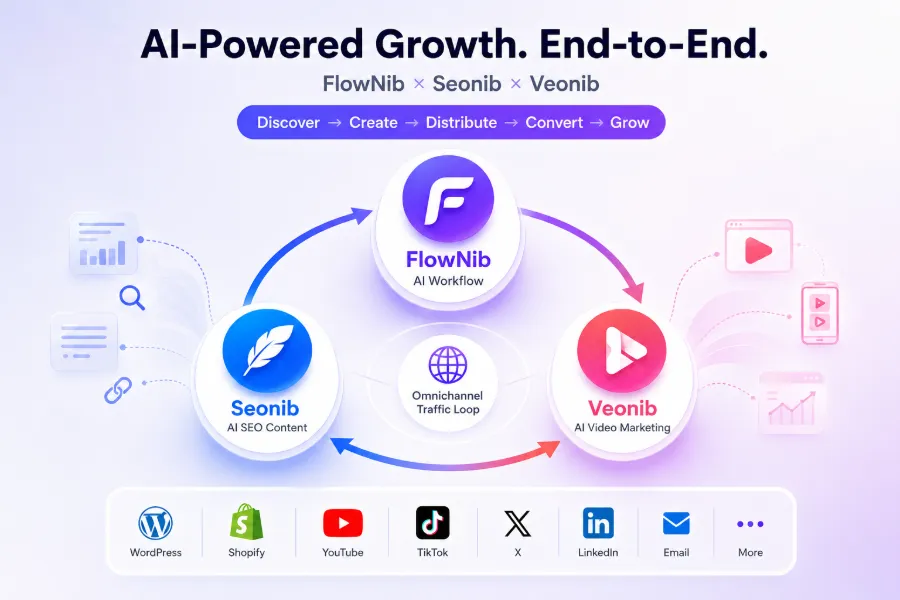
FlowNib is positioned at the distribution layer, but it sits behind a more comprehensive tool matrix. Seonib handles SEO‑automated content generation, and Veonib creates AI videos. The three tools together form a closed loop of content creation → multi‑platform distribution. In my workflow, I first generated a batch of blog articles with Seonib, turned core paragraphs into short videos with Veonib, and finally distributed the assets to the respective platforms via FlowNib. This chain turned a single long‑form piece into five or six different formatted social posts. The 2026 article “Cross‑Border Content Stack: How SEO, AI Video, and Automated Distribution Work Together” provides a systematic overview of this scenario.
However, I must mention a learning‑curve issue. The three tools have different interfaces and configuration logics, so cross‑tool collaboration requires some patience to adapt—especially when content production and social operations are handled by different team members, increasing friction in information alignment. The product description boasts a “full‑traffic closed loop” collaboration architecture; after it’s set up, efficiency is indeed high, but the initial build isn’t zero‑friction.
If you want a clearer understanding of this collaborative architecture, check out the article “Cross‑Border AI Full‑Traffic Closed Loop: FlowNib, Seonib, Veonib Collaboration Architecture and Use Cases,” which includes detailed flowcharts and configuration examples.
5. Potential Limitations of FlowNib and Selection Recommendations
No tool is universal; FlowNib has clear shortcomings in certain scenarios.
The free tier can only manage three accounts and publish six posts. That’s fine for individual creators, but if your brand operates on five platforms, the free version can’t provide basic coverage. Upgrading to a paid plan removes the account limit, but costs must be evaluated based on actual publishing volume—small teams or solo creators should start with the free tier, confirm workflow compatibility, then decide on upgrading.
TikTok video publishing is not as smooth as expected. The official API imposes strict requirements on video format and dimensions; if your third‑party edited material doesn’t match, uploads may error out. In contrast, image‑based posts are much more stable.
In a competitive comparison, traditional tools like Later and Buffer have more mature free‑plan features and looser account limits. FlowNib’s advantage lies in its AI rewriting layer—one piece of material can be automatically adapted to multiple platforms without manual adjustments, saving a lot of time for sellers who post frequently. A detailed feature comparison can be found in the article FlowNib vs Buffer vs Hootsuite: “2026 Global Brand AI Scheduling Tools Comparison Review.”
Later excels at native Instagram scheduling, with excellent image previews and asset management, but it doesn’t support automatic publishing to YouTube and TikTok. If your core platforms are Instagram and Pinterest, Later is a more mature choice; if you need broader coverage, FlowNib’s one‑time adaptation mechanism reduces duplicate work.
Finally, a selection tip: first clarify your real needs. Is it posting efficiency you lack, or content adaptation? If it’s the former, any scheduling tool will suffice; if it’s the latter, FlowNib’s AI rewriting layer is truly valuable.
Frequently Asked Questions (FAQ)
Q1: Which social platforms does FlowNib support?
It supports ten platforms: Instagram, X, LinkedIn, TikTok, Facebook, Threads, Pinterest, YouTube, Bluesky, and Google Business. All connections use official APIs, no third‑party bridges required.
Q2: How many posts can the free plan publish? Are there content limits?
The free plan includes three social accounts and six posts, with no restrictions on text length or asset quantity. No credit‑card binding is needed.
Q3: How long does it take to set up an account?
From registration to connecting the first platform takes about two minutes. Most of the time is spent on platform authorization redirects, and the process is smooth.
Q4: What advantage does FlowNib have over Buffer or Hootsuite?
The core difference is the AI rewriting layer—FlowNib automatically adapts content style and format for each platform, whereas Buffer and Hootsuite require manual editing of each post version. If you cover five or more platforms with significant format differences, FlowNib’s time savings become more pronounced.
Share Article