
2026 Practical Guide to AI Social Media Tools: Four Truly Time‑Saving Workflow Steps

Opening a blank content calendar, staring at a blinking cursor and not knowing what to write—this is the most common and time‑consuming scenario in social media management. In 2026, AI tools are no longer separate chatbots you have to open, copy, and paste; they are embedded directly into the workflows you use every day. This article won’t list 20 tools you’ll never open again; instead, it focuses on four AI‑driven steps that actually save you time, each with a specific tool and a setup you can start using this week.
What Do AI Social Media Tools Look Like in 2026?
In the past two years, the biggest change in AI social media tools isn’t the number of features, but where they appear. In 2024, the mainstream approach was to open a separate AI writing tool, enter a prompt, copy the result, and paste it back into your content management backend. Every time you ran that flow, you had to switch contexts— from the content calendar to the AI tool and back again.
Research shows that each tab switch costs an average of 23 seconds of attention. Ten switches a day add up to almost four hidden minutes lost. Over a month, that’s nearly an hour and a half of time vanished into window‑switching actions.
In 2026, AI tools embed their functionality directly into the workflow you already use. When you write copy, AI suggestions appear right next to the input field; when you schedule posts, the recommendation window shows up directly in the calendar view. No extra windows, no copy‑pasting. This difference determines whether a tool actually saves time or adds steps.
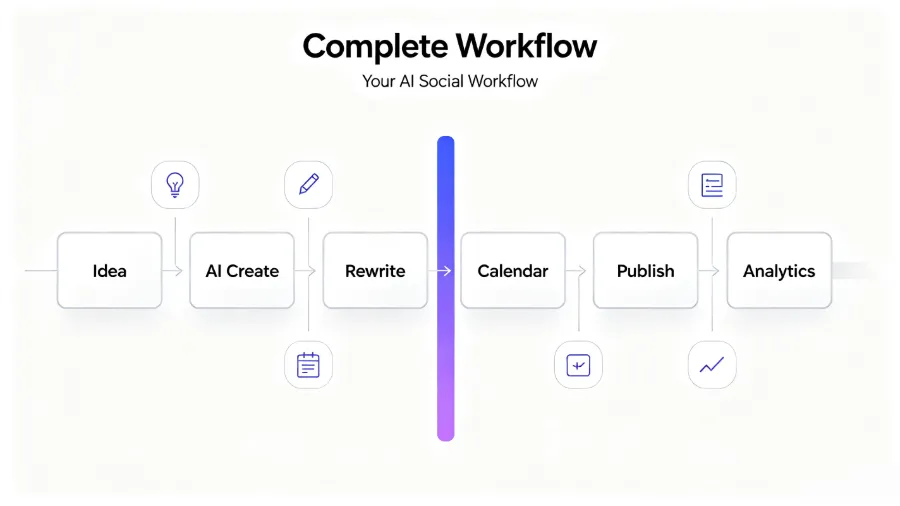
Take Later as an example: its Ideas tab, AI Caption Writer, Best Time to Post, and other features are built into the publishing flow, not separate modules. This embedded design means you don’t have to change your existing habits; AI shows up only when you need it.
Of course, embedded design has its limits. If the tool you use doesn’t support a certain feature, or if your workflow is spread across multiple platforms, the advantage of embedding diminishes. That’s why some teams consolidate publishing into a single tool rather than scattering it across many. For a concrete data comparison, see the Manual Publishing vs. AI Distribution Time Cost Comparison.
From a technical standpoint, these embedded features rely on official platform APIs. Meta’s developer documentation explicitly states that after 2025 all third‑party tools must connect via the official API, meaning tools that rely on scraping or simulated logins are being phased out. The Meta Official Developer Documentation shows that API stability directly determines whether AI tools can be reliably embedded into workflows.
The Real Value of AI in Ideation and Trend Spotting
Opening the content calendar on a Monday morning and seeing five blank slots is the most will‑draining moment in social media ops. AI’s value in ideation isn’t to replace your creativity but to help you bypass the anxiety of a blank page.
Later’s Ideas tab automatically curates topics and content formats that are currently getting engagement, based on real performance data for your category. You don’t have to guess what fans like—the data tells you. The Future Trends feature goes a step further, identifying rising but not yet saturated topics, giving you a window to plan ahead.
It’s simple to use: before your weekly content planning meeting, open the Ideas tab and scan through it. Pick three to five directions that match your brand tone and use them as the foundation for the week’s content. AI suggestions are just a starting point; the final choice of direction and tone still relies on your brand judgment.
A word of caution: AI’s trend‑spotting mechanism is based on existing data. It’s good at finding patterns that already exist but not at judging whether a trend truly fits your brand. In 2025, a brand that relied entirely on AI‑generated social media copy saw a 40 % drop in engagement after three months. All posts sounded like they came from the same template, and brand identity nearly vanished. After reverting to a human‑edited process, it took another two months to rebuild audience perception of the brand voice.
So the correct way to use AI for ideation is: let it give you a short list, then do the final filtering yourself. Its value lies in saving you the “zero‑to‑one” time, not in making the “one‑to‑ten” decisions. For a more systematic approach to trend analysis, check out the HubSpot Marketing Blog’s Latest Trend Analysis, which includes case studies of brands combining AI with human judgment.
AI‑Assisted Copywriting and Cross‑Platform Reuse
Writing five pieces of copy a day, each tailored to platform specs, character limits, and tone, is the most compressible part of social media work. AI copy tools are valuable because they give you a qualified draft before you even start, letting you tweak rather than start from a blank document.
Later’s AI Caption Writer does this well. It’s embedded in the publishing interface; after you upload an image, the AI generates a caption suggestion based on the image, context, and your preset tone. No need to leave the page or switch tools.
The real time‑saver, however, is cross‑platform reuse. A caption written for Instagram looks too casual on LinkedIn; it may exceed the character limit on X (Twitter). The traditional method is to rewrite the copy five times, each taking five to ten minutes. AI’s approach is: write one main copy, then let it automatically adapt it for each platform.
That’s what Flownib does at this stage. You write a piece of content, and the AI automatically generates versions for Instagram, X, LinkedIn, Threads, etc., then you can publish with one click. No logging into each platform, no manual formatting adjustments. For teams managing multiple accounts daily, this step yields the most noticeable time savings.
In practice, start by setting a tone guide for each brand or account. AI‑generated drafts usually cover about 80 % of the content need; the remaining 20 % requires your brand‑specific phrasing and industry terminology. When editing, focus on two things: (1) verify that the AI didn’t misinterpret any key information in the context, and (2) add the unique expressions only your team uses. For a performance comparison of different cross‑platform rewriting tools, see the AI Automatic Cross‑Platform Rewriting Tools Comparison, which contains detailed benchmark data.
AI Helps You Choose Publishing Times—No More Guesswork
The “post at 9 a.m.” rule has been around for a decade, but it may not apply to your account at all. Each account’s audience activity pattern varies based on geographic distribution, industry, and content type. Generic timing advice is essentially an average and offers limited value for a specific account.
AI publishing recommendation tools improve by using your own engagement history instead of industry averages. Later’s Best Time to Post feature analyzes the distribution of interaction times for your past posts and identifies the windows when your audience is most active.
A detail often overlooked: the optimal posting time isn’t static. As your follower count grows, the audience composition changes. A 30 k‑follower account’s best time differs from when it had 10 k followers. Audience‑structure shifts naturally alter activity patterns. Therefore, checking the recommended times monthly and comparing them to your previous schedule is a necessary maintenance step.
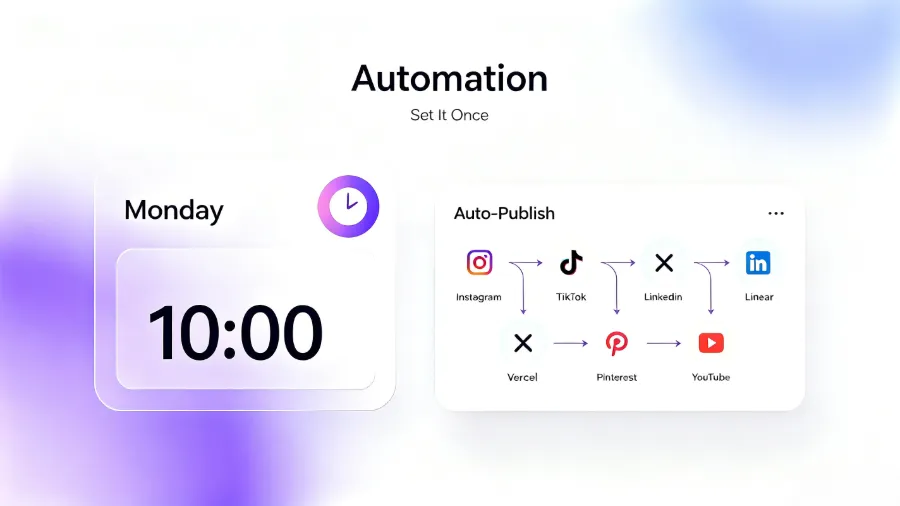
Practical tip: run a month‑long A/B test. In week one, publish at your usual times; in week two, publish at the AI‑recommended times. Compare engagement metrics. If the AI time yields higher engagement, switch to it. If the difference is negligible, your original schedule was already good. Flownib’s scheduled publishing feature also includes a similar recommendation engine that suggests windows based on account data.
Remember, AI recommendations are based on historical data and can’t predict sudden events or platform algorithm changes that cause short‑term spikes. For example, if a platform redesigns its feed distribution, the AI may need one to two weeks to reflect the new reality. So don’t rely solely on AI; occasional manual adjustments and observation are still necessary.
AI Makes Data Reporting No Longer an Excel Marathon
At month‑end, manually pulling data from each platform, copying it into Excel, charting, and writing a summary still consumes a lot of time for many teams. AI’s value in reporting isn’t to generate more complex analysis but to automate the data aggregation and visualization that would otherwise be manual.
Later’s analytics feature automatically generates performance reports for each account, including engagement rate, follower growth, best content types, and other key metrics. No manual data pulling, no pivot tables—just a ready‑to‑read report.
However, AI still struggles with interpreting the data. It can tell you “engagement rose 15 % last week,” but it can’t explain whether that rise was due to higher content quality or a random traffic spike. Business‑level insights still require human judgment.
Thus, the correct use of AI reports is: let it save you the time of data preparation, then spend the saved time on interpretation and strategic adjustments. When you review a report, spend five minutes confirming the data looks normal, then fifteen minutes thinking about the underlying reasons and next steps.
Five‑Question Checklist: Ask Yourself Before Adding Any New AI Tool
Before you add a new AI tool to your stack, spend five minutes reviewing this checklist to avoid unnecessary tool bloat:
- Is this tool embedded in your existing workflow, or does it require context switching? If you have to open a new page and copy‑paste each time, it probably won’t save time.
- Does it solve a high‑frequency, repetitive problem or a low‑frequency, special‑case one? AI is best for daily repetitive tasks, not for something that occurs once a month.
- Are its outputs verifiable? If you can’t validate the AI’s suggestions with real data, it’s hard to know whether it’s truly useful.
- Does it support all the platforms you use? A tool that only works on two platforms means you’ll still need other tools for the rest, making your stack more complex.
- What’s the time cost of setup and maintenance? If it takes two hours to set up and thirty minutes each week to maintain, the time it saves may not offset the overhead.
This checklist isn’t meant to discourage all AI tools; it’s to help you decide whether a tool truly belongs in your workflow. If the answers to all five questions are positive, the tool is likely to save you time. If one or two are negative, weigh the trade‑offs carefully. For more advanced automation integration, see the article on AI Agents in Social Automation Workflows, which showcases cutting‑edge use cases.
Frequently Asked Questions
Will AI‑generated copy make my brand sound generic?
Yes, if you publish it without any editing. AI drafts are usually neutral and lack brand‑specific tone and phrasing. The solution is to treat the AI output as a first draft, then inject brand‑specific vocabulary, sentence structures, and cultural references. A practical tip is to feed the AI three to five of your best past posts as reference samples; the resulting draft will be closer to your brand voice.
Which is better: embedded AI tools or standalone AI tools?
It depends on your workflow complexity. If your content management, publishing, and analytics all happen on a single platform, embedded tools save more time. If your workflow spans multiple platforms, a standalone tool that can manage all of them may be more suitable. The key metric is how many context switches you perform each day.
Are AI‑recommended publishing times always better than my own choices?
Not always, but they’re often more accurate. AI recommendations are based on your account’s historical data, whereas your intuition may rely on experience or industry conventions. Conduct a month‑long A/B test and let the data speak. If the AI times outperform, switch; if the difference is minimal, keep your current schedule.
Will using AI for ideation make my creative output homogeneous?
There is that risk. AI suggestions are derived from existing successful patterns, so blindly copying them can make your content resemble other brands using the same tool. The correct approach is to treat AI ideas as inspiration, not final solutions. Add your own industry insights and unique perspective to maintain creative differentiation.
Do small teams need AI social tools?
Small teams actually benefit the most from AI tools because each member’s repetitive tasks represent a larger share of total effort. If an AI tool saves each member 30 minutes a day, that’s dozens of hours per month that can be redirected to strategic work. The key is to choose the right tool—don’t use AI just for the sake of using AI.
Share Article


