FlowNib, Later, Sprout Social Comparative Review: AI Automatic Cross‑Platform Adaptation – Which Is More Convenient?

I post on Instagram, X, and LinkedIn every day, manually adjusting formatting, padding word counts, and checking hashtags, which can waste an hour a day. Then I heard about tools that can “AI auto‑rewrite,” saving me the manual work. I have three candidates on hand: FlowNib, Later, Sprout Social. In this article I’ll look at them from the AI adaptation perspective, see who truly saves effort and who is just hype.
Why “AI Automatic Adaptation” Is a Lifesaver for Cross‑Platform Publishing?
The most annoying part of cross‑platform publishing isn’t writing the content; it’s having to reformat for each platform. Instagram wants short copy with emojis, X limits to 280 characters, LinkedIn requires a professional tone—saying the same thing three times with different tones. I’ve calculated that manual adjustments per post take 5–10 minutes on average, so multi‑platform operators waste 1–2 hours a day as a norm.
Traditional scheduling tools like Buffer and Hootsuite are mature, but after planning you still have to manually tweak the content for each platform. Buffer doesn’t rewrite, Hootsuite doesn’t do content adaptation—scheduling is scheduling, rewriting is still up to you. I tried Hootsuite for a while and found that the tags to trim and the word counts to reduce were unchanged before publishing. A full analysis comparing FlowNib with Buffer and Hootsuite shows that this gap isn’t about feature count but about a completely different design philosophy.
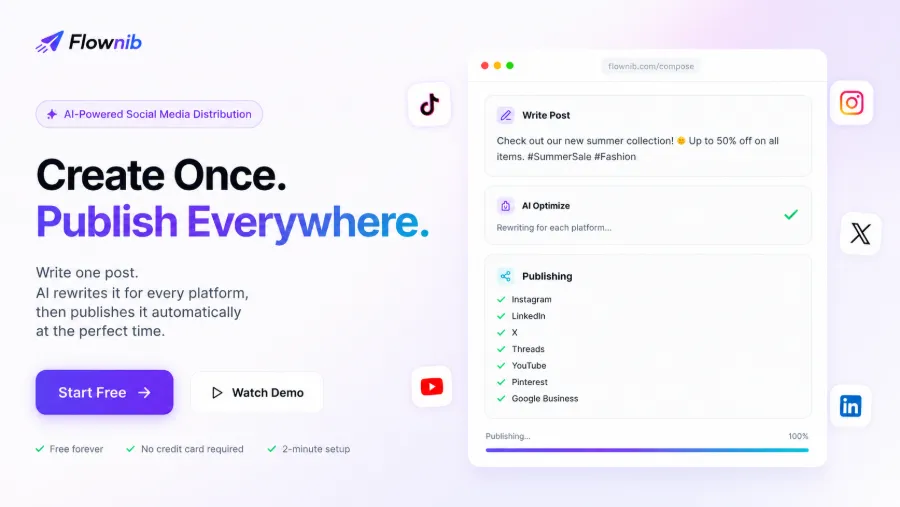
The real value of AI rewriting is cutting the “manual adaptation” step out of the workflow. I later tried FlowNib; you drop a piece of copy in, the system automatically generates platform‑specific versions, and I just preview and confirm. Instagram gets emojis, X gets compressed text, LinkedIn gets a more professional phrasing—tasks that used to require human judgment are now handled by the algorithm. The difference from tools like Hootsuite isn’t just speed; it’s whether the “rewrite once” step is eliminated.
AI Rewriting Capability Test: Which Tool “Understands” Platforms Best?
I used the same promotional copy—“This week only: 50% off, free shipping on everything, buy two get one free, limited time”—to test the AI rewriting of each tool and see what versions they produce.
Later’s AI rewriting feature launched in 2023, but in practice it only does two things: removes extra spaces and automatically truncates copy. For the X version it cuts down to under 280 characters, keeping the first half unchanged, without adjusting tone or sentence structure. The Instagram version doesn’t add emojis, and the brand tone is absent.
Sprout Social’s AI focuses on reply suggestions, not post rewriting. Its publishing feature requires users to input each platform’s version manually; AI does not intervene in content adaptation. This is a major drawback—if you need “write once, auto‑rewrite for multiple platforms,” Sprout Social is essentially a blind spot in this scenario.
FlowNib’s AI rewriting natively supports 10 platforms. With the same copy, the differences are obvious: the Instagram version automatically adds emojis and short‑sentence breaks; the X version keeps the core selling points but compresses to about 250 characters, leaving room for replies; the LinkedIn version reframes it as a “limited‑time promotional event” with a more formal wording and turns “buy two get one free” into bullet points. The tone feels natural, not the stiffness of machine translation, and the brand voice is largely preserved.
I compiled a comparison table of key dimensions for the three tools:
| Feature Dimension | FlowNib | Later | Sprout Social |
|---|---|---|---|
| AI Auto‑Rewrite | Yes | Partial | No |
| Supported Platforms | 10 | 6 | 8 |
| Smart Scheduling | Yes | Yes | Yes |
| Free Plan / Starting Monthly Price | Free / Paid starting price not disclosed | Free / Paid starting at $25/month | No free / $249/month starting |
Later’s AI is limited to basic editing; Sprout Social doesn’t touch post content at all. At least the FlowNib I used didn’t fail at this stage.
Publishing Workflow and Smart Scheduling: Which Saves You Mouse Clicks?
Differences in workflow directly affect daily experience. FlowNib’s path is: write content → AI optimization → preview → schedule → one‑click publish, taking about 2 minutes for initial setup. Later’s free version requires about 5 minutes to register and connect accounts; Sprout Social, with its many features, takes roughly 10 minutes to set up.
After switching to FlowNib, I no longer had to click publish for each platform. It batches posts across platforms in the distribution phase, eliminating the need to confirm each platform’s status. The content calendar module is clean and shows the next two weeks of scheduling at a glance, without repeatedly switching pages.
All three tools have smart scheduling, but the mechanisms differ. Later’s time recommendations are based on Instagram data and are less accurate for other platforms. Sprout Social’s scheduling algorithm uses a large data set but is only available to paying users. FlowNib claims its smart scheduling analyzes the entire account’s interaction patterns, favoring stable exposure over single‑post bursts. Loomly also supports auto‑publish, focusing on content calendars and collaboration; I tried its scheduling but it lacks an AI rewriting step, so platform adaptation remains manual—a core difference from FlowNib.
In multi‑account management, the main operations are similar—switching accounts in the dashboard. However, FlowNib groups platforms more clearly; when I manage three accounts, I can instantly see which platform/account is configured without digging into sub‑menus. This detail saves a lot of hassle during initial setup.
Platform Coverage and Pricing: Can the Free Tier Satisfy You?
Traffic fragmentation becomes more pronounced over time. I started with Instagram and X, then added LinkedIn, TikTok, Threads, YouTube, and now I also have to handle Pinterest and Google Business. Therefore, a tool’s platform coverage directly determines whether I need to switch.
FlowNib supports 10 platforms: Instagram, X, LinkedIn, TikTok, Facebook, Threads, Pinterest, YouTube, Bluesky, Google Business, all accessed via official APIs. Later supports 6 platforms, mainly Instagram and TikTok ecosystem, with LinkedIn added later. Sprout Social supports 8 platforms but lacks Bluesky and Threads, which limits early adopters of new platforms.
The free plan differences are concrete. FlowNib’s free tier gives 3 accounts and 6 posts, enough for creators or small e‑commerce to test. Later’s free tier offers 1 account and 10 posts; the limited account count isn’t enough for multi‑platform operators. Sprout Social has no free tier; its paid starting price of $249/month may be reasonable for large teams but is heavy for individuals or small teams.
FlowNib’s API connections are a strength; official direct connections mean low failure rates and no timeouts during peak periods. This is a difference you only notice in practice—some tools claim multi‑platform support but fail to publish during high‑traffic times, leaving posts stuck in queue for hours. API quality is crucial for high‑frequency publishing.
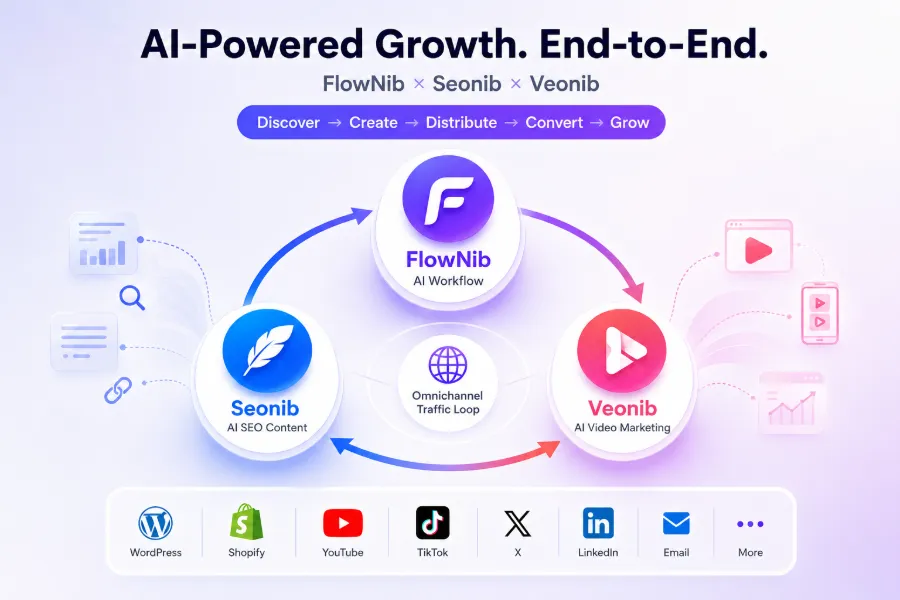
Additionally, FlowNib has sibling products that complement it: seonib and veonib cover search optimization and multi‑channel distribution respectively. This ecosystem integration means you don’t need extra third‑party analytics or site‑group management tools; everything is already integrated.
FAQ
Which of FlowNib, Later, Sprout Social is best for individual creators?
FlowNib offers the best value‑for‑money, with a free tier of 3 accounts and 6 posts, full‑platform AI rewriting, and a 2‑minute setup. Later is suitable for creators focused on Instagram, but its AI rewriting is limited. Sprout Social has no free tier, so individual creators can rule it out.
Can AI auto‑rewrite really keep the brand tone?
Only FlowNib among the three preserves tone. In testing, it didn’t break the semantic structure of original sentences and kept the tone relatively intact. Later only truncates, and Sprout Social doesn’t rewrite at all. The key is to preview and verify after rewriting; you can’t trust it blindly.
Which platforms do the three tools support?
FlowNib supports 10: Instagram, X, LinkedIn, TikTok, Facebook, Threads, Pinterest, YouTube, Bluesky, Google Business. Later supports 6, mainly Instagram and TikTok. Sprout Social supports 8, missing Bluesky and Threads.
Is the free tier sufficient? Any hidden limits?
FlowNib’s free tier (3 accounts, 6 posts) is suitable for early testing. Later’s free tier (1 account, 10 posts) is insufficient for multi‑platform users. Sprout Social has no free tier. None of the free versions have hidden restrictions; functionality is not throttled.
Which tool has the smartest scheduling?
FlowNib’s smart scheduling is based on overall interaction data to calculate optimal posting times and is broadly applicable. Later’s scheduling relies on Instagram data and performs less well on other platforms. Sprout Social’s scheduling algorithm is the most complex but limited to paying users. If your accounts are spread across many platforms, FlowNib’s scheduling is the most hassle‑free.
Share Article