
Creator Case Study: One Piece of Content, 10 Platforms — How I Doubled My Income with FlowNib

Around this time last year, the first thing I did every morning was open five browser tabs and paste the same piece of content into Instagram, X, LinkedIn, YouTube, and Pinterest. Each paste required a format tweak—X’s 280‑character limit, LinkedIn’s article layout, YouTube description’s keyword strategy… a set of rules per platform, and an entire morning was spent on it. Over a week, manual posting alone took 15 hours, while the time actually spent creating content was less than half of that. Even more frustrating, the posting frequency couldn’t increase, follower growth on each platform stalled, and my monthly revenue stayed around $2,000 for half a year. Eventually I over over my workflow, replacing “manually posting the same content ten times” with “create once, auto‑publish everywhere.” Six months later, my monthly income rose to $4,200. This article is a complete post‑mortem of that workflow.
From Manual Copy‑Paste to Global Distribution: Why I Dropped a Month‑Long Inefficient Method
When I started doing overseas self‑media, I thought multi‑platform distribution was just copy‑pasting, nothing hard. In practice, each platform has its own rules. Instagram’s image dimensions (1:1 vs 4:5) must be checked separately; X posts need a hook within a tight character limit; LinkedIn articles require a contextual intro; YouTube descriptions that put links too early get collapsed by the platform. These details have to be verified daily; a formatting mistake means deleting the post and starting over, costing another round of time. Manually posting to 10 platforms averages 40–60 minutes, not counting interruptions.
During that month, my content update frequency dropped from daily to every other day, sometimes even once every three days. Engagement metrics fell accordingly—fewer posts meant less exposure, and less exposure meant slower follower growth. Revenue didn’t increase, and my creative enthusiasm visibly drained. That’s when I realized the core issue wasn’t content quality but distribution efficiency. No matter how good the content, if it never gets out, it’s worth nothing.
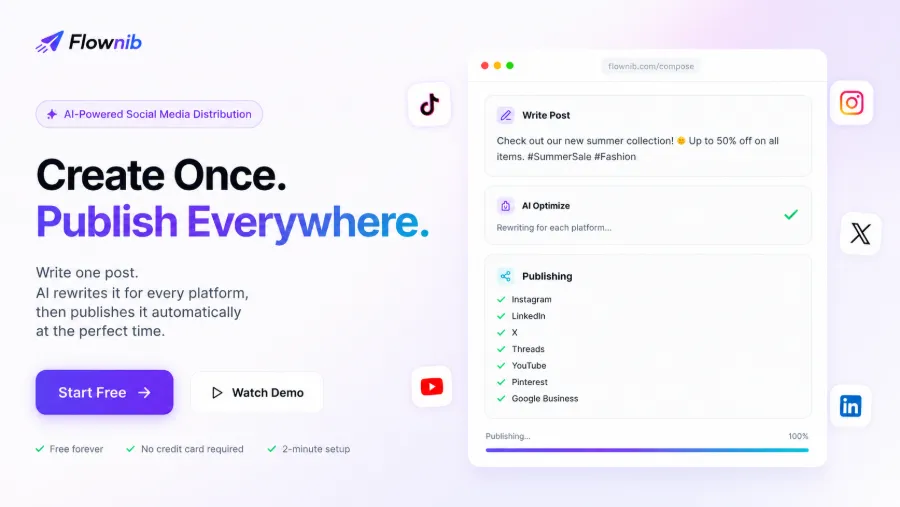
That’s why I started using Flownib. Its core logic is to centralize content, have AI rewrite it to each platform’s style, then publish everywhere with one click. I no longer have to remember Instagram’s character limits or whether LinkedIn titles need emojis—everything is handled by the tool. After switching to this workflow, the total time to publish a single piece of content across all platforms shrank from 40 minutes to under 5 minutes.
| Process Step | Manual Time | Flownib Time | Efficiency Gain |
|---|---|---|---|
| Single‑platform content adaptation | 3–5 minutes | Automatic | — |
| Content rewriting | 10–15 minutes | ≤ 30 seconds | 20–30× |
| Scheduling | 5–10 minutes | 1 minute setup | 5–10× |
| Cross‑platform check | 10–15 minutes | 2 minutes preview | 5–7× |
The data doesn’t lie. The saved time was poured back into content creation, and once the posting frequency increased, each platform’s feedback started to come alive.
AI Rewriting: Making One Piece of Content “Fit” All Ten Platforms
The hardest part of multi‑platform distribution isn’t “posting,” it’s “posting right.” X users love short, punchy hooks; if a sentence isn’t clear, they scroll away. LinkedIn readers expect professional depth; dropping a product link right away backfires. YouTube titles and descriptions need SEO‑friendly keywords, but overstuffing hurts click‑through rates. The same piece of content must wear ten different faces.
Here’s a real example. I once announced a new product launch. The original draft was roughly: “We just launched our summer collection, all made from eco‑friendly fabrics. Get 20 % off your first week purchase. Click the link for the full range.”
After feeding this into Flownib, the AI rewrote it as:
- Instagram Story: swipe up! Summer launch, eco‑fabric + 20 % off, first week only 🌿🔥
- X Post: New collection live. Eco‑fabric. 20 % off first week. Link below 👇
- LinkedIn Article: Starts with an industry background — “As the environmental impact of fast fashion gains attention, our summer line fully switches to sustainable fabrics…” then naturally introduces the product.
- YouTube Description: Places “eco‑fabric,” “20 % off,” “summer collection” at the front, then adds the full product link.
The core information stays the same, but the expression matches each platform’s reading habits. The whole batch rewrite took less than 30 seconds. If I did it manually, the LinkedIn article alone would have taken 15 minutes to craft an intro. More importantly, the AI kept the brand voice consistent—no jarring shift from a lively Instagram tone to a stiff LinkedIn tone. For detailed steps, see the article on how AI automates rewriting and distributes to ten platforms. If you’re interested in the overall architecture of a multi‑platform content strategy, check out the comprehensive cross‑platform content stack analysis, which discusses how SEO, AI video, and auto‑distribution work together.
The Data Behind the Income Doubling: Follower Growth, Traffic, and Monetization
In the second month after switching workflows, the data started to shift noticeably. By the sixth month, total follower growth was 220 %, and cumulative platform impressions rose from an average of 150 k per month to nearly 500 k. Monthly website visits jumped from 3 k to 11 k, with almost 40 % of traffic coming from social referrals.
Revenue growth wasn’t linear. The first month showed almost no change; the second month introduced occasional affiliate earnings; the third month brought brand sponsorship talks—companies valued my simultaneous activity across multiple platforms, not just a single account’s follower count. By month five, I launched a Notion content‑planning template on my own site; leveraging traffic from all platforms, I sold 127 copies in the first month. Six months in, monthly revenue climbed from $2,000 to $4,200.
Looking back, the process created a clear “flywheel effect”: higher posting frequency → more total impressions → faster natural follower growth → greater account influence → more monetization channels → higher revenue → more resources for content creation. Once the cycle starts, each month’s growth compounds on the previous accumulation.
Another counter‑intuitive observation: platforms feed each other’s traffic. A piece discussed on LinkedIn can cause related X posts to suddenly receive a surge of shares; a long YouTube video can drive traffic to X communities, which then funnel users back to the purchase page. Such cross‑platform synergy simply doesn’t happen on a single platform. For Flownib’s specific features and cost analysis, see the beginner‑focused content pricing and feature breakdown, which helps evaluate ROI.
Practical Walkthrough: Key Steps of the “Create Once, Publish Everywhere” Workflow
Here are the concrete steps. My daily routine is split into five stages:
1. Topic selection and creation – Every Monday I use Notion to plan five core topics for the week, writing a 200–300‑word draft for each. At this stage I ignore platform specifics; I just clarify the information points.
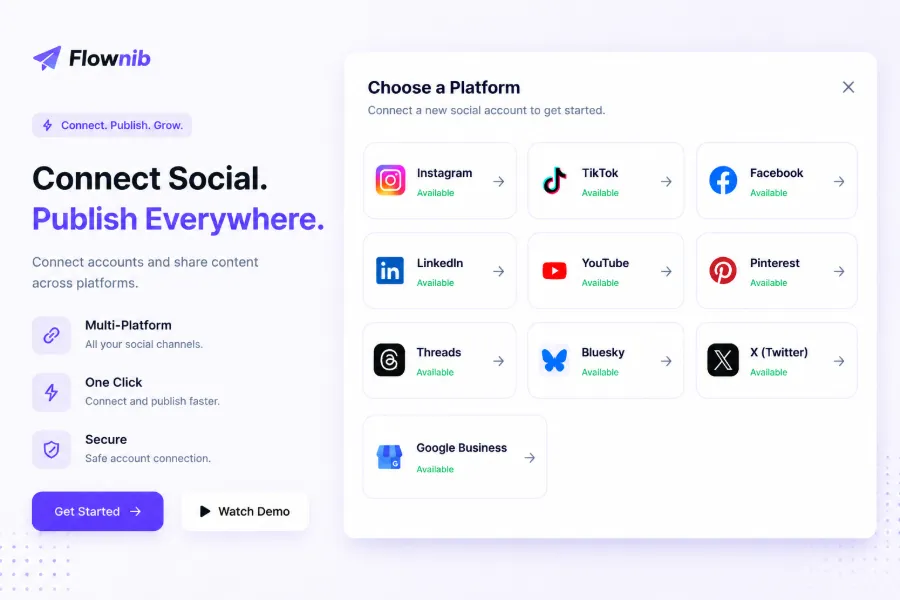
2. Create posts in Flownib – Paste the draft, select the platforms I want to publish to—I currently post to Instagram, X, LinkedIn, Threads, YouTube, Pinterest, and Google Business, seven platforms simultaneously. The system automatically detects which platforms each piece fits, but I usually select all.
3. AI rewrite and preview – The AI generates a platform‑specific version in seconds. The key here is previewing—while the AI rarely makes major mistakes, it can occasionally misinterpret technical terms (e.g., turning a product model abbreviation into a regular word). Scanning the preview takes about two minutes, saving at least ten times the effort of manual rewriting.
4. Schedule publishing – I usually post at 10 AM and 8 PM local time, which I’ve identified as peak engagement windows from my data.
5. Post‑publish tracking – After publishing, I check each platform’s status. Occasionally an API connection fails (e.g., Instagram token expiration or X rate limiting). The fix is usually just re‑authorizing the account, with minimal overall impact.
From content creation to full publication, the average total time is about two minutes, a 90 %+ improvement over manual handling. If you’re comparing distribution tools, see the comparative analysis of Flownib versus Later and Sprout Social on AI cross‑platform adaptation, which outlines differences in rewrite depth and platform coverage.
A tip for creators who want to replicate this workflow: don’t aim for ten‑platform coverage right away. Start with three or four core channels, get the process running, ensure the AI rewrites meet your standards, then gradually expand. The tool solves a systemic problem—consistent publishing is far more important than perfect publishing.
FAQ
Does “create once, publish everywhere” really increase revenue?
Yes, but it takes time to accumulate. The first 1–2 months mainly show increased impressions and follower growth; revenue typically starts to rise noticeably after the third month. In my case, clear revenue changes appeared in month 4, and I doubled my income by month 6. The key isn’t the tool itself but reinvesting the saved time into higher‑quality content and more monetization channels.
How many platforms are optimal for beginners?
Start with 3–4 platforms, choosing your most essential channels. For image‑text content, Instagram, X, LinkedIn, and Pinterest work well; for video‑focused work, prioritize YouTube, TikTok, and Instagram Reels. Once the workflow is solid, add more platforms to avoid spreading yourself too thin early on.
Will AI‑rewritten content lose my personal style?
It depends on how clear your original draft’s tone and wording are. If your draft has a distinct voice, the AI will try to preserve it. After six months, my subscribers haven’t complained that the content “doesn’t sound like me.” Still, I recommend a quick human review during the preview stage, especially for technical terms or brand‑specific phrasing.
Is the free plan sufficient?
Flownib’s free tier offers three social accounts and six posts, suitable for testing. If you need to manage more than three platforms or post multiple pieces daily, upgrade to a paid plan. For my usage across seven platforms, the mid‑tier monthly quota fits perfectly.
How do I manage fan comments after distributing content to ten platforms?
Flownib solves the publishing side; comment management still happens in each platform’s native app. My approach is to concentrate on two daily windows—morning and afternoon—to open each platform and reply. It’s not instant, but I ensure all comments are answered within 24 hours, and my engagement rate hasn’t suffered.
Share Article


