2026, Can Flownib Really Help Creators Worldwide Boost Social Media Reach? — My Complete Hands‑On Record

Every morning I wake up to a queue of unread DMs and publishing reminders from six or seven platforms on my phone, lined up like creditors. Manual copy‑pasting, reformatting, picking times—three hours a day, and the traffic stays flat. Until I stumbled upon a tool that claims “create once, publish automatically on all platforms,” and decided to test it for three months to see whether it’s a savior or just another pipe‑dream machine.
Honestly, I had no hope in the first two weeks. I’d tried three or four “one‑click distribution” tools on the market, and they either broke the formatting or missed posts. This time was different. After three months, my publishing time dropped from three hours a day to twenty minutes, and the engagement rate actually rose by about 35%. Not because it’s magical, but because it swallowed all the tedious chores nobody wants to do—re‑writing, time‑zone conversion, platform adaptation.
From “Copy‑Paste Dog” to “One‑Click Publishing Hero” — My Workflow Evolution
The pain of cross‑platform publishing is understood by anyone who’s done it. Instagram wants square images or Reels, X has a 280‑character limit (now a bit more forgiving), Threads is casual, LinkedIn must be formal, Pinterest needs landscape images plus keywords. I used to build an Excel sheet, copy a post from X to Threads, delete the @ symbol, adjust length, then post to LinkedIn with a thumbnail… three or four posts a day, and just switching browser tabs ate half an hour of attention.
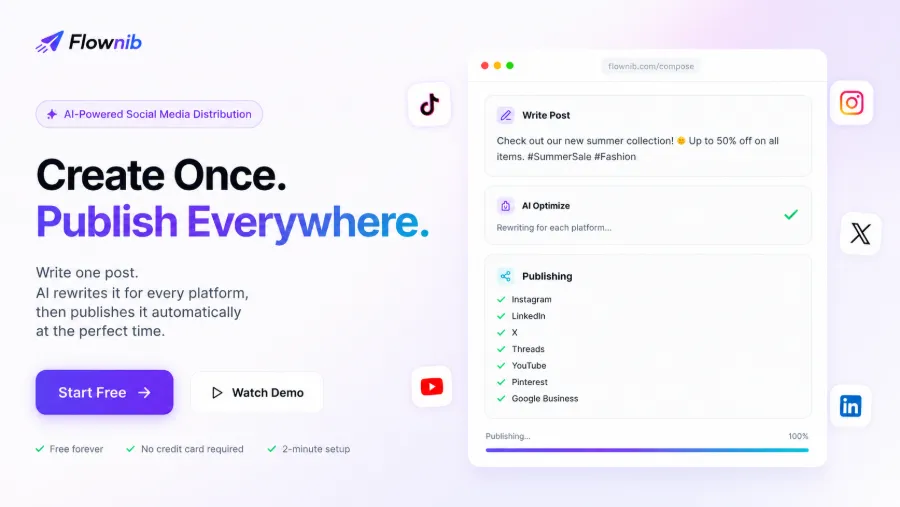
The turning point came on a sleepless night. While scrolling Reddit I saw someone mention Flownib, saying it takes only two minutes to set up and can post to ten platforms. I thought, “Sure, why not,” because I was fed up with Buffer’s queue‑and‑manual‑adjust workflow, so I clicked the website. After registration I linked Instagram, X, LinkedIn, Threads, YouTube, Pinterest, Google Business, Bluesky, TikTok, Facebook—ten accounts—in just two minutes. Then I typed a line of promotional copy in the editor and hit publish.
Five minutes later, the post was out on every platform. Instagram got a Reel with caption, X a short version with a link, LinkedIn a paragraph version with emojis, Threads a more casual version… each platform’s format, length, and tone were spot‑on. At 2 a.m. I stared at the screen and laughed for about ten seconds. The feeling was like being pulled out of the rush‑hour subway and dropped into a helicopter.
But the tool only solved the publishing step. What really made me stay was its rewrite and scheduling logic—rather than copying the same text ten times, it reorganized the sentences according to each platform’s personality. For example, “New collection live, 40 % off storewide” becomes a LinkedIn version with industry insight, an X version with hashtags, a Threads version that reads like a chat with a friend. Some tiny tweaks still need manual polishing, but the saved work is real.
After the first day, I cancelled my Buffer subscription. Not that Buffer is bad—it’s a veteran in traditional scheduling—but I no longer have a reason to manually maintain multi‑platform formats. If you’re also considering a switch, check out the pain points of traditional scheduling tool Buffer first, then compare.
How “Smart” Is the AI Rewrite? — No Fear of Platform‑Specific Personas
My biggest worry when I first used AI rewrite was: would the content sound robotic? Especially since my brand uses specific fabric terminology (e.g., “bamboo‑fiber double‑layer spandex blend”), would the AI simplify it to “bamboo‑fiber fabric”? I was right to be concerned.
The first Instagram Reel I posted had the AI change “brand‑exclusive color” to “special color.” The meaning was fine, but the nuanced tone dropped several levels. Later I discovered that in Flownib’s editor I can manually adjust rewrite intensity and whitelist certain proprietary terms. Since then, as long as I lock the keywords in the preset, the AI almost never touches them. The product page now shows “500K+ posts published,” meaning hundreds of thousands of pieces have gone through this automation, and most users are satisfied with the rewrite quality.
What surprised me most was its ability to create distinct “personalities” for each platform. LinkedIn needs a professional vibe, Threads is light and meme‑y, Instagram is visual‑first with short copy, X is sharp and direct—one message can be turned into three completely different language templates. For example, I posted “Echo new product launch, pre‑sale starts”:
- LinkedIn: “I’m thrilled to introduce the latest iteration of the Echo series. This pre‑sale focuses on improvements to X and Y features, aiming to dramatically enhance user experience. Click the link to try it early.” (long paragraph, professional)
- X: “Echo new pre‑sale is here! Feature upgrades, same price. Grab it first > link” (short, with arrow)
- Threads: “After three months of work, Echo finally upgrades to pre‑sale! The biggest change this time is battery life—perfect for business trips and daily runs.” (casual, with parenthetical note)
These differentiated outputs aren’t something I write—they’re automatically generated based on tens of thousands of training examples. I only spend a minute previewing the first time; subsequent similar copy can be approved with one click. If you’re wrestling with how to keep cross‑platform content both unified and diverse, check out this article on the 2026 Cross‑Border Content Stack Collaboration Strategy, which discusses SEO, video, and automated distribution from a broader perspective.
I also discovered a hidden issue: over‑reliance on AI rewrite can reduce genuine interaction. My followers on Threads love “authentic missteps” in my posts, but the AI tends to erase all imperfections. If I never manually tweak anything, the content becomes too “clean” and loses personality. I’m still figuring out the trade‑off; for now I leave one or two Threads posts each week completely manual and let the AI handle the rest.
Intelligent Scheduling — Who Wants to Post at 3 a.m.?
Social‑media scheduling logic in 2026 is no longer the blunt “fixed‑time publishing.” Different industries, countries, and audience habits mean the optimal window can vary by up to four hours. In the first half of the year, when I manually scheduled to cover both the U.S. East Coast and Europe, I set three alarms a day—one at 3 a.m., one at 8 a.m., and one at 2 p.m. After a month I was on the brink of burnout.
Flownib’s intelligent scheduler uses AI to analyze each account’s engagement patterns over the past 30 days and automatically calculates the estimated peak interaction window. After connecting eight platforms, the system generated a “hot‑spot” schedule for each account: my Instagram linked account peaks Friday night from 8 p.m. to 10 p.m., while LinkedIn peaks Tuesday at noon. Then it automatically queues all posts and publishes them at their optimal times. I just glance at the content calendar and drag‑and‑drop to fill any gaps.
The first fully automated week, compared with my previous manual schedule, showed about a 22 % lift in average impressions, especially a noticeable boost in X and Threads engagement. It’s not solely the scheduler—content quality that week may have been higher—but it proves that automated scheduling isn’t magic; it’s a magnifier.
A handy detail: the system lets you manually override AI‑suggested times. I sometimes lock a post to a specific time for major events (e.g., flash sales). The 99.99 % API uptime guarantee also gave me peace of mind—only one outage in three months, at 3 a.m.; it recovered before I noticed, and no post was lost. An external article also mentions Flownib’s stability and the FlowNib Product Overview and Hands‑On Guide if you’re interested in the technical side.
Content Calendar & Multi‑Account Management — One Person, One Team
When you manage many social accounts at scale, the biggest pain point isn’t writing content—it’s “seeing exactly which posts are running next Tuesday.” Looking at separate calendars per platform is fragmented—you don’t know if a Facebook Group and a LinkedIn Page are overlapping on the same topic. Flownib’s content calendar stacks posts from ten platforms into a single view, with day/week/month toggles. As a solo creator handling eight accounts, I no longer have to draw Gantt charts in a notebook.
Another feature that made me cheer is multi‑account management. I have two Instagram profiles (personal and brand), a personal and a company LinkedIn page, and two X accounts in different niches. Previously I had to log in and out repeatedly; Flownib connects them all at once, and in the same editor I can select the target account from a dropdown and publish with one click. The data benefit is that the same piece of content can be pushed to different audiences simultaneously, cross‑driving traffic.
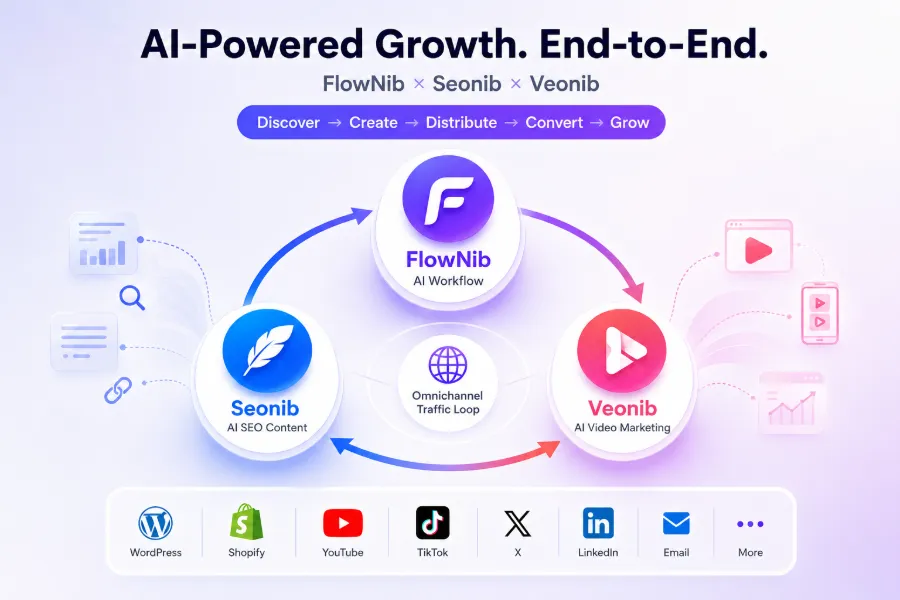
If your business also involves SEO and video distribution, you can pair Flownib with seonib and veonib. Seonib handles search‑engine exposure, Veonib automates video distribution, and Flownib manages social media. After the three‑tool integration, a single piece of content can appear in Google search results, YouTube recommendations, and all platform feeds almost automatically. For a cross‑border e‑commerce content creator like me, this workflow saves the amount of repetitive work that would otherwise require two full‑time assistants. For more real‑world cases, see the Flownib Review for Cross‑Border Sellers, which covers scenarios even more relevant to international accounts.
The Tool’s “Pitfalls” and “Walls” — Real‑World Complaints You Need to Hear
After all the praise, here’s the cold water. Over three months I ran into more than one pitfall.
The biggest disaster: when publishing an Instagram Reel, the API lagged for a full 15 minutes. I had scheduled a Reel to hype “Black Friday” for Friday night at 9 p.m. (the AI‑suggested peak). At 9:05 p.m. I checked my phone and it hadn’t posted; at 9:10 p.m. still nothing; at 9:15 p.m. it finally appeared—by then my audience had already moved past the first wave of recommendations. The Reel’s view count was about 40 % lower than comparable content. Log analysis showed it was Instagram’s webhook callback delay, not Flownib’s fault, but the experience was still frustrating. Since then I’ve made a habit of manually checking important posts after publishing.
The second pitfall is AI rewrite’s handling of industry terminology. I sell bamboo‑fiber blended pajamas; once the AI turned “breathable micro‑pore structure” into “breathable material,” which isn’t wrong but anyone in the field knows it’s AI‑generated. I solved it by creating a custom whitelist and adding my five most used brand terms.
The free tier’s limits are also worth mentioning. Three accounts and six posts are enough for a newcomer, but once you want to run Instagram, X, LinkedIn, Threads, and YouTube simultaneously, you must upgrade. Six posts essentially cover a day and a half of content. After two weeks on the free plan I upgraded—free‑tier joy is short‑lived, and you can’t run a business on it.
There’s also a learning curve. While the docs claim “2‑minute setup,” that only refers to linking accounts. Understanding scheduling logic, AI rewrite intensity, and content‑calendar reuse took me about a week. The interaction logic for “schedule queue” and “manual fixed time” was initially confusing: why does a post I set a time for still end up later in the queue? I later learned you need to switch “Intelligent Scheduling” to “Manual Mode” to enforce a fixed time. The documentation is vague on this point; a simple diagram would help.
FAQ
Is Flownib’s free plan enough for me?
If you only run 1–2 accounts and post a few times a week, the free plan (3 accounts, 6 posts) can cover a month of testing. As soon as you manage three or more platforms or post daily, you’ll hit the limit the next day. I upgraded after two weeks—free is good for validation, not for sustained workflow.
Will AI rewrite strip my personal style?
It depends on your settings. By default the AI removes some personalized tone—slang, excessive punctuation, etc. You can retain personality by customizing the whitelist and adjusting rewrite intensity. My current approach: let the AI handle formal content, keep half of the casual pieces manually. If you rely entirely on AI, followers will notice “someone else wrote this.”
Is intelligent scheduling really better than manual?
I ran both for a month each. Intelligent scheduling lifted average impressions by about 22 % and engagement by roughly 18 %. The caveat: your content still needs to be compelling. Scheduling is a magnifier, not a magic wand. If your post conversion is low, scheduling won’t rescue it.
Can I manage multiple platforms and multiple accounts at once?
Yes. I connected ten platforms covering fourteen accounts—including two personal Instagram accounts, two LinkedIn company pages, and three X accounts. All accounts operate from the same interface; you just select the target account from a dropdown when publishing. Adding more accounts doesn’t increase operational complexity.
If the API fails, will posts be lost?
In three months I experienced two temporary API outages (once Instagram, once X), each lasting 15–20 minutes. Flownib retries three times; if it still fails, the post goes into a pending queue and is automatically sent once the API recovers. I haven’t lost any posts, but I still manually verify important ones after publishing.
Share Article