
AI Agent Era: Write Copy with Claude, Publish to All Platforms with One Click

You just finished a carefully crafted social media copy in Claude—what next? Copy and paste to Instagram, then copy and paste to LinkedIn, then reformat and post to X… This repetitive work is all too familiar to anyone handling social media. Each operation takes at least 10–15 minutes; a team posting five pieces of content a day spends nearly an hour just copying and pasting. The emergence of AI Agents is changing this workflow—copy copy you write in an AI tool can now bypass the manual steps and be distributed directly to all platforms. One creation, full‑platform publishing isn’t a future feature; it’s a daily reality that already works.
AI Agent is a set of automated programs that can take over the repetitive chain of “manual copy → adjust format → post one by one.” After you finish creation in Claude or Cursor, the Agent automatically rewrites the copy to fit Instagram’s character limits and hashtags, LinkedIn’s professional tone, X’s concise style, then publishes with one click. The core value isn’t just eliminating copy‑and‑paste; it frees the time that operations would otherwise consume, letting you focus on content strategy.
Why You Need an AI Agent to Manage Social Media
If you’ve ever managed three or more social accounts, you’ve experienced this scenario: you write a promotional copy in Claude, eagerly copy it to Instagram, only to be told the character limit is exceeded. After trimming and editing, you finally post, only to realize the LinkedIn version wasn’t updated, resulting in inconsistent content across platforms. The cost of this manual switching isn’t just time—each cross‑platform post averages 10–15 minutes—but also error‑prone. Eventually you may get too exhausted to update a platform, breaking your publishing rhythm.
The core value of an AI Agent shines here. It takes over the four repetitive steps of “copy → adjust → paste → publish,” handing the format adaptation, tag selection, and scheduling to automation. You set the content once in the Agent, and it automatically rewrites according to each platform’s specifications, then publishes at the time you set or at the AI‑recommended optimal moment. From creation to full‑platform rollout, the entire chain is compressed into a single interface.
More importantly, this workflow changes how you think about content strategy. Previously you had to decide “which platform should this content go to”; now you can test all platforms simultaneously—AI rewrites the content, you observe interaction data on each platform, and you optimize the next round of creation. Manual processes can only maintain consistency; AI Agents let you keep a unified brand voice while tailoring expressions for each audience.
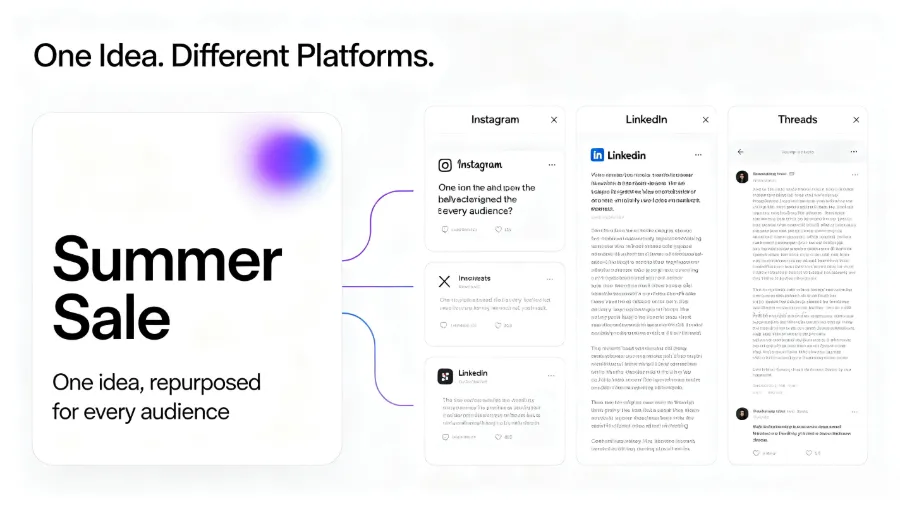
If you extend this logic, you’ll see that AI Agents also change how e‑commerce or brands operate on overseas social media. For example, the approach discussed in Using AI for Fully Automated Cross‑Border E‑Commerce Operations reduces human intervention through automation, allowing operators to focus on product selection and creative content.
How AI Agents Transform Social Media Management Workflow
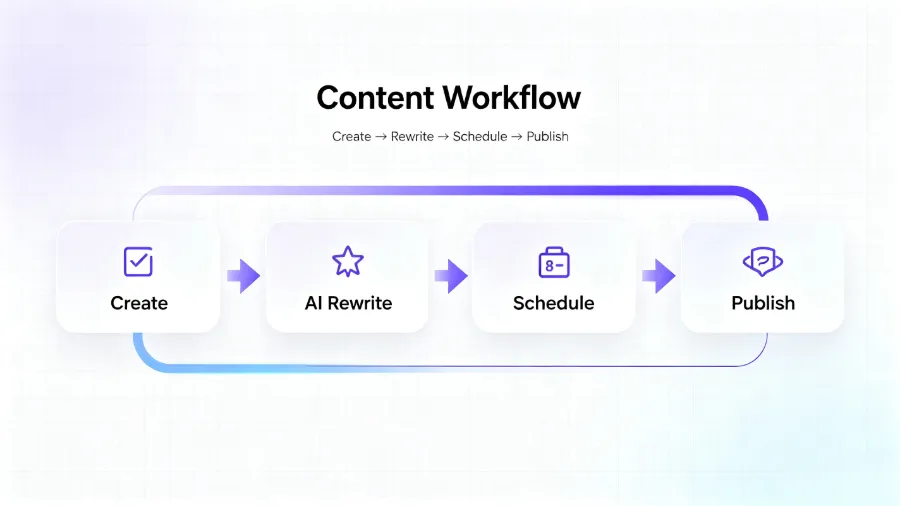
The AI Agent workflow in social media management can be broken into three key stages: creation, rewriting, and publishing. You still draft the copy in Claude or Cursor—your familiar creation environment. After that, the Agent takes over all subsequent actions. It automatically detects each connected platform—Instagram’s 1:1 image and character limits, LinkedIn’s paragraph spacing requirements, X’s 280‑character limit, Threads’ conversational style, YouTube’s description format, Pinterest’s pin description length—and then rewrites the original copy accordingly.
The value of content rewriting is often underestimated. Many think it’s just shortening or lengthening text, but true rewriting reorganizes language based on platform context. For example, an e‑commerce promotional copy:
- Instagram: Emphasize visuals, keep text concise, add popular hashtags
- LinkedIn: Shift to an industry‑insight tone, include data points
- X: Extract core selling points, use short sentences with emojis
- Threads: Expand in a conversational voice, encourage replies
This capability can’t be achieved with simple copy‑and‑paste. AI Agents keep the core brand message unchanged while making each piece of content feel native to its platform. After rewriting, a single original piece can be adapted for ten or more platforms without you having to adjust each manually.
The publishing step is also simplified. The Agent automatically posts the rewritten content to all connected accounts at the time you set (or the AI‑recommended optimal time). After publishing, the content calendar automatically records the action, making it easy to track each platform’s publishing history and performance. If you’re still manually switching browser tabs to post one by one, check out the comparative analysis in The End of Manual Publishing: Marketing Teams Upgrade Social Media Workflow.
From Writing Copy to One‑Click Publishing: Practical Process Breakdown
Below is a step‑by‑step breakdown of the workflow from creation to full‑platform publishing in a real scenario. Assume you just finished a social media copy about a new product launch in Claude.
Step 1: Complete Copy Creation in Claude or Cursor
Open Claude and enter the prompt: “Help me write a social media copy for a product launch, including discount information and deadline.” After the AI generates a draft, you make minor tweaks to match brand tone and finalize it.
Step 2: AI Agent Automatically Rewrites to Fit Each Platform’s Style
Paste the finalized copy into the AI Agent’s Compose interface, select the platforms you want to publish to: Instagram, LinkedIn, X, Threads. Within seconds, the AI generates a rewritten version for each platform, preserving core information while adjusting tone, length, and format.
Step 3: Preview Rewritten Results
Glance at the preview to confirm that the brand name, discount percentage, and deadline are intact and that each platform’s expression style is correct. If needed, you can manually fine‑tune a specific platform’s version at this stage.
Step 4: Set Publish Time or Choose AI‑Recommended Optimal Time
You can manually pick a posting time or enable “Smart Scheduling,” letting the AI recommend the best time based on each platform’s audience activity patterns. For example, the AI might suggest posting on LinkedIn at Tuesday 10 AM and on Instagram at Thursday 8 PM.
Step 5: One‑Click Publish
After confirming everything, click “Publish All.” All platform‑specific versions are automatically posted at the designated time. The entire process—from pasting the copy to confirming publishing—usually finishes within five minutes. The content calendar then automatically logs each post’s status and link for easy post‑mortem analysis.
The table below compares the traditional manual process with the AI Agent‑driven process at each step:
| Step | Traditional Manual Process | AI Agent‑Driven Process |
|---|---|---|
| Create copy | Write in Claude/Cursor, then manually save | Write in Claude/Cursor, then call API directly |
| Adapt for platforms | Manually adjust format, characters, tags | AI automatically rewrites while preserving core info |
| Publish operation | Log into each platform, copy‑paste one by one | One‑click distribution to all connected accounts |
| Time management | Manually set alarms or calendar reminders | AI recommends optimal times, auto‑schedules |
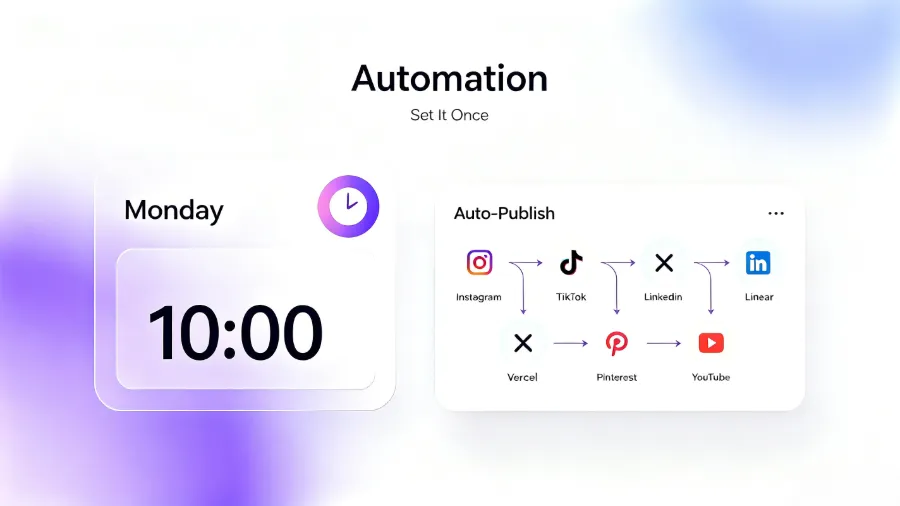
If you manage multiple brand social media accounts, the efficiency gains from this workflow are striking. Take Flownib as an example; its Compose interface integrates creation, rewriting, scheduling, and publishing into a single screen, effectively merging a process that previously required repeatedly switching tools.
If you have questions about Instagram publishing guidelines, refer to the Instagram Business Tools Official Guide. For LinkedIn format requirements, see the LinkedIn Marketing Solutions documentation.
Common Questions and Considerations
Whether AI rewriting will lose brand tone is a frequent concern. The answer depends on the rewriting rules you set. Most AI Agents allow you to preset brand guidelines—including preferred wording, prohibited words, and tone description. If the rewritten version deviates from the brand tone, it’s usually because the original product description wasn’t specific enough or the rewriting rules weren’t detailed enough. We recommend testing a few platforms initially and manually correcting a few times; the AI will gradually learn your style.
When managing multiple accounts, permissions and security are also critical. After connecting several accounts, if an account’s API token expires, the Agent can’t update automatically, potentially causing a publishing failure on that platform. Regularly check each platform’s authorization status, or set up expiration alerts within the Agent. For team collaboration scenarios, see the permission‑allocation plan in A Team Managing 50 Client Brand Voices.
API stability directly impacts the publishing workflow. Most social media automation tools rely on official APIs, which claim 99.99 % uptime, but occasional rate limiting or intermittent errors do occur. Flownib automatically retries on API errors and flags failures in red on the console, requiring manual handling. Free plans usually cover basic publishing, sufficient for individual creators or small teams; if you post more than ten pieces per day or need to manage multiple accounts across platforms, upgrade to a paid plan for higher API call limits.
Different platforms have varying restrictions on automated publishing tools. For example, Instagram’s official API allows image and Reel posts but not plain text; LinkedIn’s API caps daily publishing frequency; X’s free tier limits the number of monthly posts. Always review the target platform’s developer documentation before use to avoid triggering controls.
FAQ
Can AI Agent’s automatic rewriting make content sound mechanical?
Rewritten copy can sometimes feel stiff, especially when the original contains a lot of colloquial language or cultural references. The solution is to preview the rewrite and manually polish any platform‑specific version; also provide a clear brand tone description in the AI settings, such as “conversational but not overly familiar.” After a few rounds of human‑AI collaboration, the rewriting quality stabilizes.
Do I need programming skills to use AI Agent for social media management?
No. Most AI Agents offer a graphical interface where you simply connect accounts, paste copy, and click publish. A few advanced features (like custom API callbacks) may require basic programming concepts, but the core functionality is completely no‑code.
Which social platforms are supported?
Mainstream platforms are largely covered, including Instagram, Facebook, X, LinkedIn, Threads, YouTube, Pinterest, TikTok, Google Business, Bluesky, etc. The exact list may vary slightly between Agents, so check the platform list before use.
What happens if a platform’s API fails? Will the post be lost?
Yes. If the API experiences a temporary outage, the Agent cannot complete the publish and will mark the failure in the console. Some Agents offer automatic retry mechanisms, but after exceeding retry limits you’ll need to handle it manually. It’s advisable to leave a buffer before the deadline rather than publishing right at the cutoff time.
Share Article


