
AI Social Media Tool: One Creation, Automatic Distribution Across All Platforms

Anyone who has managed social media knows the repetitive labor: you format a post on Instagram, write a caption, copy it to X only to find it exceeds the character limit, delete half of it and re‑organize the language, then open LinkedIn and realize the tone is completely off, so you edit it again. One round, the same content is moved to three or four platforms, and twenty minutes are gone. If you need to post three to five times a day, just the repurposing can consume an entire morning. Worse, each platform has its own image dimensions, character limits, and hashtag formats, so every switch feels like a new fill‑in‑the‑blank exercise.
My early solution was primitive—I created a Google Doc with a “format memo” for each platform and adjusted the post line by line while looking at the document. It was slow and I often missed a platform. Once I posted an Instagram‑style post on LinkedIn; the tone was too casual, and someone in the comments asked, “Is this auto‑posted?” After that, I started seriously looking for a solution, hoping to write once and let a tool handle the rest.
Why AI Social Media Tools Have Become an Operational Necessity
The number of social platforms has exploded in recent years. Instagram, X, LinkedIn, Threads, Pinterest, YouTube, TikTok, Google Business… a brand that wants to maintain a basic presence must cover at least three to five platforms. Each piece of content must be adapted to different formats, tones, and character limits, and doing it manually is absurdly time‑consuming.
Industry data predicts AI marketing revenue will surpass $107 billion by 2028. This isn’t hype; it reflects a real need—when publishing volume jumps from a few posts per week to dozens per day, human staff can’t keep up. In a mid‑size e‑commerce team I worked with, a single operator spent an average of 2.5 hours per day on “content repurposing,” not counting the extra time lost to format errors, delayed publishing, and re‑work.
AI tools don’t solve “how good the copy is,” they solve “whether you can keep publishing.” Content automation lets teams reuse a core idea and quickly generate platform‑specific versions. Content reuse sounds simple, but the efficiency gap before and after a tool is orders of magnitude. If you’re still manually repurposing, check out the specific approach of global‑team multilingual social media automation to see how others compress their publishing workflow into minutes.
From Manual Copy‑Paste to AI‑Driven: Evolution of the Content Distribution Workflow
What does a traditional manual publishing workflow look like? Write a piece of content, copy it to Instagram, adjust formatting and hashtags; then copy it to X, trim to 280 characters (the limit has relaxed a bit, but the logic is the same); then go to LinkedIn and change the tone from casual to professional; finally, go to Threads or Pinterest and repeat similar adjustments. If the team has a brand guide, you also have to verify visual consistency across platforms.
The problem isn’t just slowness; it’s error‑prone. Forgetting to change hashtags, using the wrong image size, omitting a link—these low‑level mistakes happen especially when you’re racing against the clock. I once pasted an Instagram caption directly onto LinkedIn; the tone was too casual, the post’s engagement was abysmal, and the partner thought we weren’t professional enough.
After AI tools entered the picture, the workflow became: write a core piece, AI rewrites it automatically for each platform’s style, the user previews and confirms, then schedules the publish. The whole process shifts from “write → copy → paste → adjust → copy again → paste again” to “write → preview → confirm → publish.”
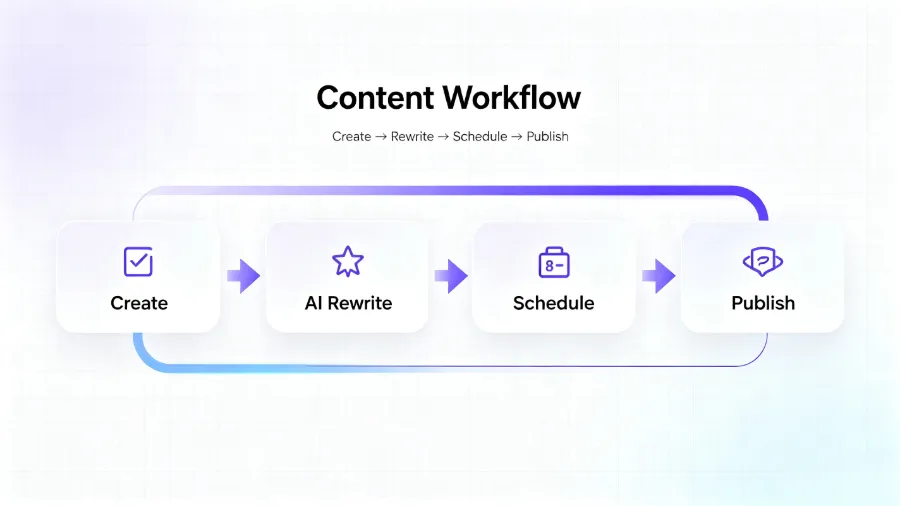
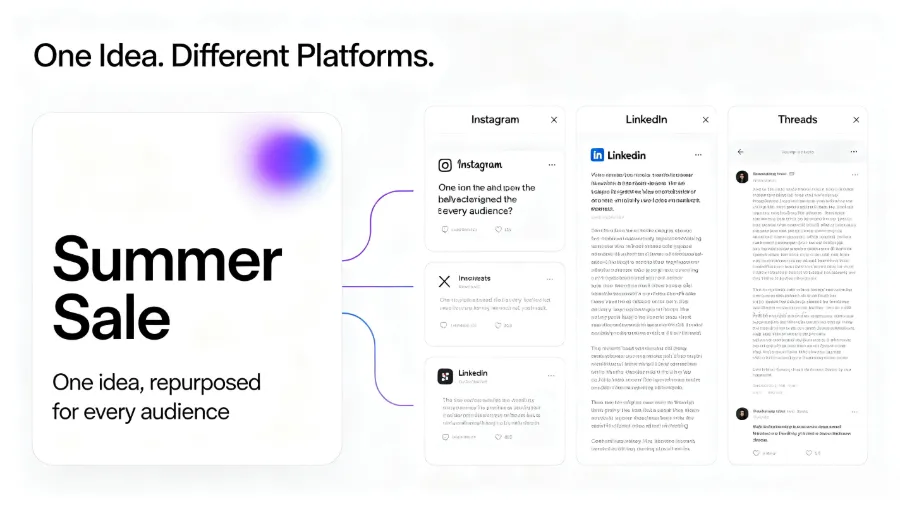
Take Flownib as an example. Its core logic is “write once, post everywhere.” In my test, I wrote an English post about a new product; the system automatically generated an Instagram version with hashtags, a concise X version, and a more formal LinkedIn version. The whole process took less than two minutes, and a single click published to three platforms. Compared with manual steps, the time saved isn’t a few seconds—it’s from twenty minutes down to two minutes.
With the simplified process, the team can free up time for strategic work, such as analyzing which platform performs best or determining optimal posting times. If you’re interested in this workflow, check out the practical case study “Write once, generate a week’s worth of content,” which details how to batch‑generate and schedule content with AI.
Different AI Tools Solve Different Bottlenecks
There are many AI tools on the market, but each addresses a different stage. Knowing these categories helps you pinpoint exactly what you’re missing.
| Function Category | Core Use‑Case | Typical Tool Examples |
|---|---|---|
| Content Generation | Auto‑generate copy, hashtags, post ideas | ChatGPT, Jasper, OwlyWriter |
| Image & Design | Auto‑generate visuals, resize, templates | Canva, Adobe Firefly |
| Video Production | Text‑to‑video, long‑to‑short video, subtitles | Invideo, Munch |
| Audio & Voice | Generate voice‑overs, narration, audio content | Murf.ai, ElevenLabs |
| Productivity | Meeting notes, content calendars, workflow automation | Fireflies.ai, Notion AI |
Content‑generation tools solve the “what to write” problem. When you stare at a blank document, AI can give you several directions, saving the time spent brainstorming from scratch. Image & design tools solve the “what picture to use” problem, especially since each platform has different size requirements; AI can automatically crop and adapt. Video tools have advanced rapidly in the past two years—input a script or a long video, and AI can produce short clips, add subtitles, and adjust pacing. Audio tools are great for podcasts or video voice‑overs.
But there’s a common oversight: most of these tools solve only a single point. A content‑generation tool writes, a design tool creates graphics, a video tool edits video. If you want an end‑to‑end “write → edit → publish → analyze” pipeline, you need to stitch them together, and that integration cost often exceeds the price of the tools themselves.
Three Common Pitfalls When Choosing AI Tools (and How to Avoid Them)
Pitfall #1: Tools Solve Only One Point and Can’t Form a Complete Workflow
My first mistake was being cheap. I gathered a bunch of free or low‑cost single‑point tools: one for copy, one for graphics, one for scheduling, one for publishing. They were incompatible, data couldn’t flow between them, and I had to manually copy output from tool A into tool B, then import into tool C. I thought automation would save time, but it added a “tool‑management” step.
Worse, because the tools lacked a unified API, every content update required repeated actions across multiple tools. Once I changed a phrase in a caption but forgot to sync it to the scheduling tool, so the old version went live. Fixing that cost more than just publishing manually.
Solution: map out your entire workflow—from creation to publishing to data feedback—and identify where each step occurs. If a single tool can cover rewriting, scheduling, and publishing for most platforms, you don’t need to split into multiple tools. Flownib, for example, handles AI rewriting, one‑click distribution, scheduled publishing, and a content calendar, linking the whole process without needing a separate scheduler.
Pitfall #2: AI‑Generated Copy Sounds Mechanical, Requiring Heavy Manual Tweaking
Many AI tools produce copy that is obviously machine‑written—stilted tone, repetitive sentence structures, lacking brand personality. After testing several tools, I found that some required me to rewrite more than half of the output before it was usable. That defeats the purpose of “automatic generation,” as you save no time and the quality drops.
In practice, the best AI rewriting tools don’t promise “no editing”; they minimize the editing cost. Some offer a “brand tone” setting where you define your voice, and the AI’s output aligns more closely with your speaking style. Another trick: let AI generate a first draft, then manually polish only the opening and closing, leaving the middle untouched. This keeps quality high while keeping revision time under five minutes.
Pitfall #3: Focusing Only on Generation, Ignoring Post‑Publish Data Feedback
When selecting a tool, many people only consider “can it write?” and “can it publish?” and overlook “can it show me data after publishing?” Without analytics, you never know which content works or which platform deserves more effort.
I’ve seen a team use an AI tool to post twenty pieces of content per day, looking diligent, but after three months their data showed 80 % of engagement came from a single platform while the others were dead. If the tool didn’t provide analytics, they would have kept blindly posting. LinkedIn’s LinkedIn Marketing Solutions offers detailed content analytics, but you still need to spend time reviewing the data rather than just publishing and ignoring results.
When choosing a tool, prioritize those with built‑in basic analytics—at least showing each post’s impressions, engagements, and publishing time. If a tool lacks this, you’ll need an additional analytics solution, bringing you back to the integration problem.
In summary, treat tool selection as a filter: first map your full workflow, then look for a single tool or a combination that covers the largest portion of that workflow. If budget is tight, prioritize covering “publishing” and “data feedback,” because those stages consume the most time. For a detailed comparison, see the Flownib pricing and feature analysis, which lists the capabilities of each plan and can serve as a reference.
Frequently Asked Questions
Can AI tools completely replace human content creation?
No. AI excels at “rewriting” and “adapting,” not at “creating.” A brand’s core values, unique narrative angle, and deep audience insight still require human input. AI acts as an efficient editorial assistant, turning your ideas into multi‑platform‑ready versions. A solid content strategy remains “human direction → AI execution → human review.”
Is the gap between free and paid AI tools large?
Yes. Free tools usually have strict usage limits, fewer platform integrations, and weaker models. In my tests, many free‑tool outputs needed extensive manual edits, so time savings were minimal. Paid tools offer more stable APIs, smarter rewriting, and fuller workflow coverage. For high publishing volumes, the ROI of a paid solution is clear.
How do I determine if an AI tool fits my team?
Ask three questions:
1. How many steps of my current workflow does the tool cover?
2. Does it support all the platforms I need to publish on?
3. Does its rewriting output match my brand tone?
Don’t rely solely on feature lists—run a trial. Most tools offer a free trial; simulate a week of real publishing and compare the experience to any review.
Will using AI tools make my content style uniform and bland?
There is a risk, but it can be mitigated. The key is a “AI rewrite + human review” process. After AI generates a draft, a human adds brand‑specific insights, industry knowledge, and personal experience, preventing the content from feeling generic. Teams that publish AI output verbatim will look like copy‑pasting; treating AI as a drafting aid and humans as polishers yields much better results.
Can a single AI tool handle multiple social platforms simultaneously?
Most modern AI tools support multiple platforms, but the number and depth of support vary. Some cover only the major platforms; others include ten plus, such as Pinterest, Google Business, Bluesky, etc. When choosing, verify that the tool uses official APIs—official API integrations are far more stable than third‑party hacks. Also, confirm that it supports platform‑specific features like Instagram Reels, LinkedIn long‑form posts, or YouTube Shorts.
Share Article


