Must‑Read for Cross‑Border Independent‑Site Sellers: How Delicious Is Using AI to Master Global Social Distribution in 2026

It’s 8:30 a.m.; you’ve just sat down, coffee still untouched. Your phone pings with three reminders—post a new product image to Instagram Stories, edit the industry article you saved on LinkedIn last night, and jump on a trending topic on X. You open three dashboards, copy‑paste, adjust kerning, delete emojis, add hashtags… look up, it’s already 10:30 a.m. A day of tweaking a single piece of content eight times—can you still endure that in 2026?
It’s not that you’re lazy; the workflow itself is broken. External traffic for an independent site shouldn’t rely solely on paid ads; social‑media free‑traffic pools are deep, but you can’t manage them all with two hands. Today we’ll break down AI‑driven automatic distribution—no hype, just how to do it.
How Painful Is the “Traffic Paralysis” of Independent‑Site Players?
People who run independent sites share a common problem: traffic sources are extremely skewed. Most sellers dump their budget on Google Ads and Facebook ads; even if on site conversion is flawless, traffic drops to zero the moment external ads stop. This isn’t alarmist—2025 research shows that over 70 % of independent‑site sellers post on social media less than three times a week, for a shockingly uniform reason: no time to adapt to each platform.
Instagram needs short copy with emojis and up to eight hashtags; LinkedIn demands data‑rich, industry‑specific long posts; X (formerly Twitter) only allows 280 characters and a meme; Threads requires rapid trend‑hopping… With a three‑ or‑four‑person team already busy with graphics, copy, and customer service, can you realistically write a native post for each platform every day? Most end up either abandoning most platforms or posting copy‑pasted junk that gets double‑digit views—essentially never posted.
Worse, after a month of perseverance you discover that your carefully edited Instagram product image was stolen on Xiaohongshu, and your LinkedIn industry insight was repackaged by a competitor into a viral hit. It’s not that you lack good content; you lack the energy to deliver that good content at the right time, in the right way, on the right platform.
AI Doesn’t Just “Write” for You—It “Transforms” You: The Ultimate Solution for Cross‑Platform Content Adaptation
Each platform has its own temperament.
Instagram is visual; a caption under 150 characters is optimal, with no more than ten hashtags, emojis where possible. LinkedIn is the opposite—400‑800‑word deep posts with data, industry insights, and personal opinions, up to three hashtags; overly flashy content looks unprofessional. X is blunt—either add informational value or humor; the middle ground gets ignored. YouTube Shorts and Pinterest each have their own copy styles.
You can’t possibly remember every platform’s character limits, best posting times, and tone preferences. AI can.
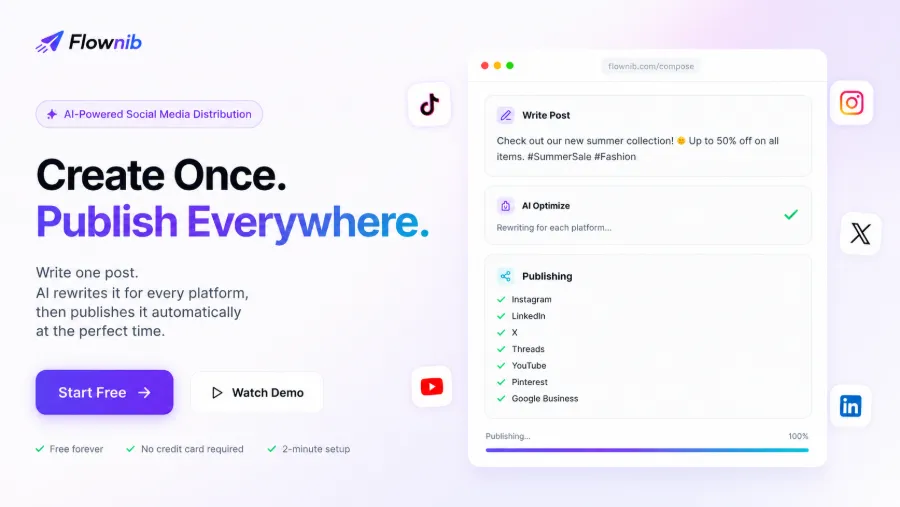
A detail from my own experience: I wrote an 80‑word raw product launch copy with a list of selling points. After feeding it into Flownib’s AI rewrite, the Instagram version added four emojis, compressed the copy to 50 words, and suggested hashtags #NewProductTaste and #CrossBorderGoodies; the LinkedIn version added an industry background analysis, expanded to 350 words, and shifted the tone to professional sharing; the X version kept only the core selling point plus a question, perfectly fitting 280 characters. The whole process took under two minutes.
Manually, adapting one piece of content for five platforms takes at least half an hour. Thirty posts a month = 15 hours of manual work. After AI rewriting, the same raw content generates ten platform‑specific versions in about two minutes each, compressing a month’s workload to one and a half hours—time you can spend testing products, optimizing landing pages, or doing customer follow‑ups. Which is more valuable than repeatedly tweaking copy?
Other tools exist. Buffer and Hootsuite can schedule posts, but their AI capabilities are essentially nonexistent—you still write the content yourself and manually adapt it. If you’re evaluating options, see this comparison: Flownib vs Buffer vs Hootsuite: 2026 Cross‑Border Brand AI Scheduling Tools Review. It contrasts AI rewrite ability, platform coverage, and free‑plan limits, concluding plainly.
From One Post to Ten—A Complete Workflow Breakdown
Running the process once is absurdly simple. Let me walk you through it.
Step 1 – Write content. Take the raw post you normally produce—product description, promotional copy, or industry insight—and paste it into Flownib’s editor, which supports text and basic layout. Click the AI‑optimize button.
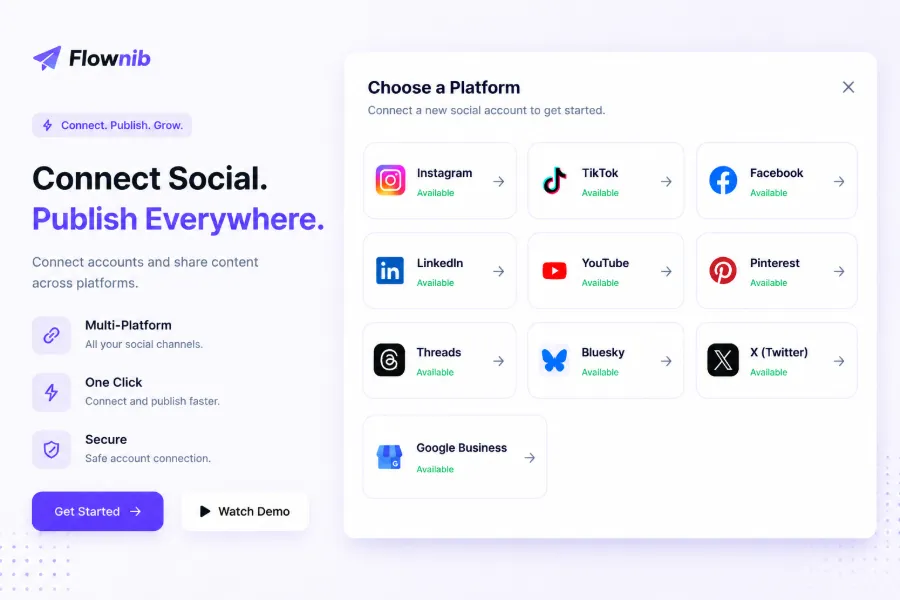
Step 2 – AI adaptation. The system detects the platforms you’ve linked and automatically generates a dedicated version for each. You can preview each one and adjust if needed. For example, the abbreviation “DTC brand” became “Direct‑to‑Consumer brand”; if the word count exceeds limits, you can fine‑tune in the preview pane. I initially missed that AI expanded an industry abbreviation to its full form, adding an unwanted sentence—adding “preserve industry abbreviations” to the prompt solved it.
Step 3 – Scheduling. Flownib’s smart scheduler analyzes peak activity times per platform (e.g., LinkedIn 11 a.m.–1 p.m., Instagram 7 p.m.–9 p.m.). You don’t need to remember these; the system matches them automatically, though you can set manual times if you prefer.
Step 4 – One‑click distribution. Click publish and all platforms launch simultaneously. The backend marketing calendar logs each post’s publish time, status, and engagement data, eliminating the need for a separate Excel tracker.
The first run takes about five minutes because you preview all versions. Once familiar, from input to publish averages two minutes. Flownib claims 99.99 % API availability; I’ve used it for months without a single outage.
For multi‑account users—e.g., managing a US site and a European site with different styles and assets—Flownib lets you bind multiple accounts per platform and switch between them in a single dashboard, avoiding constant log‑ins/log‑outs. This feature was a nightmare with manual workflows; now it’s a huge time‑saver.
If you want deeper architectural integration, check out the Cross‑Border AI Full‑Traffic Closed Loop: Flownib, Seonib, Veonib Collaborative Architecture & Use Cases for extended reading on how three tools work together to close the traffic loop for independent sites.
Selection & Pitfall Guide – Should Your Independent Site Adopt AI Distribution?
Not every seller needs an AI distribution tool right away. Before evaluating tools, ask yourself three questions:
- Are you already posting regularly on more than two platforms? If you haven’t started on Instagram, your priority isn’t a tool; it’s building content‑production capability.
- Do you publish more than five pieces of content per week? If you only repost one or two blog articles, manual effort is low and AI rewriting may feel wasteful.
- Does anyone on your team have ten minutes to learn a new tool? If new hires can’t even navigate a basic dashboard, forcing an AI tool just adds a dormant account.
If you maintain accounts on three or more platforms, produce over ten posts weekly, and your team’s time is heavily fragmented, AI distribution will deliver immediate ROI—those extra ten hours can be spent testing an ad campaign or optimizing a landing page, far outweighing the tool’s cost.
Below is a side‑by‑side comparison of common tools; see which matches your situation:
| Comparison Dimension | Flownib | Buffer | Hootsuite | Later |
|---|---|---|---|---|
| AI automatic rewrite | ✅ Native adaptation | ❌ None | ❌ None | ❌ None |
| Supported platforms | 10 | 4 | 8 | 6 |
| Smart scheduling | ✅ AI‑optimized | ⏳ Fixed times only | ✅ Smart scheduling | ✅ Automatic scheduling |
| Free plan | ✅ 3 accounts, 6 posts | ✅ 1 post per platform | ❌ No free tier | ✅ Unknown |
See the difference? AI rewrite is currently only fully implemented in Flownib; the others either lack it or are still experimental. Buffer’s free tier is strict—if you have low content volume it’s fine, but for high‑frequency posting you’ll need a paid plan.
Another common pitfall: focusing on price while ignoring API stability. A seller friend once used an open‑source self‑hosted solution to save money, throttling the API too aggressively; Twitter limited them for three days, causing them to miss the Black‑Friday hype and lose thousands of dollars in projected revenue. Flownib’s 99.99 % API uptime isn’t a marketing gimmick; it means less than one hour of downtime per year—a commercial necessity.
For an in‑depth experience with Flownib—including bugs, support response times, and third‑party integrations—read the Flownib Deep Review: Is the Cross‑Border Seller’s AI One‑Stop Social Distribution Tool Worth It?. The author is candid about pros and cons, noting occasional mishaps like the brand name “NeoGear” being auto‑changed to “New Gear”.
If you want to try it first, Start Using Flownib for Free requires no credit card; three accounts and six posts are enough for a month‑long trial. After a month, assess how much time you saved and decide whether to upgrade.
FAQ
Q1: Will Flownib’s AI rewrite alter my brand tone?
It won’t completely deviate, but you need to set appropriate prompts. The first use is best with per‑post previews; manually correct any tone issues once, and the AI will learn your preferences. Within the same category, the AI retains tone over 85 % of the time, though highly branded slogans or niche jargon may occasionally be altered—currently unavoidable.
Q2: Is the free plan sufficient? When should I upgrade?
The free plan includes three social accounts and six posts, suitable for single‑category, low‑frequency personal sellers. If you manage 2–3 category accounts, publish over ten posts weekly, or need multi‑brand management, upgrade to a paid tier—free post limits are typically exhausted in about two weeks of active use.
Q3: Which social platforms does Flownib support? Does it include TikTok?
It supports ten platforms: Instagram, X, LinkedIn, Threads, YouTube, Pinterest, Google Business, Facebook, TikTok, and Bluesky. All are accessed via official APIs for stable publishing. TikTok is in the list, but API permissions vary by region; mainland Chinese sellers should verify that their TikTok account region has official API access.
Q4: I manage multiple category accounts—can I handle them together?
Yes. Each platform can bind multiple accounts, all managed from a single dashboard. For example, you can simultaneously manage the Instagram accounts for a US site and a European site, each with its own publishing calendar, avoiding confusion. Note that platform‑specific account limits differ (e.g., an Instagram admin can bind up to five business accounts).
Share Article