FlowNib Price and Feature Full Analysis: For the Conflicted Cross‑Border Newbies

Open your phone’s notes app, and on your cross‑border tool selection list there are already four or five tools claiming “publish on all platforms,” with prices ranging from free to a few hundred dollars per month, yet you haven’t registered for any of them. The reason is simple: the feature descriptions all look alike, the pricing seems like a word game, and you just want a usable, inexpensive screwdriver. This article will tear FlowNib apart from the dimensions of pricing and actual features—can the saved time justify the ticket price? After reading, you’ll know.
During my own grind in cross‑border e‑commerce operations, the thing I feared most wasn’t copywriting, but manually tweaking content for six platforms. Instagram wants square images, Pinterest needs vertical, TikTok captions must be as short as a password, and LinkedIn demands a professional tone. Adjusting the same post for each platform takes half an hour. So I understand why you’re torn.
What Problem Is FlowNib Actually Solving? Core Features Explained in One Go
When you hear “cross‑platform publishing tool,” many people’s first reaction is: isn’t it just an auto‑copy‑paste scheduler? If you think that, your understanding of the pain point is still superficial.
True cross‑platform publishing isn’t hardest about sending the post out; it’s about making it feel native to each platform. You post a promotion on Instagram, and you must adapt layout, hashtags, caption length, tone—everything. Manually, one post can require ten‑plus revisions, and you end up confused about which version belongs to which platform.
Flownib is built for exactly this scenario. Its most direct feature is AI auto‑rewriting: you write a core draft—say, a summer discount tweet—and the system automatically generates versions for Instagram, X, LinkedIn, Threads, YouTube, Pinterest, Google Business, TikTok, Facebook, and Bluesky based on each platform’s character limits and tone conventions. It’s not just truncation; it truly reorganizes the language.
Beyond AI rewriting, one‑click distribution, smart scheduling, content calendar, and multi‑account management are standard. What reassures me most is the official API integration—over 500,000 posts have been published through this system, the API uptime is 99.99%, and the average setup time is two minutes. The official API becomes a price‑tier divider when your account triggers risk controls.
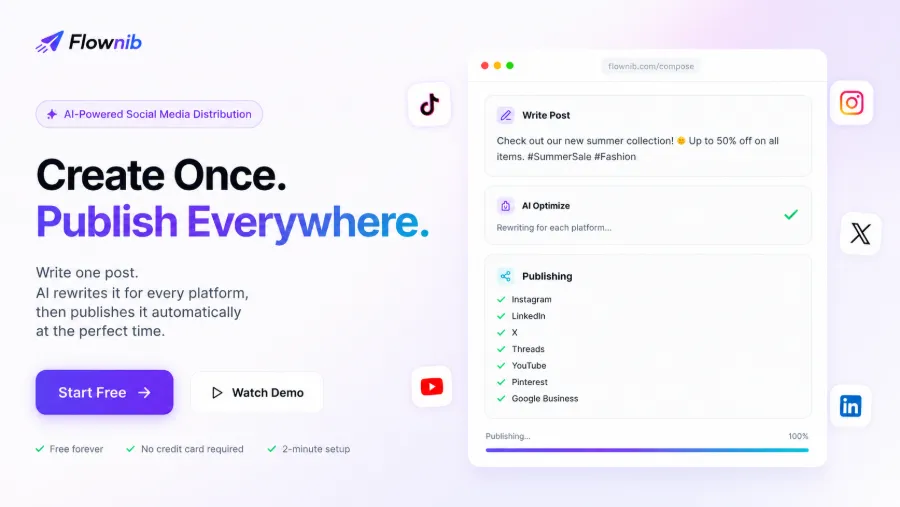
To be honest, your initial core draft must be decent. AI isn’t magic; give it a trash draft and it will give you six trash drafts. But with a solid core draft, this workflow truly closes the loop of “image cropping – caption rewriting – scheduled publishing.” Many users mention this in their feedback—see the real‑world reviews from cross‑border sellers about FlowNib.
Three Pricing Plans Compared: Starter, Growth, Agency – What’s the Difference?
First, see which platforms FlowNib supports. It currently covers 10 major social platforms, all via official APIs.
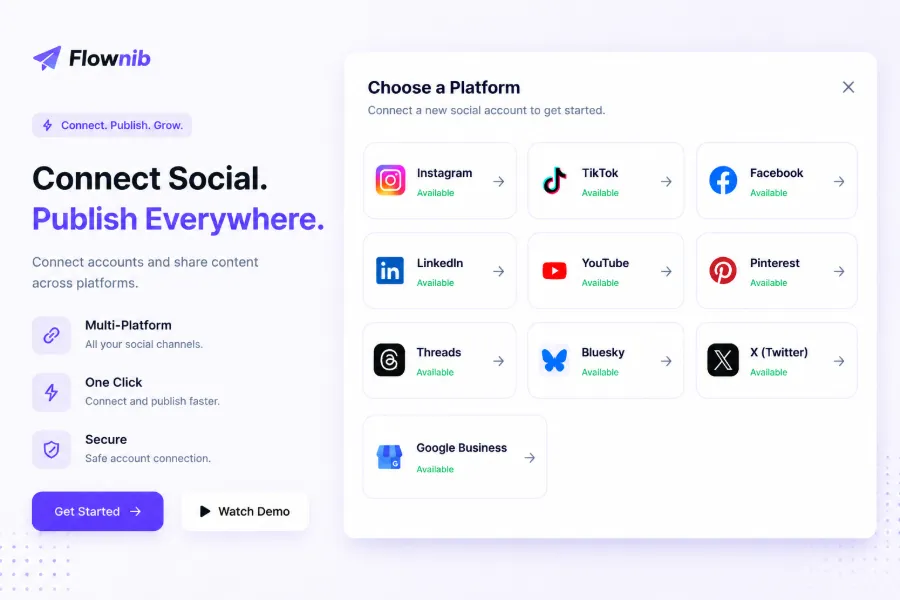
Notice that this includes Bluesky and Google Business—Bluesky is a new overseas traffic hotspot, and Google Business is valuable for localized operations. Full coverage itself is a component of the pricing value.
FlowNib currently offers a limited‑time 40 % discount, with three tiers:
| Plan | Discounted Monthly Fee | Social Accounts | Monthly AI Credits | Monthly Post Limit | Extra Features |
|---|---|---|---|---|---|
| Starter | $11 (original $19) | 3 | 100 credits | 100 posts | AI content generation, AI platform optimization, email support |
| Growth | $23 (original $39) | Unlimited | 300 credits | 300 posts | Priority AI generation, analytics dashboard, priority support |
| Agency | $47 (original $79) | Unlimited | 1000 credits | 1000 posts | Multiple workspaces, team collaboration, API access, dedicated support |
Quickly match yourself:
- Starter is for individual creators or fledgling cross‑border sellers managing just a few accounts. The social account limit is 3; if you need to run five platforms, you must pick three.
- Growth is the mainstream choice for cross‑border teams or growing traders. Unlimited accounts + analytics dashboard mean you no longer have to manually screenshot and compile data for the boss.
- Agency is for agencies or large teams. Multiple workspaces let you isolate different client accounts, and API access leaves room for more integrated operations.
In a horizontal comparison with competitors, this price isn’t the lowest, but the feature density is high. If you’re interested, check out a more detailed comparison article: FlowNib vs. Buffer & Hootsuite Detailed Review.
How Do Time and Money Add Up? Is It Worth It for a New Cross‑Border Operator?
Now let’s do the real math.
A brand‑border newcomer manually handling three social accounts (e.g., Instagram, TikTok, LinkedIn) spends 15–20 minutes per platform for each piece of content—image cropping, caption adjustment, hashtag addition, scheduling. That’s at least 45 minutes to an hour per post across three platforms. Publishing 7–10 posts a week easily consumes 5–10 hours.
This isn’t just copy‑paste time loss; the bulk is “adaptation.” Image sizes differ, tone differs, optimal posting times differ per platform. After a week you’ll start hunting for automation tools; after a month you’ll question your life choices.
Flownib user feedback shows teams save an average of 15 hours per week—roughly two full workdays. Some agencies claim they set up in 2 minutes and launch on eight platforms simultaneously. Feel that efficiency gap.
But a few things need clarification.
AI rewriting can sound a bit stiff in Chinese, especially with industry jargon or brand‑specific copy. I’ve seen it turn “爆品冷启动” into a weird promotional tone that needed a second pass. Don’t over‑idolize AI accuracy—you still need to review drafts, especially when brand tone matters.
The free tier is indeed usable. It lets you manage three social accounts and publish six posts—enough for a trial. If you already run five accounts, the free tier’s account limit becomes a blocker. You’ll either have to delete two accounts or upgrade to Growth. Compute whether the 15 hours saved per week justifies $23; the math is clear.
Many tools look cheap but lack official APIs and rely on third‑party headless interfaces, making accounts prone to risk controls. Flownib’s listed official API support—Instagram, X, TikTok, LinkedIn, Facebook, Pinterest, YouTube, Google Business, etc.—is a hidden value. Newcomers often don’t realize how costly a week‑long account suspension can be, which can exceed a year’s subscription fee.
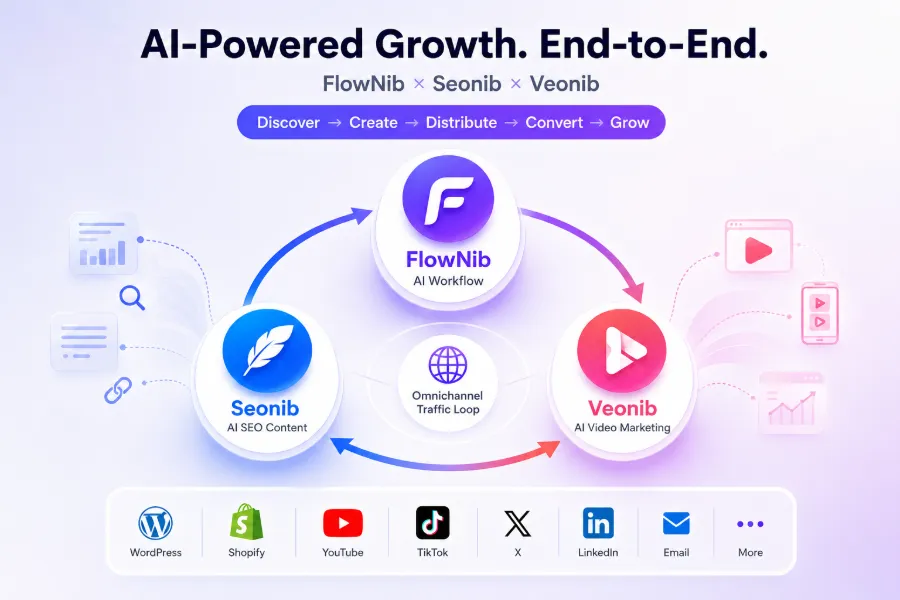
Looking at the bigger picture, Flownib isn’t isolated. There’s a cross‑tool ecosystem: Seonib handles SEO traffic acquisition, Veonib does video generation, and together they form a full‑traffic closed loop. An article analyzes this collaborative architecture in practice. If you want more than just social distribution, explore further.
Finding comparable tools is easy. If you’re torn between Sprout Social, Later, or this system, see the feature comparison of FlowNib vs. Later & Sprout Social to narrow your choices.
In the end, do the math and decide. Tools don’t create value; time and attention gaps do.
FAQ
Q1: Does FlowNib have a free version? Is it sufficient?
Yes. The free tier offers 3 social accounts and 6 posts, no credit card required. If you have only one or two accounts and a low weekly posting volume, it’s enough to start. If you already run 5+ accounts, the free tier’s account limit will block you.
Q2: Which social platforms does it support? Are they all official APIs?
Currently Instagram, X, LinkedIn, TikTok, Facebook, Threads, Pinterest, YouTube, Bluesky, and Google Business—10 platforms in total—all accessed via official APIs. Using non‑official interfaces carries a lower risk of account bans—something you’ll notice over time.
Q3: Will AI auto‑rewriting distort the original meaning? Can I edit manually?
Occasionally, especially with industry terms or brand‑created words. After AI generation, you can manually edit in the preview interface—nothing is irreversible. It’s recommended to run through the draft before publishing, especially for key promotional events.
Q4: Is the current 40 % discount permanent or time‑limited?
It’s a limited‑time discount. You’re charged the discounted rate at subscription; subsequent price changes won’t affect you unless renewal terms change. The price page at registration is the definitive reference.
Q5: I’m a solo cross‑border newcomer— which plan wastes the least?
The Starter plan at $11/month is the most suitable, provided you manage no more than 3 social accounts. If you exceed 3 accounts, the Growth plan’s unlimited accounts and 300 credits cover the transition from newcomer to mature stage, offering better value.
Share Article