Write Content with AI Agent, Flownib Auto‑Publish: One Command Connects the Social Media Workflow

You spend far more time on copy‑and‑paste than you think. You write a product promotion copy, then copy it to Instagram, adjust the format, paste it to X, change hashtags, then to LinkedIn and switch to a formal tone—repeating the same content three times, three minutes each, which adds up to nearly two hours a week. Content operators have long been accustomed to this inefficiency, but what’s even more frustrating is that when an AI Agent can generate three different‑style copies in a minute, you still have to manually paste each one onto each platform.
This gap is real. Your Codex, Claude Code, or Coze already helps you write copy, but the publishing step still relies on manual work, meaning automation is only half‑done. The Flownib Agent is designed to solve exactly this part—connecting the AI Agent’s creative capability directly to multi‑platform automatic publishing. With a single install command, your AI Agent can write, rewrite, and publish in a seamless end‑to‑end flow.
Why Your AI Agent Needs a Publishing Bridge
If you manage Instagram, X, LinkedIn, TikTok, and other platforms, you know how time‑consuming manual publishing is. A rough estimate: logging into a platform takes about 30 seconds, pasting the copy and adjusting formatting takes 2 minutes, previewing takes 1 minute, and finally publishing takes another 30 seconds. That’s 4 minutes per platform, 12 minutes for three platforms. At that pace, publishing three pieces of content a day already costs 36 minutes—not counting the thinking and writing time.
AI Agents solve half the problem. Using Codex or Claude Code to write a tweet, then having it generate LinkedIn and Instagram versions, yields higher quality and speed than manual work. The problem is that after the AI Agent creates the content, you still have to open a browser and publish manually. This deadlock makes “AI writes content” look cool, but the actual workflow isn’t truly faster.
Traditional social‑media scheduling tools like Buffer and Hootsuite aren’t useless, but they require you to create posts, set times, and manage calendars in a web UI that has its own learning curve. More importantly, these tools don’t integrate with AI Agents—you still have to copy‑and‑paste the Agent‑generated content into their editors, so you’re still doing it manually.
That’s where Flownib comes in. It doesn’t create content nor replace your AI Agent; it builds a bridge in the middle. After installing a Skill, your AI Agent can directly invoke Flownib’s publishing engine, automatically sending the generated content to authorized platforms. No extra web pages, no manual copy‑and‑paste—once the AI Agent finishes writing, it’s done. Compared with traditional schedulers, Flownib is more of an “execution layer”—delivering AI‑generated content to each platform’s official API rather than to another editor you must log into.
You might ask: what about scheduling? Flownib retains timed‑publish capability, but in the AI Agent scenario the trigger changes from “click a button on a webpage” to “send a command within the Agent.” This difference has a much larger impact on daily workflows than you might imagine.
For a comprehensive comparison of Flownib with other tools, see the FlowNib vs Buffer vs Hootsuite 2026 Comparison, which lists actual differences in AI integration, API support, multi‑account management, etc.
Flownib Skill Installation & Configuration: Three Steps
The installation is far simpler than you might think; the core command is just one line.
In any AI Agent you use—whether Codex, Claude Code, Cursor, or Gemini CLI—the install command is identical:
Install FLOWNIB Skill:
https://flownib.com/SKILL.md
After installation, the next step is OAuth authorization. In the Flownib dashboard, go to the “Connect Accounts” page, select the social platforms you want to authorize, and complete the official OAuth flow. This only needs to be done once; thereafter your AI Agent can publish without re‑authorizing.
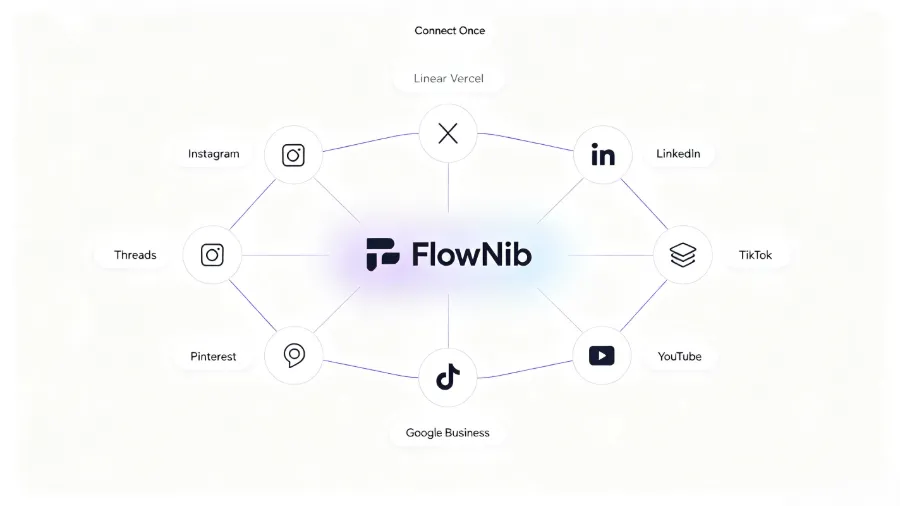
Flownib currently supports 10 social platforms: Instagram, X, LinkedIn, TikTok, Facebook, Threads, Pinterest, YouTube, Bluesky, and Google Business. This coverage essentially includes all mainstream channels, sufficient for cross‑border operations.
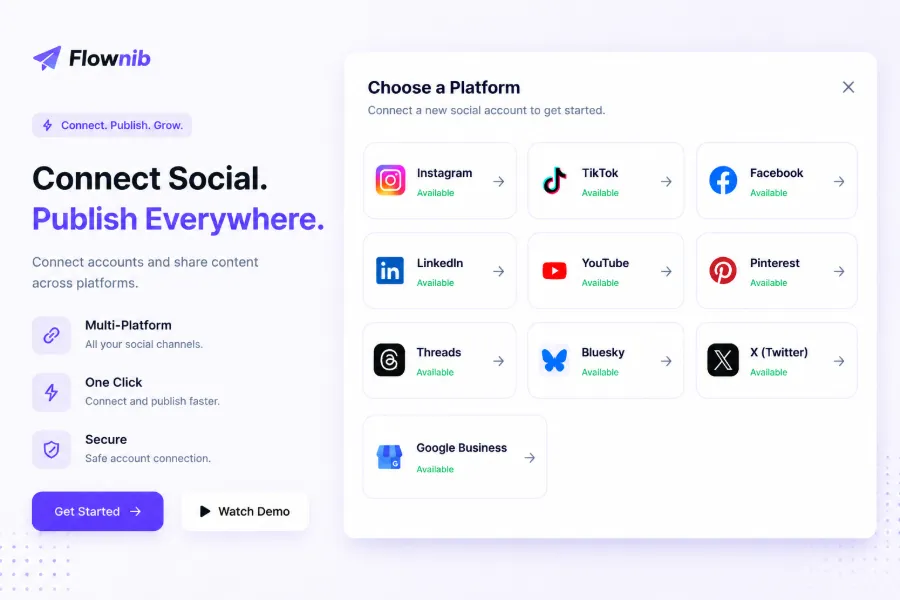
After authorizing, your Agent can publish directly. Start with a test post to confirm everything works, because a common oversight is that the binding must be completed in the Flownib backend—not just by installing the Skill on the Agent side. We’ve seen a user install the Skill, then issue a batch of publish commands from the Agent, only to get failures because the Instagram account had never been bound with an OAuth token in Flownib. So always run a test post first to verify the flow.
From an efficiency standpoint, once installed and authorized, subsequent operations are virtually cost‑free. For concrete time‑saving numbers, see another data set: publishing a single piece of content to five platforms traditionally takes about 10 minutes, while the AI Agent + Flownib combo can complete the whole process in under a minute. For a detailed comparison, refer to the Manual Publish vs FlowNib AI Distribution Time‑Saving Comparison, which includes timing logs and real‑world team measurements.
Another point worth noting is that the Flownib Skill is designed to be open and not tied to a single AI Agent. Although the official list of compatible platforms includes Codex, Claude Code, Cursor, GitHub Copilot, Gemini CLI, Coze, n8n, etc., any Agent that can execute external commands or load a Skill can theoretically use it. If you’re interested in cross‑tool collaboration architecture, see the Cross‑Border AI Full‑Traffic Closed Loop: Flownib, Seonib, Veonib Collaborative Architecture for relationships and responsibilities among them.
Practice: Driving Publishing with Natural Language
Installation and authorization are just the first steps; the fun part is commanding your AI Agent with natural language to perform various publishing actions. Flownib does not generate content; your AI Agent does. Flownib only calls the APIs to publish. So the quality of the content depends on the Agent you use.
Below are a few typical commands covering the most common scenarios. Each scenario shows a single representative command to illustrate the workflow, not an exhaustive list of combinations.
Scenario 1: Write a single‑platform tweet
Help me write a tweet about the new weekly report feature, aimed at social media operators, with a professional tone but not too stiff, include 3 relevant hashtags, then publish to X.
The AI Agent will first generate the copy, then use the Flownib Skill to send it to Flownib, which publishes via X’s official API. The whole process happens inside the Agent’s terminal; no web page needs to be opened.
Scenario 2: Multi‑platform simultaneous publishing
Publish the following product description to Instagram, LinkedIn, and Facebook, automatically adjusting the copy to each platform’s tone and format: We just launched an AI‑powered content rewriting feature that supports message‑style adaptation for 10 platforms. The core feature is that a user posts once and AI automatically generates versions for each platform.
In this case Flownib takes over the rewriting. Based on the accounts you’ve authorized, it tailors the copy to Instagram’s character limits and style, LinkedIn’s professional tone, and Facebook’s community voice. Publication times can be set individually or use smart scheduling.
Scenario 3: Weekly batch generation
Generate 5 teaser posts for next week’s “Social Media Automation Week” event, schedule them from Monday to Friday, covering Instagram and LinkedIn, with each post focusing on a different angle—Monday defines, Tuesday explains pain points, Wednesday gives a case study, Thursday makes a comparison, Friday offers a preview.
The AI Agent will generate five copies at once and schedule them according to your timing requirements. Flownib’s publishing queue automatically handles the timed tasks, so you don’t need to trigger anything manually each day.
Scenario 4: Multi‑language cross‑account publishing
Translate this brand announcement into English, Japanese, and Spanish, and post each version to the corresponding language account.
For multilingual scenarios, if your Agent supports multilingual generation, Flownib routes each language’s content to the appropriate account, covering multiple markets with a single command.
A detail to keep in mind while performing these actions: AI‑generated copy quality is indeed high, especially with recent model versions that excel at style imitation and language organization. However, platform‑specific character limits and formatting quirks still exist—X’s 280‑character limit, Instagram’s handling of links, LinkedIn’s hashtag tolerance, etc.—so a manual preview is sometimes still needed. Automation solves the publishing‑efficiency problem but can’t guarantee 100 % zero‑check. We recommend at least one preview before final publishing, especially for multi‑platform syncs.
Another often‑overlooked point is that while the Flownib Skill command is identical across AI Agents, the trigger method differs. In Codex or Claude Code CLI terminals, you type a natural‑language command and the Agent processes and returns results instantly. In Coze or n8n workflows, you need to wrap the Skill as a node and invoke it via a workflow trigger. If you prefer workflow‑based automation, test it in a simple flow first before scaling to production.
The API uptime of 99.99 % looks good, but occasional platform rate‑limit issues can arise—e.g., Instagram limits the number of posts per account per minute. Flownib handles retries and queuing, but for large batch publishes it’s wise to stagger the timing rather than pushing everything at once.
If you’re building a more complete content‑operation loop—from generation and SEO optimization to social distribution—consider combining Seonib, Veonib, and Flownib. For practical guidance on this collaborative structure, see Content Closed Loop: Seonib + Veonib + FlowNib Three‑Tool Collaboration, which includes architecture diagrams and use cases.
Regarding publishing timing, if you care about optimal posting windows per platform, check the Later Blog Best Posting Times Study. Their data covers Instagram, TikTok, LinkedIn, and other major platforms, and pairing it with Flownib’s smart scheduling yields better results.
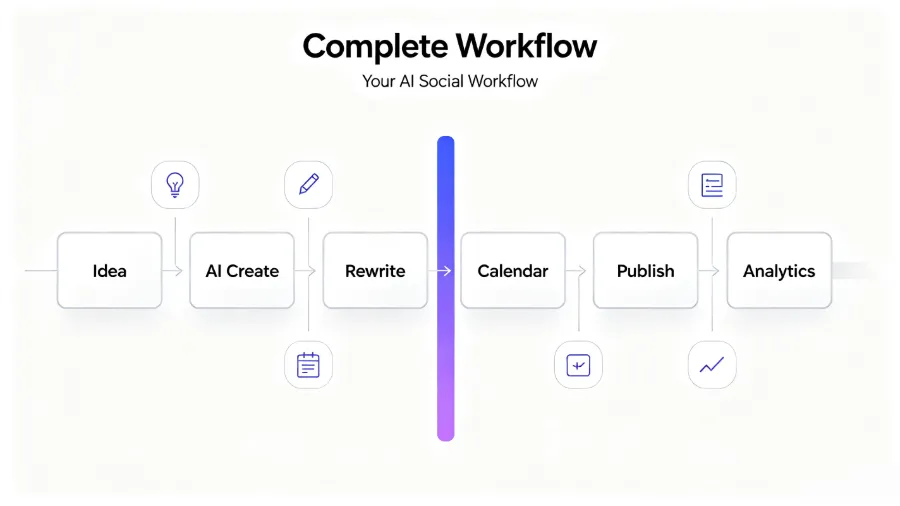
The whole workflow is essentially a closed loop: starting from your idea or command, the AI Agent generates and rewrites content, Flownib schedules and publishes, and each platform’s interaction data flows back to your analytics dashboard, informing the next creation cycle. Automation doesn’t eliminate the operator’s role; it removes repetitive, low‑value steps so you can focus on creativity and strategy.
FAQ
Q1: What is the Flownib Skill?
Flownib Skill is an AI Agent extension provided to Flownib subscribers. After installation, you can directly invoke Flownib’s publishing engine from Codex, Claude Code, Coze, etc., automatically publishing generated content to social media platforms without switching workflows or manually copying and pasting.
Q2: Do I need programming experience to install the Flownib Skill?
No. Installation only requires copying a single link into your AI Agent’s terminal or chat box. With the OAuth step, the whole process takes about three minutes and requires no code.
Q3: Which AI Agent platforms does the Flownib Skill support?
Officially supported platforms include Codex, Claude Code, Cursor, GitHub Copilot, Gemini CLI, Coze, n8n, and other mainstream tools. Flownib follows an open‑ecosystem design, so any Agent that can load a Skill or execute external commands can theoretically use it.
Q4: Is the content generated by Flownib or by the AI Agent?
The content is generated by your AI Agent (e.g., Codex, Claude Code, Coze). Flownib does not create content; it only publishes the Agent‑generated copy via official APIs. If you prefer to write directly inside Flownib, it also offers a built‑in AI content generation feature.
Q5: What configuration steps are required before use?
The first‑time setup includes: logging into a Flownib account, obtaining a publish token, installing the Flownib Skill in your AI Agent, and authorizing the social media accounts you wish to publish to. After this one‑time configuration, you only need to issue commands in the Agent to publish automatically, without repeating the setup. It’s recommended to send a test post first to verify that the authorization works.
Share Article