
Social Media Automation Practical Guide: Workflow Optimization from Scheduling to Cross-Platform Distribution

“Create once, publish everywhere” — this slogan is heard by virtually everyone doing social media operations. Once you get hands‑on, you’ll find that most of the time you’re still manually copying, pasting, adjusting formats; switching platforms feels like switching an entire workflow. The weekly time spent on pure publishing tasks quickly exceeds expectations.
The core of social media automation is not to let the machine think for you, but to hand over repetitive, predictable, energy‑draining operations to software. Specifically, automation is divided into two layers: automation inside a tool (such as scheduling, analytics report generation, AI‑assisted copywriting) and automation between tools (such as format adaptation and API integration when content moves across platforms). Only when both are combined can you build a truly operational workflow.
Take the example of managing four platforms each week. In manual mode, each piece of content requires logging in, pasting, adding images, adjusting tags—about ten minutes per post. Five posts a day equal fifty minutes. Using a scheduling tool to dispatch with one click compresses the same work to under fifteen minutes. The gap isn’t a tool‑function issue; it’s whether you have set up a stable automation process. Industry data show that, using automation tools wisely, you can save 5–15 hours per week on content management—time that can be returned to strategy and creative output.
But automation also has limits. It performs “execution,” not “decision‑making.” You still need to decide which content fits which platform, when to publish, and what tone to use. The value of automation is to free you from these execution steps, not to replace your judgment.
You can see the differences in automation levels among tools in the Flownib vs. Similar Tools Comparison Review, but ultimately, finding a workflow that fits you is the key.
Core Tasks and Tool Selection for Social Media Automation
The most common automatable tasks cluster around a few stages: content scheduling, cross‑platform publishing, automatic analytics report generation, and content repurposing. The degree to which different tools support these tasks varies widely.
| Tool | Core Positioning | Supported Platforms | Free Plan | Target Users |
|---|---|---|---|---|
| Buffer | Simple scheduling | 6 | Yes | Individual creators, small teams |
| Hootsuite | Enterprise management | 8 | Yes | Mid‑size to large brands |
| Later | Visual scheduling | 5 | Yes | Instagram‑first users |
| SocialBee | Content categorization loop | 7 | Yes | Content‑heavy strategies |
| Loomly | Team collaboration calendar | 8 | Yes | Small teams |
Looking at the “schedule → publish → analyze” chain, each tool’s focus is distinct. Buffer excels at smooth scheduling flow and a clean UI; Hootsuite shines in multi‑account management and team collaboration; Later offers a more natural visual‑content scheduling experience. The problem arises when you need to sync across more than five platforms, each with its own format, character limits, and hashtag strategies—simple copy‑and‑paste publishing from a scheduler is no longer sufficient.
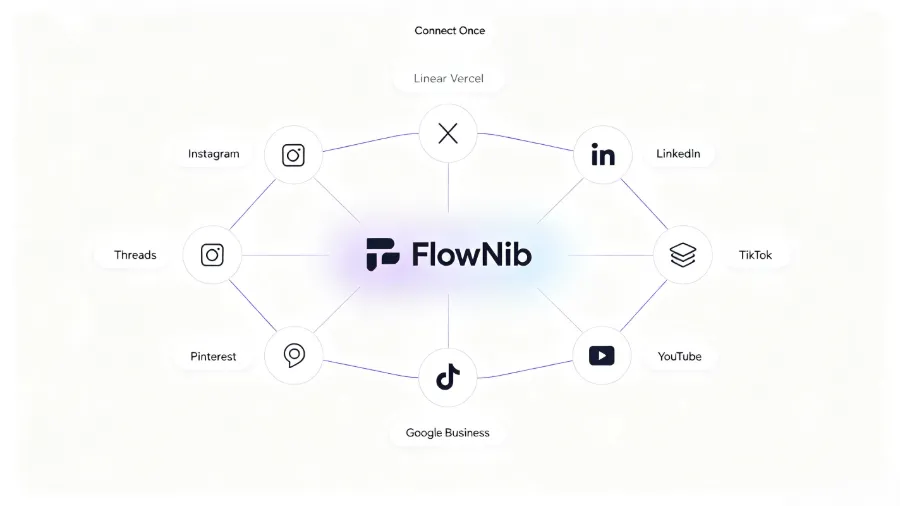
That’s the turning point. Scheduling tools are great at timestamping, not at content adaptation. When you notice that the same copy gets high engagement on LinkedIn but almost no traction on Instagram, the real issue isn’t posting frequency; it’s the lack of platform‑specific re‑processing. What you need isn’t a pricier scheduler but a workflow that rewrites and adapts content before publishing. That’s where Flownib comes in—once you write a piece, it automatically rewrites it according to each platform’s style and character limits, then distributes it to the appropriate accounts. Scheduling tools answer “when to post”; Flownib answers “how to post to different platforms without copy‑pasting.”
The core framework for tool selection is simple: team size determines how many collaboration seats you need, platform count dictates the required API coverage, and content frequency decides whether you need hour‑level or day‑level granularity. Don’t chase an exhaustive feature list from the start; most teams discover after two months that they actually use no more than four core features.
If you need a more detailed side‑by‑side comparison of scheduling tools, check out the 2026 Top Ten Social Media Scheduling Tools Deep Comparison. The latest HubSpot article on automated marketing also cites a statistic: over 60 % of surveyed creators spend at least six hours per week on pure publishing—time that can be compressed to under an hour with the right tool mix.
Advanced Automation Workflows — AI Rewriting, Content Repurposing, and Cross‑Posting
Basic scheduling solves “when to post”; advanced automation solves “what to post” and “how the content changes.”
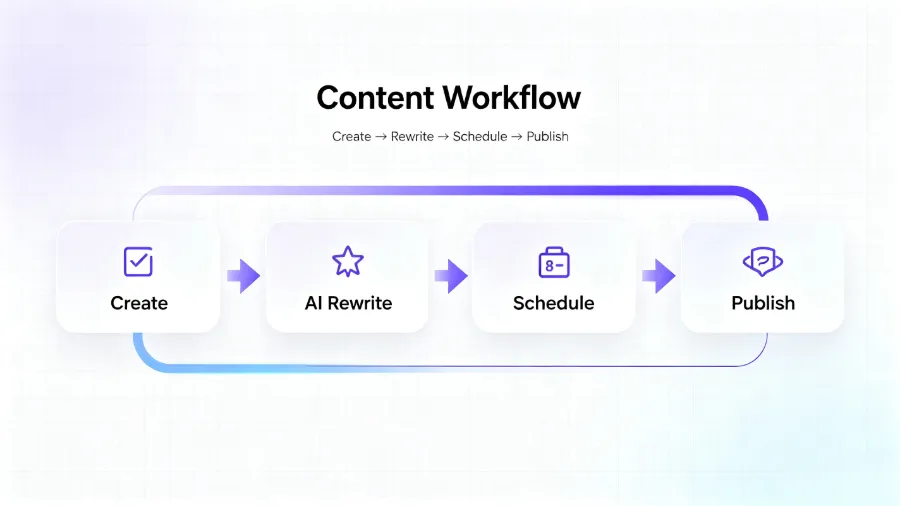
The core logic of AI content rewriting is not to generate new material but to translate tone. The same product feature description needs a professional, industry‑insight‑rich phrasing on LinkedIn, a concise ≤ 280‑character bullet point on X (Twitter), and a short, visually‑oriented caption on Instagram. A deep‑dive piece can, through automatic rewriting and repurposing, cover 5–7 different channels, whereas manual adaptation takes 15–20 minutes per piece.
My workflow is as follows: first publish the full version on a platform (usually LinkedIn or a blog), then use a tool to treat that version as the “master” and automatically extract key information, reorganizing it into formats suitable for each platform. This process typically follows three common patterns:
Long‑form to short‑form. A 2,000‑word blog post is broken into three to five independent insights, each becoming a separate post. Flownib’s rewriting engine automatically recognizes logical relationships between paragraphs, not just truncating but re‑phrasing so each stand‑alone.
Video screenshots to image‑text posts. Frame‑by‑frame screenshots from a short video, combined with AI‑generated voice‑to‑text summaries, can produce a carousel of image‑text posts. This works well on Pinterest and Instagram, where users are more likely to engage with visual content that includes captions.
Blog summary to multi‑platform posts. Compress the core arguments of a new blog post into three posts from different angles, then publish each on a platform that suits its audience. The “different angles” are not simple repetitions; they are tailored to each platform’s reading habits.
Cross‑posting execution details are equally important. The same content should be staggered across platforms rather than released simultaneously. Typically, LinkedIn posts in the early workday, Instagram in the midday‑to‑afternoon slot, and X (Twitter) when timeliness is critical, can be posted in the evening or during a trending window. When setting up the publishing queue, I manually adjust the platform order twice, then let the system run the remaining cycles automatically, avoiding the same ordering every day.
The AI Agent and Social Media Automation Integration Solution can further reduce manual steps, making the entire chain—from master content to multi‑platform publishing—fully connected.
A repeatedly observed bottleneck in testing: the real limitation of social media automation is not tool capability but content adaptation strategy. The same text can achieve up to three times the engagement on one platform versus another. For example, a LinkedIn post with data points may garner 800+ interactions, while the identical copy pasted on Instagram receives only 47 likes. The issue isn’t the content itself but the context. Automation tools can shorten conversion time, but the judgment of adaptation strategy still rests with the operator.
Pitfalls of Social Media Automation — What Should Never Be Handed Over to Machines
There are three areas I recommend keeping fully manual: genuine user interaction and conversation, crisis management and public sentiment response, and the core creative part of content creation.
First, user interaction. Auto‑reply features seem convenient, but platform algorithms are sensitive to “real humans.” Users can tell when they’re talking to a bot, especially in comment sections. In 2023, a brand that used fully automated replies lost 12 % of its followers in two days because the system replied “Thank you for your support” to every complaint, sparking massive backlash. This case is frequently cited—not because of a technical flaw, but because of decision‑logic: machines can’t gauge emotional context.
Crisis management is even more off‑limits for automation. When negative sentiment spreads, each public response must consider timing, wording, and compliance. Letting a machine intervene at that moment hands over control.
The creative core of content creation should also not be fully automated. AI can generate 80 % of material, but the remaining 20 %—brand tone, emotional connection, industry insight—cannot be replaced. Automation yields higher returns on low‑engagement accounts than on high‑engagement ones, because the frequency gap is easier to fill automatically. If you’re a new account with fewer than 500 followers, using automation to maintain daily posting frequency is perfectly sensible. But if you already have a mature community, automation should free you to reply to comments, not replace your comment content.
Understanding each platform’s policy boundaries for automation is equally important. The Meta Developer Platform Automation Policy specifies limits on posting frequency and interaction automation, and the TikTok Developer Documentation API Usage Limits outline technical red lines. Tolerance varies—Instagram is sensitive to bulk actions, LinkedIn is more permissive but restricts scraper behavior. Ignoring these boundaries can lead to throttling or account bans.
Recommendation: before deploying any automation workflow, consult the relevant platform’s developer documentation and set a conservative frequency ceiling. Don’t cross the line just to save time; losing an account costs far more than a few saved hours.
FAQ
Will social media automation cause my account to be banned? Yes, but only if you violate the platform’s automation policies. Most bans stem from excessive posting frequency, duplicate content, or using unofficial APIs. Using tools that operate through official APIs and maintaining a reasonable posting cadence usually avoids triggering risk controls. A safe guideline is to post no more than 3–5 pieces per day, with substantive differences between them.
Is just scheduling posts considered complete automation? It’s only half. Scheduling solves the “forgot to post” problem, but it doesn’t address content adaptation, data analysis, or interaction response. Full automation should cover scheduling, publishing, analytics, and basic interaction—four essential stages, none of which can be omitted.
Where should a small team start with automation? Begin with scheduling. Ensure weekly content is published on time before adding AI rewriting and repurposing. If budget is tight, start with a free tool for two weeks, confirm the workflow is stable, then upgrade to a paid plan. Most small teams struggle with inconsistent publishing, not with insufficient tool power.
How can automatically generated content maintain consistent brand tone across platforms? The key is a brand tone reference table. Compile a list of commonly used keywords, phrasing, and exclusion words, then feed it into the tool’s rewriting model. The AI will rewrite based on that reference rather than inventing from scratch. Review output every two weeks and fine‑tune the keyword list.
Are free tools sufficient for daily operations? For individual creators or small teams using up to three platforms, free tools are adequate. However, free plans limit analytics and multi‑account management. When you exceed 20 posts per week or need to operate across more than five platforms, upgrading to a paid plan is advisable. The upgrade cost is typically lower than the time cost of manual work.
Share Article


